-8-
USING HEADPHONES (not included)
A stereo headphone jack has been provided so that the radio can be used without disturbing others.
Plug in the headphones at the point marked ‘ ’ and adjust the listening volume to your chosen
level. Excessive sound pressure from earphones and headphones can cause hearing loss. The
speakers will not operate when earphones are fitted.
RESET
1. If moving the radio to another location in the country the pre-tuned and stored DAB stations
may no longer be available and it will be necessary to reset the radio back to the factory settings.
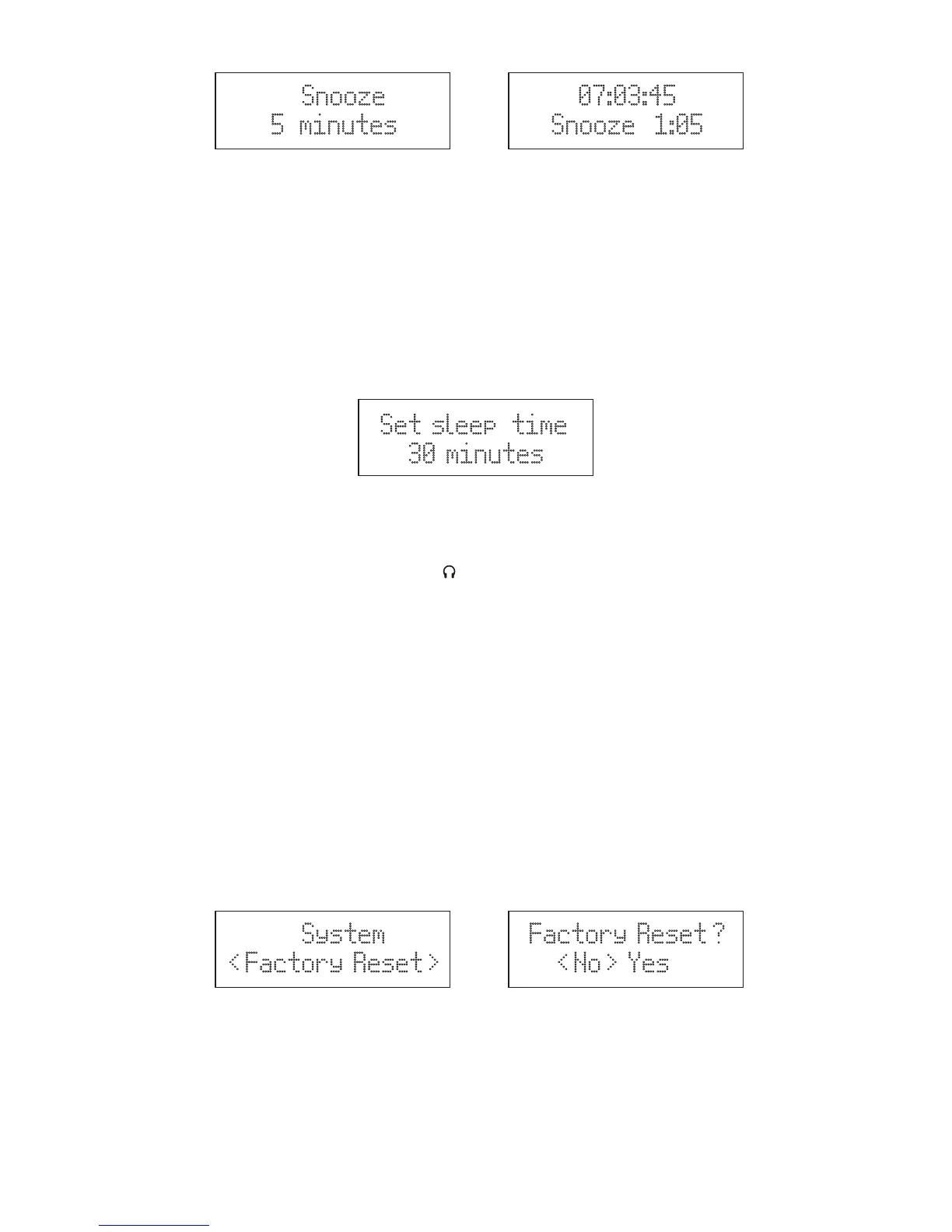
2. With the unit switched on, press and hold the MENU/INFO button and press ▼/▲ buttons until the
display shows ‘System’ and press the SELECT button and continue press ▼/▲ buttons until
the display shows “Factory Reset <No> Yes’ and press ▼/▲ buttons to “<Yes>” and press the
SELECT button. (F.15), (F.16)
3. The radio will display “Restarting….” and will then go into standby mode.
Note 1: All stored programmed stations will be lost during reset.
Note 2: Use the battery status without reset function.
BACKLIGHT
The product display has a backlight with three brightness setting, Low/ Medium/ High
With the unit switched on, press and hold the MENU/INFO button and press ▼/▲ buttons until the
display shows ‘System’, press the SELECT button to confirm. Press ▼/▲ buttons until the display
shows “Backlight” and press the SELECT button to cycle through “High/Medium/Low” and press the
SELECT button to confirm the setting.
Set sleep time
30 minutes
F.14
SLEEP (AC OPERATION ONLY)
This function allows you to program the unit to switch off itself after a set period of time.
1. Press and hold MENU/INFO button, then press ▼/▲ buttons to select “System”, and press the
SELECT button to confirm. Press ▼/▲ buttons to select “Sleep”, then press the SELECT button
to confirm. Press ▼/▲ buttons to change the sequence: Sleep Off /10/20/30/60/70/80/90
minutes. (F.14)
2. To check the sleep interval remaining, press ▼/▲ buttons to select “Sleep”, then press the
SELECT button to check.
3. To cancel the sleep timer, press ▼/▲ buttons to select “Sleep Off”, then press the SELECT
button to confirm
Snooze
5 minutes
07:03:45
Snooze 1:05
F.12 F.13
System
< Factory Reset >
Factory Reset ?
< No > Yes
F.15
F.16



 To Next Page