OSD Menu
11
OSD Menu
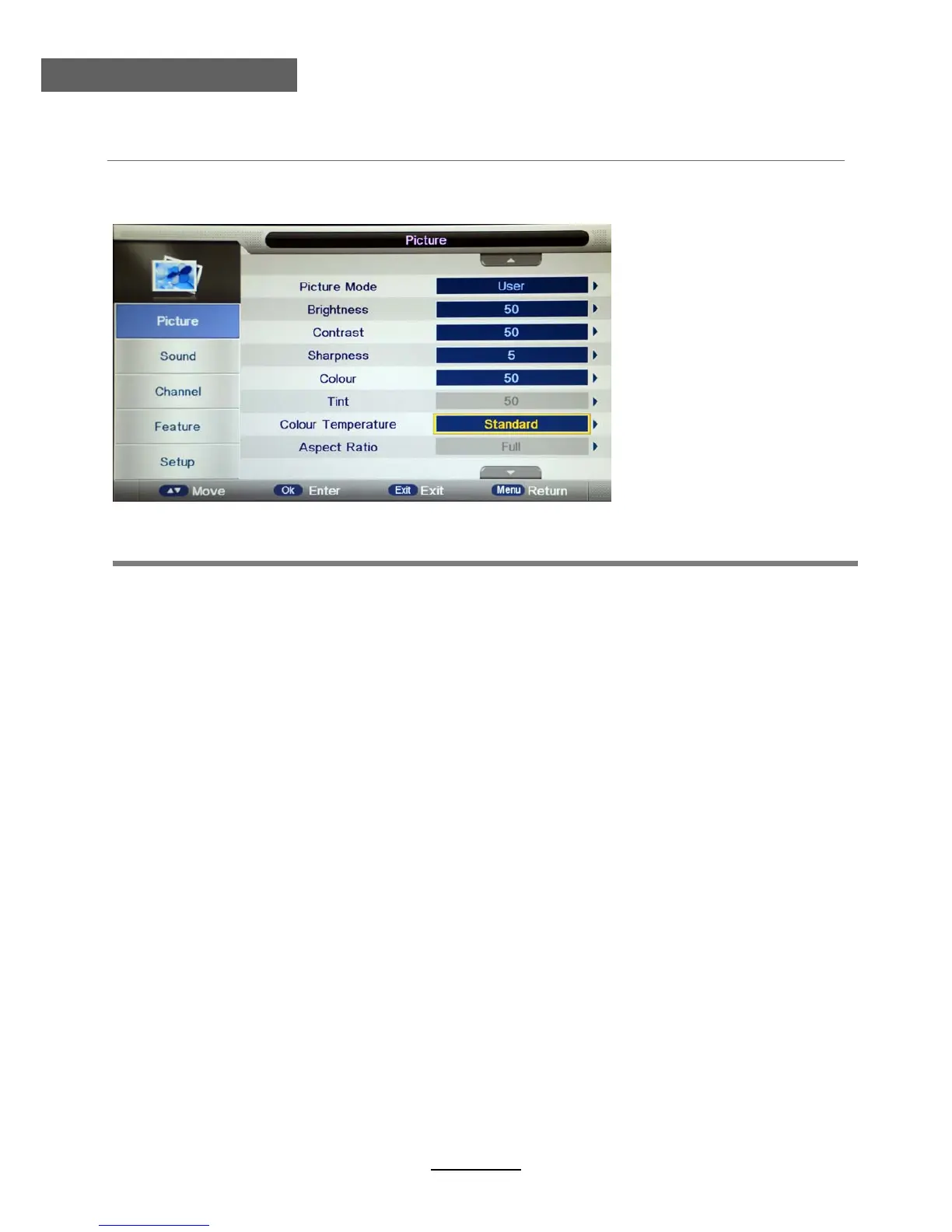
1. Picture menu
Description
Picture Mode: Select your desired picture mode from Dynamic, Standard, Mild and User.
Brightness: Adjust image black level.
Contrast: Adjust image contrast.
Sharpness: Adjust the sharpness(Gray and invalid in VGA/PC mode).
Colour: Adjust image colour from black and white.
Colour Temp.: Select an optimum color temperature mode to suit your eyes for viewing from
Warm, Cool, Standard.
Noise Reduction: If the broadcast signal received is weak, you can select the Noise Reduction
option to reduce the video noise level between Off, Low, Middle and High.
Tint: Control the tint ( NTSC mode only).
Aspect Ratio: Change the aspect for the screen from 4:3,16:9,Zoom1,Zoom2 or Panorama etc....



 To Next Page