EPG menu
21
EPG menu
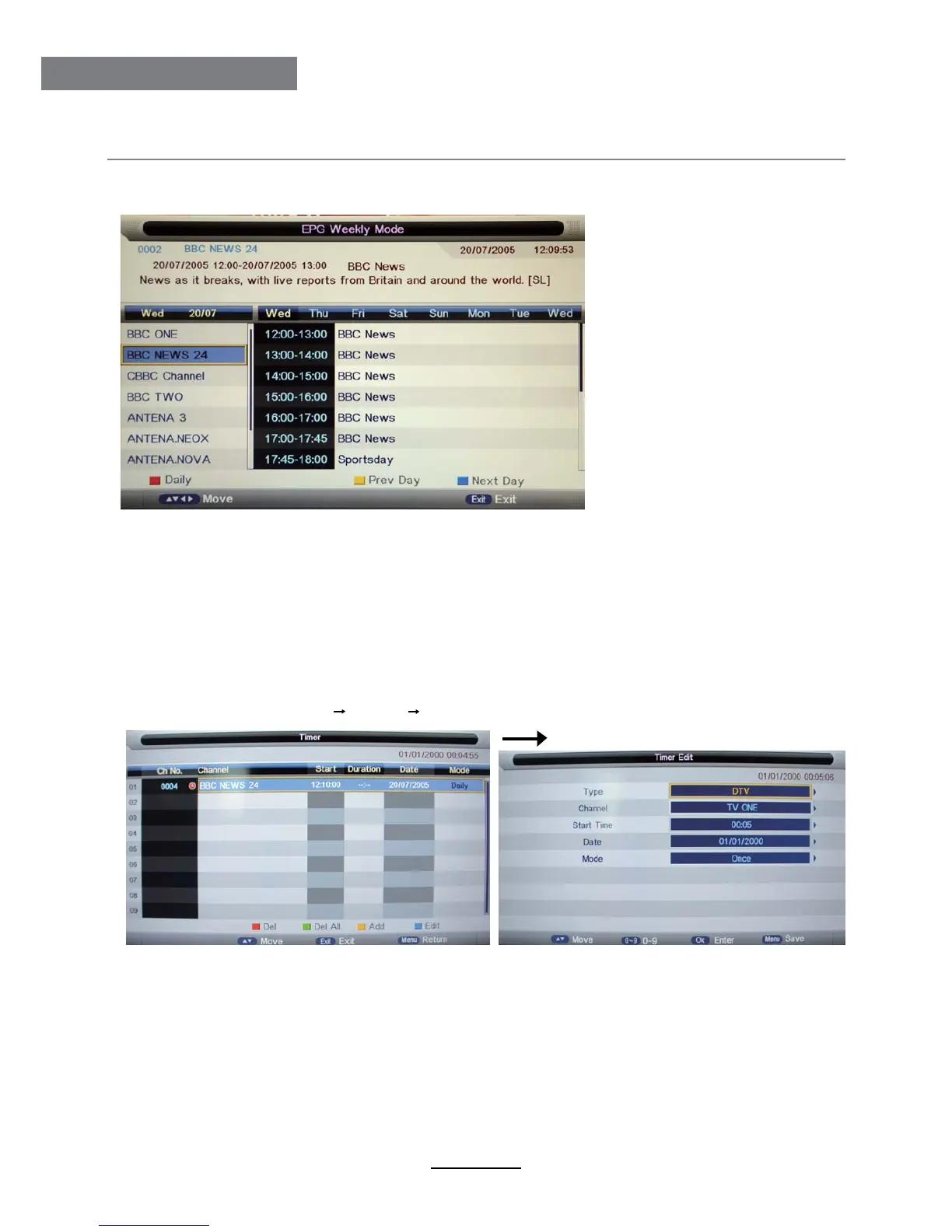
Press EPG button on the remote control to display the EPG menu.
EPG mode: Press RED button to change the EPG display mode.
Daily mode: shows the information of the programs to be broadcasted in daily mode.
Weekly mode: shows the information of the programs to be broadcasted in weekly mode.
Reminder: Press GREEN button once to remind the program for watching, and press GREEN button
again to cancel. For detail reminder settings, please take following for reference.
Previous/Next Day: Press YELLOW/BLUE button to display the programs on previous or next day.
Enter the Timer menu (Menu Feature Timer) to setup the timer settings.
Press yellow button to add.
Type: Select the type of the program you want to timer.
Channel: Select the channel you want to timer.
Start Time: Setup the start time for timer the program.
Timer
Date: Select the date for timer.
Mode: Select the mode for timer.



 To Next Page