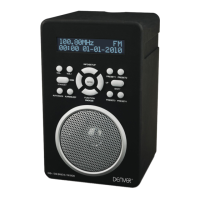
► To switch the device into FM mode, press the MODE/AL-ON button until FM appears on the display
along with the currently set frequency.
4.2.1. Searching for an FM station
To tune to a radio station, hold down the / button.
To fine tune a radio station, press the / button for frequency change.
4.2.2. Storing stations automatically
You can store 20 FM stations. The AMS function automatically searches and saves the radio station with
strong signals.
► Press the MODE/AL-ON button until FM appears on the display along with the currently set
frequency.
► Press and hold the SCAN button.
The station search starts automatically. As soon as a sufficiently strong signal is found, the station is
stored. The station preset number (e.g. P01) is shown briefly on the display. The search will continue until
all 20 memory slots are assigned.
4.2.3. Storing stations manually
► Press the MODE/AL-ON button until FM appears on the display along with the currently set
frequency.
► Use the / button as described above to select your desired station.
► Press and hold the PRESET button.
► The preset number flashes on the display.
► Press the / button to select a preset number
► Press the SCAN button to complete the saving process.
4.2.4. Calling up stations
► You can call up the desired station preset by pressing the PRESET button repeatedly.


 To Next Page