OPERATION
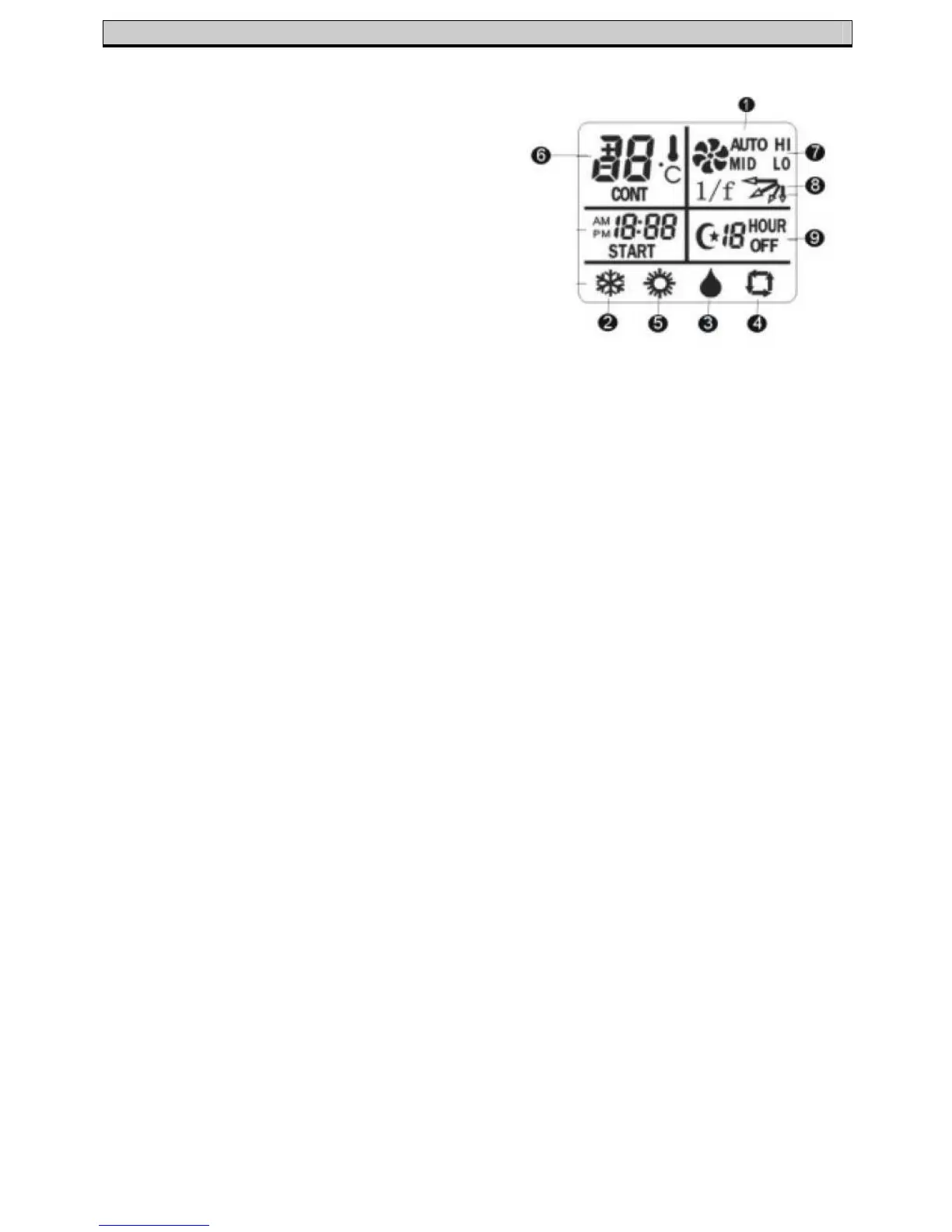
Remote Control Indications
1. Auto Function Selected
(the temperature will be set at 23
o
C)
2. Cooling Function Selected
3. De-humidifying Function Selected
4. Fan Function Selected
5. Heating Function Selected
6. Temperature Indicator
(press ‘Up’/’Down’ to show the set
temperature – the temperature
range is 16
o
C – 30
o
C)
7. Fan Speed Indicator
(Auto, Low, Medium, High)
8. Airflow Directional Indicator
9. Timer Indicator
Setting the Clock
The clock is set on the remote control by pressing the ‘Hour’ and ‘Min’ buttons
until the accurate time is reached
Timer Function
Please Note - In order for the timer to work, the clock must first be set on the
remote control
The timer can be set to control when the unit will start functioning within 24 hours
of the current time
• Set the clock to the correct time, following the method above
• Press the ‘Timer’ button so ‘HOUR’ is displayed
• Press the ‘Hour’/’Min’ buttons until the desired time before the unit
switches on is displayed on the remote control
• The unit will automatically check the temperature 1 hour before running
time and choose the appropriate Cool/Heat function
• Pressing the ‘Timer’ button again will cancel the timer function
Sleep Function
The air conditioner unit is also equipped with a Sleep function. This enables the
unit to switch off after 1, 2, 3, 5, 7 or 10 hours
• Press the ‘Sleep’ button so the moon logo is displayed on the remote
control
• Press the ‘Up’ arrow to set the required time
• Pressing the ‘Sleep’ button again will cancel the function


 To Next Page