www.desatech.com
111986-01F 23
INSTALLING OPTIONAL WALL
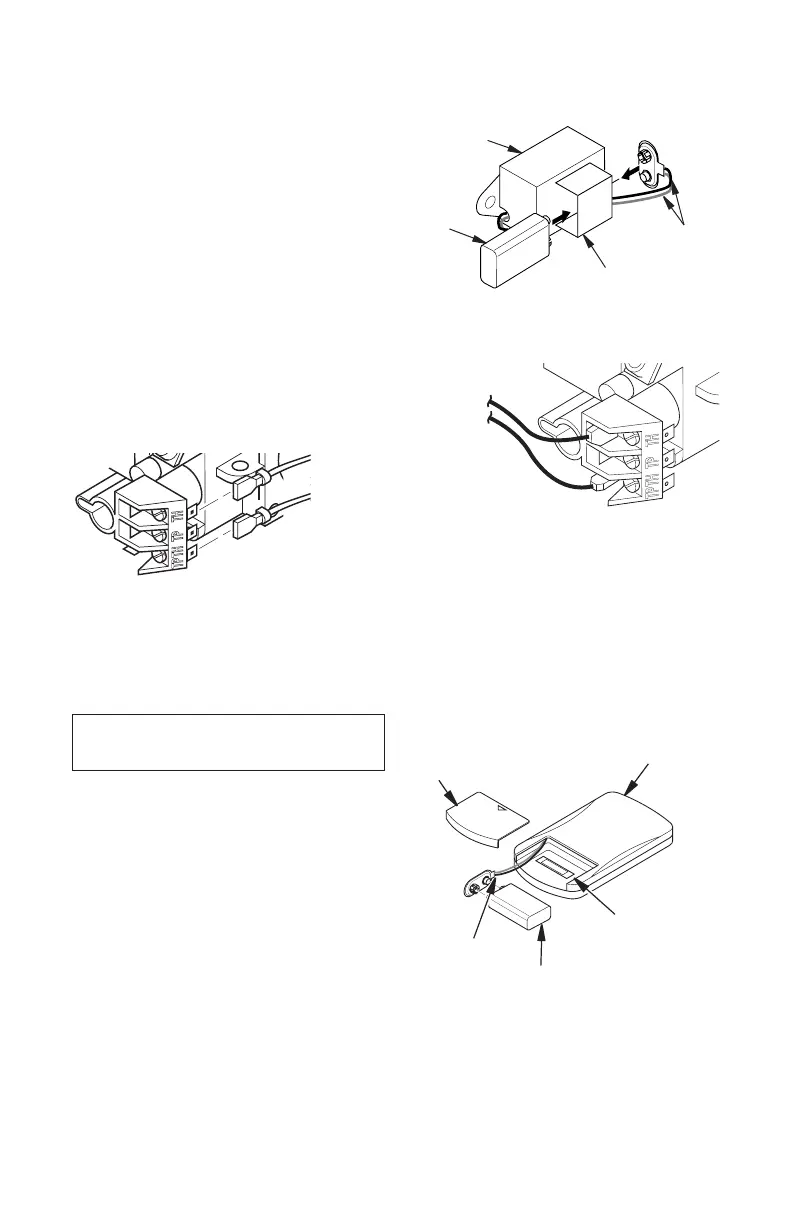
1. Connect one terminal of 25 ft. wire for
wall switch to TPTH terminal on the valve.
Connect remaining wire terminal to the TH
terminal on the valve. Make sure wire ter-
minals are in positions on unit as pictured
in Figure 36. If wires are not connected as
shown, switch will not work.
2. Route 25 ft. wire through openings pro-
vided on sides of burner system to a con-
venient location to mount your switch.
3. Connect one bare wire end to each termi-
nal of GWMS wall switch.
4. Install wall switch and cover in the wall.
FIREPLACE INSTALLATION
Continued
Figure 36 - Attaching Alkaline Battery to
Receiver
To Wall
Switch
Accessory
INSTALLING OPTIONAL WIRELESS
HAND-HELD REMOTE CONTROL
-
1. Open bottom louver and locate the switch
bracket on the left.
2. Unscrew the switch bracket. Lean bracket
forward so you are able to access the
back of the remote receiver.
3. Locate the battery clip mounted on the
back of the receiver. Slide a 9-volt alkaline
battery (not included) through the clip (see
Figure 37).
4. Attach the terminal wires to the battery.
5. Connect wires from receiver to TH and
TPTH to control valve (see Figure 38).
6. Replace the switch bracket.
Figure 37 - Attaching Alkaline Battery to
Receiver
Figure 38 - Control Valve Terminals
To Optional
Remote
Accessory
9-Volt
Alkaline
Battery
Receiver
Terminal
Wires
Battery
Clip
Held Remote Control Unit
1. Remove battery cover on back of remote
control unit.
2. Attach terminal wires to a 9-volt alkaline
battery (not included). Place battery into
the battery housing.
3. Replace battery cover onto remote control
unit.
Figure 39 - Installing Alkaline Battery in
Hand-Held Remote Control Unit
Battery
Cover
Battery
Housing
Remote
Control Unit
Terminal
Wires
9-Volt
Battery


 To Next Page