26
6.3.5. ADJUSTING DIRECTION OF LOCKING ACCORDING TO DOOR’S OPENING WAY (MOTOR)
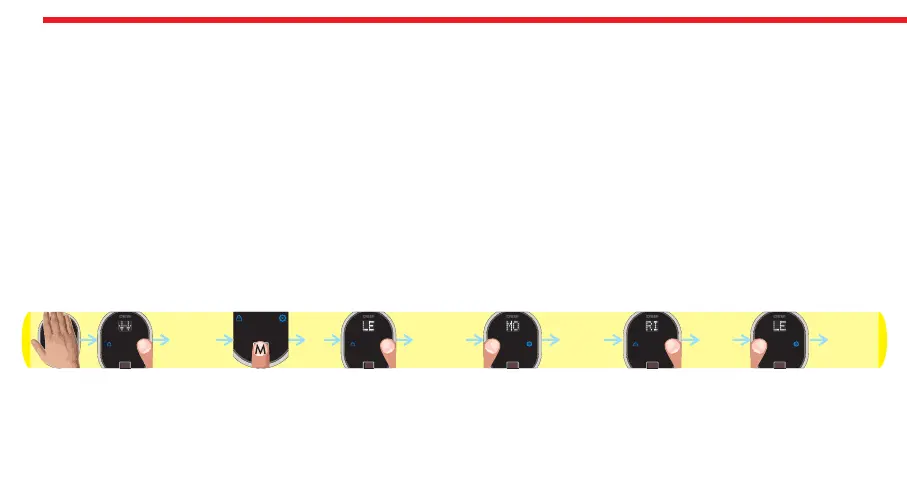
To adjust your motorized cylinder’s locking way according to the door, follows the steps below:
- Touch to device with your palm to wake it up. Two arrows will appear on display. Touch “Button #2”. ADMIN will be shown.
- Put one of the master fingers onto the reader. First “OK” and then “LEARN” will be shown.
- Touch “Button #2" till “MOTOR” appears and touch “Button #1" when “MOTOR” is on display. ”RIGHT” or “LEFT” will be
shown.
- Touch “Button #2" to toggle between;
“RIGHT” - right door,
“LEFT” - left door.
- When desired way is displayed, touch “Button #1". “OK” will be displayed.
In this way, motorized cylinder’s direction of locking will be set. Schematic representation of changing direction of locking
from right to left is as follows:
NOTE: To transfer settings to motorized cylinder, you need to lock or unlock motorized cylinder via master controller.
DESi
OK
RIGHT
ADMIN MOTOR
OKLEFT


 To Next Page