33
6.3.11. DELETING ALL ENROLLED CONTROLLERS OF MOTORIZED CYLINDER EXCEPT MASTER CONTROLLER
To delete all enrolled controllers of your motorized cylinder, follows the steps below:
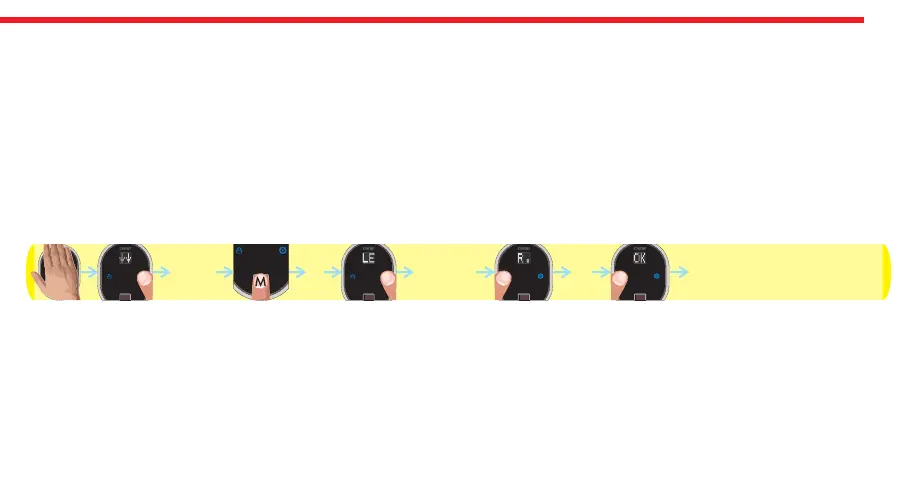
- Touch to device with your palm to wake it up. Two arrows will appear on display. Touch “Button #2”. ADMIN will be shown.
- Put one of the master fingers onto the reader. First “OK” and then “LEARN” will be shown.
- Touch the “Button #2" till “R.DELETE” appears and touch “Button #1" when “R.DELETE” is on display. ”OK" will be shown.
- Touch “Button #1".
- “OK” will be shown.
In this way, motorized cylinder will delete all enrolled controllers of motorized cylinder with a long warning tone.
Schematic representation of operation is as follows:
NOTE: This operation doesn’t delete master controller from motorized cylinder’s memory. If you want to delete master
controller as well, please check “HOW TO RESET MOTORIZED CYLINDER” topic on the last page.
DESi
OKADMIN R.DELETE
OK
OK


 To Next Page