ibration meter. Two people are normally needed to
perform the calibration.
1. The sensor location must be de-classified prior to
calibration.
CAUTION
This calibration procedure involves placing the
controller in the sensor replacement mode.
Upon entering the sensor replacement mode, the
fault output will be de-energized. Be sure to
secure any output devices connected to the fault
output to prevent unwanted actuation of these
devices.
2. Place the controller in the sensor replacement
mode by pressing and holding the RESET button
on the controller faceplate for approximately 9
seconds until the digital display begins flashing
and the CAL LED is illuminated. Release the
RESET button.
3. Press the SET button. The FAULT LED comes on.
The controller is now in the sensor replacement
mode.
CAUTION
Upon entering the sensor replacement mode, all
previously entered sensor calibration information
21 95-8398
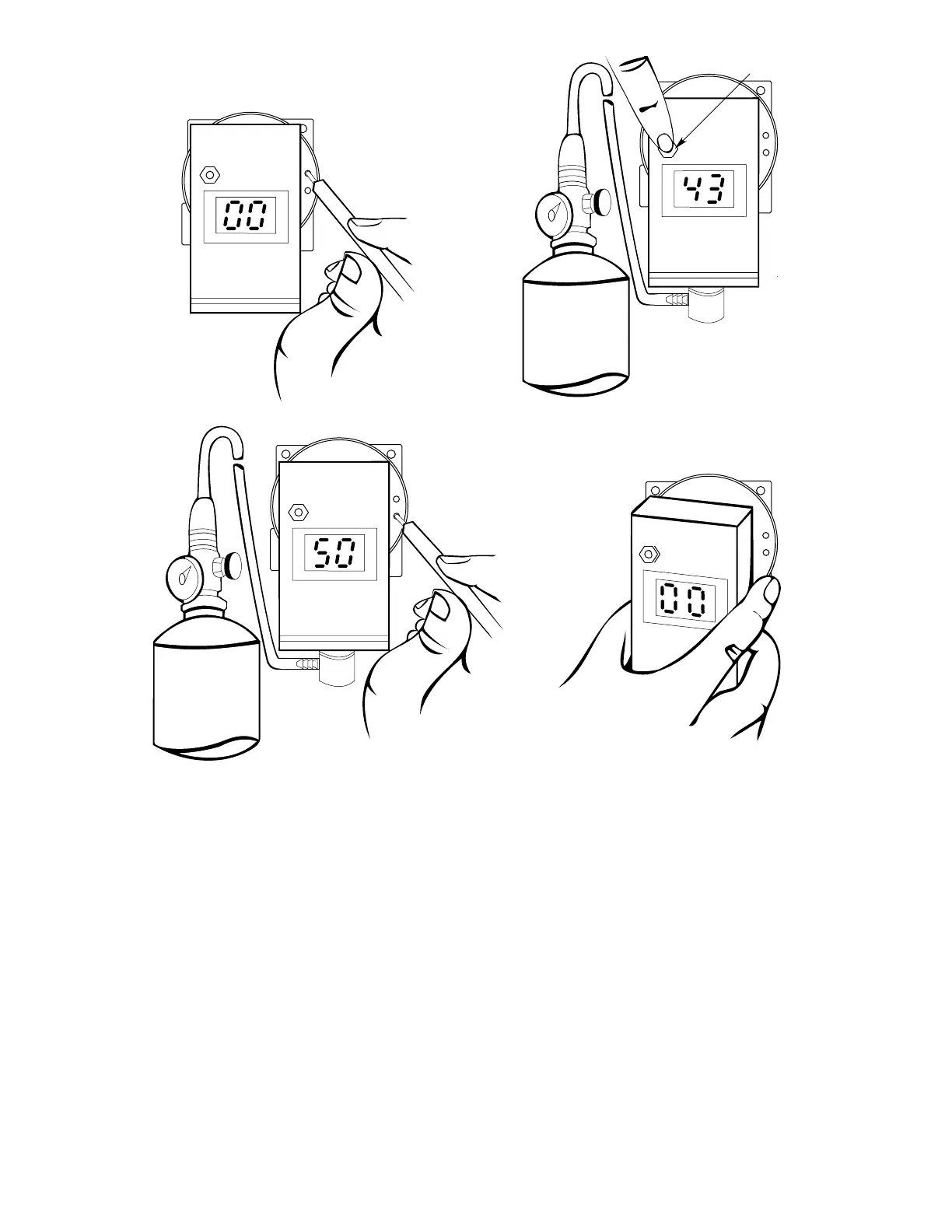
Figure 14—Calibration Sequence for K Series Transmitter
2. APPLY CALIBRATION GAS.
CHECK SENSOR SENSITIVITY.
1. SET ZERO.
3. SET SPAN.
4. REMOVE CALIBRATION GAS. WHEN % LFL
READING IS BELOW ALARM LEVEL,
CALIBRATION METER MAY BE REMOVED.
ZERO
SPAN
ZERO
SPAN
ZERO
SPAN
ZERO
SPAN
% LFL
% LFL
% LFL
%
LFL
SENSITIVITY CHECK
B1123


 To Next Page