P.15
BA
BA
1”
1
2
3
9
BA
BA
A + 0.1.2.3.4.5.
B - 5.4.3.2.1.0.
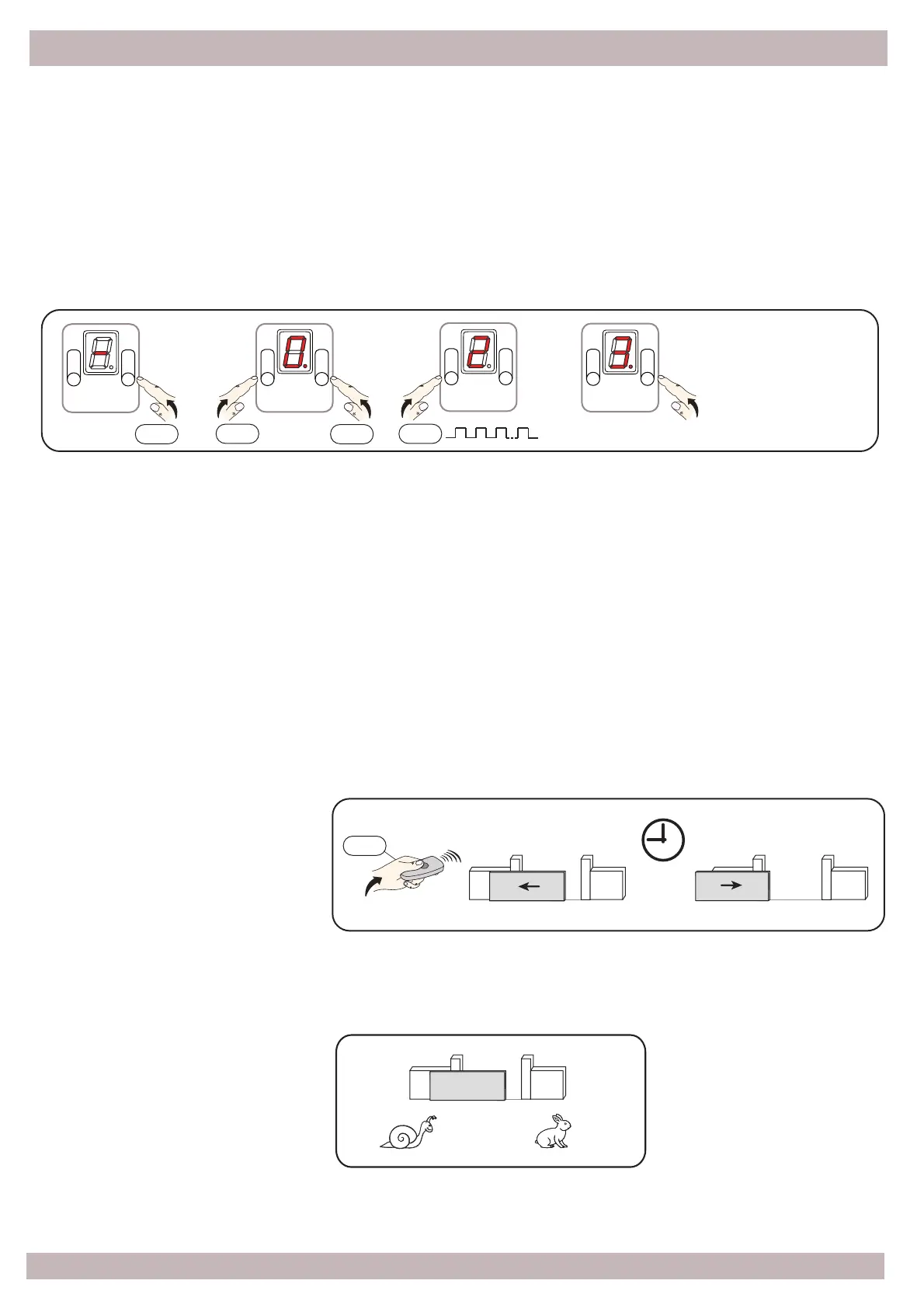
Press and hold the B bu!on, immediately a"er press the A bu!on, then release both bu!ons; now
every #me you press the bu!on A, the display will show the op#on number [ 0 ] - [ 1 ]…[ 9 ] for 5”;
in order to confirm the desired op#on press B.
Now the display indicates with the icon [ . ] the adjusted level that goes from 0 to 5; with bu!ons A
and B you can adjust the level according to the table shown below; a"er 5” the system
automa#cally quits and stores the last level.
Press
Press
Press
Press
[0] - Opera!ng Op!ons
[0] Semi-automa#c (Default)
[1] Condominium
[2] Open - Stop - Close - Stop
[3] Opens - Closes
[4] Man’s switch
[5] . . . . . . . . . . . . . . . .
[1] - Automa!c Closing
[0] No (Default)
[1] 5”
[2] 10”
[3] 30”
[4] 60”
[5] 120”
[2] - Speed Level
[0] Minimum
[1] -----
[2] -----
[3] (Default)
[4] -----
[5] Maximum
Press
Opening
Closing
6 - SETTING


 To Next Page