Deutronic DBL Manual (MPC4) - 14VDC - EN - 8 / 20 - 10 / 2006
4) Initial Operation / Handling
The DBL has two different operation modes – CHARGEMODE (battery charging) and
SUPPLYMODE (normal power supply mode). In addition with operation mode AUTOMODE the
DBL is able to detect the appropriate operation mode via automatic load detection.
Possible settings and parameters are described in the following point 5) Operation Mode
SUPPLYMENU – for power supply mode, CHARGEMENU – for battery charge mode and
DEVICEMENU – for device specific parameter setting.
User Interface / Display:
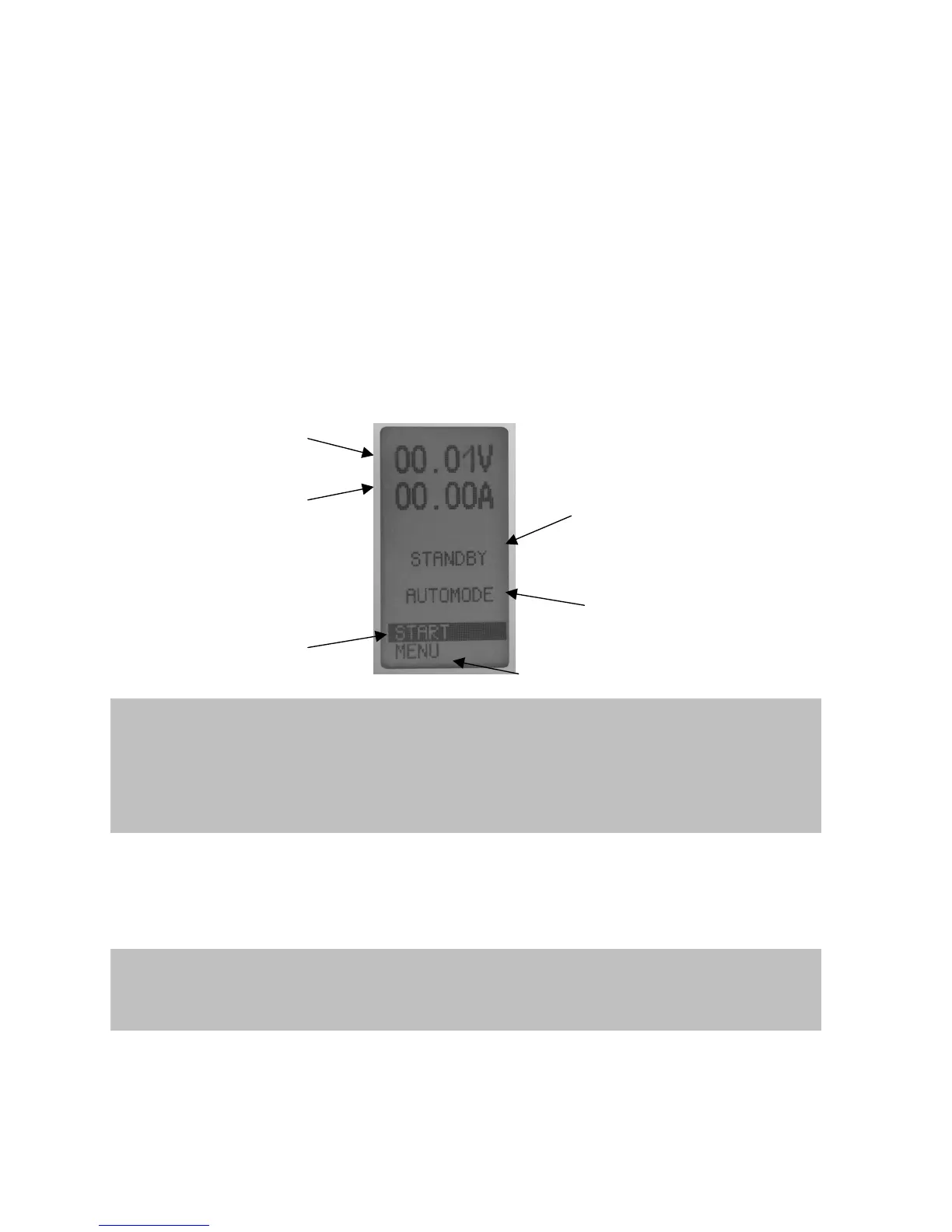
In the above part of the start dialog the display shows voltage, current, capacity (Ah), previous
charging time, operation mode / state / error messages:
User menu:
-Display ‘START/STOP changes due to operating mode
-Display ’START’: Device is on stand by and can be started by pressing the ENTER button
-Display ’STOP’: Device is in supply or charge mode. When pressing the ENTER button the
supply/charge mode stops
- MENU: Device configuration (as the case may be it is protected with a key lock)
Selection of operation mode (SUPPLYMODE / CHARGEMODE / AUTOMODE)
Configuration menu (SUPPLYMENU, CHARGEMENU, DEVICEMENU)
Selection of language (German, English, Spanish, French, Italian)
Indication:
Operation mode: CHARGEMODE,
SUPPLYMODE or AUTOMODE
Indication: Actual voltage value
on output
Indication: Actual current value
on output
Indication:
Operating condition / state / error messages
User Menu:
START / STOP for operation mode
Power supply or battery charger
User Menu:
Device settings / Parameter
Important note for operation:
Should a parameter be changed by the user, it can be selected with the UP / DOWN buttons a
the device and activated for editing by means of the ENTER key. When a parameter value
blinks, it is able to be edited with the UP / DOWN buttons. When pressing the ENTER key the
new adjusted value is accepted.
Note:
Some parameters can only be configured when the DBL is not in supply or charge mode (e.g.
changing the operation mode like AUTO-MODE, SUPPLY-MODE, CHARGE-MODE etc.).


 To Next Page