ineo+ 3350/3850 2-12
2.3 Control Panel
2
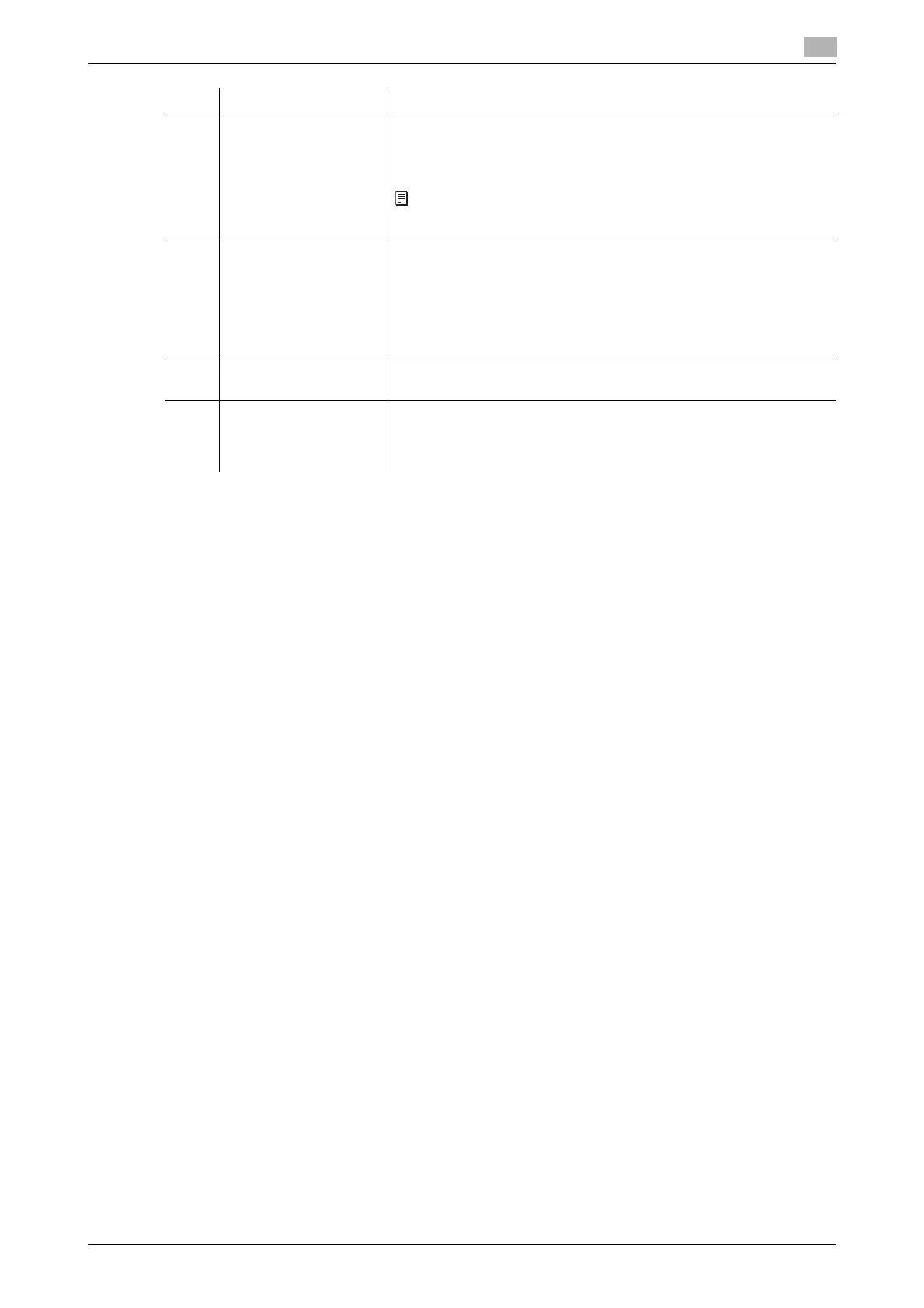
6 Start Press this key to start an operation such as copying, scanning, faxing,
or printing.
• Lights up blue: This machine is ready to start operating.
• Lights up orange: This machine is not ready to start operating.
If this indicator lamp lights up orange, check whether any warning or
message is displayed on the Touch Panel.
7 Register Key 1 to Reg-
ister Key 3
Press each key to switch the display of the Touch Panel to a function
assigned to a Register key.
• The default function assigned to the Register key varies depend-
ing on the region the machine is used in.
• A function to be assigned to a Register key can be changed to suit
your environment. For details, refer to Chapter 7 in [User's Guide
Introduction].
8 Power key Press this key to switch this machine to Power Save mode.
For details, refer to page 2-9.
9 Warning Indicator Indicates the status of this machine by the lamp color, flashing, or a
lamp lighting up.
• Flash in orange: Warning
• Lights up orange: The machine has stopped.
No. Name Description











 To Next Page