The DEVO 7E is a 7-channel micro computer system transmitter designed for radio-controlled (RC) aircraft, including both helicopters and airplanes. It utilizes 2.4GHz Direct Sequence Spread Spectrum (DSSS) technology, offering features like automatic ID binding, automatic ID assignment, and the option for users to set a fixed ID. This wireless copy function simplifies data transfer between transmitters, eliminating the need for wired connections. The transmitter boasts a 30-model memory, allowing users to store configurations for various models. Its ergonomic design aims to provide comfortable and straightforward operation. The DEVO 7E also supports online firmware updates via USB, ensuring the transmitter remains current with the latest features.
Technical Specifications:
- Encoder: 7-channel micro computer system
- Frequency: 2.4GHz DSSS
- Output Power: ≤ 100 mW
- Current Drain: ≤ 200 mA (100 mW)
- Power Supply: 4 x 1.5V AA batteries (5#) or 4 x 1.2V NiMH batteries (1,600 - 2,000 mAh)
- Output Pulse: 1000 - 2000 Ms (1500Ms Neutral)
Receiver Specifications (DEVO-RX701):
- Type: 2.4GHz 7 channels
- Sensitivity: -105 dbm
- Frequency Interval: ≥ 4 M
- Weight: 11.6 g
- Dimensions: 43 x 28 x 16 mm
- Receiver Battery: 4.8-6V 1,300mAh
Usage Features:
The DEVO 7E offers a comprehensive System Menu for configuring the transmitter's core functions and a Model Menu for managing model-specific data.
- Language Setup: Users can select their preferred language (English, Simplified Chinese, German, French).
- Display Settings:
- Backlight Contrast: Adjustable using UP/DN and R/L buttons.
- Backlight Intensity: Adjustable, with higher intensity increasing power consumption. A value of 1 turns off the backlight.
- Backlight Timeout: Configurable from 5 to 60 seconds in 5-second intervals, or "Always On."
- Buzzer Setup:
- Buzzer ON/OFF: Toggles the buzzer function.
- Throttle Stick (THSTK) Tone: When active, a musical scale plays as the throttle stick moves, indicating its position.
- Buzzer Tone: Selectable from 10 different notes.
- Vibrator Setup: The vibrator can be activated as an alarm function.
- Stick Mode Setup: Supports four stick modes (MODE 1, MODE 2, MODE 3, MODE 4). MODE 1 and 3 are for right-hand throttle, while MODE 2 and 4 are for left-hand throttle.
- Stick Direction: Allows users to reverse the direction of Elevator, Aileron, Throttle, and Rudder sticks. Factory default is Normal.
- Stick Calibration: Used to recalibrate sticks if unusual behavior is observed. Users move all control sticks to their maximum and minimum levels, then return them to neutral positions.
- About: Displays firmware and library versions.
- Model Selection: Allows selection from up to 30 stored model configurations.
- Model Name: Users can edit model names (up to 8 characters) for easier identification.
- Model Copy: Enables copying settings from one model to another.
- Model Wireless Copy: Facilitates wireless data transmission between two DEVO 7E units, useful for training mode.
- Model Reset: Resets settings for a single model or all models to factory defaults.
- Type Select: Choose between Helicopter and Airplane model types.
- Trim System: Fine-tunes Elevator, Aileron, Rudder, and Throttle. Trim step is adjustable (default 4/20). Options include "Normal" (trim always active) and "Limited" (trim inactive at maximum stick position).
- Stick Position Switch: Configures a switch to activate or inhibit channels based on stick position.
- Device Select: Customizes function switches like Flight Mode (FMOD SW, HOLD SW) and Stunt Trim mode (Common or Flight Mode).
- Device Output: Configures output switches for Gear and AUX2, allowing activation, inhibition, or other functions (Gyro, Governor).
- Gear: Assignable to FMOD SW, HOLD SW, SPS0-SPS3 SW.
- AUX2: Assignable to FMOD SW, HOLD SW, SPS0-SPS3 SW.
- Swash Type (Helicopter): Offers five swashplate options: 1 Servo Normal, 2 Servos 180°, 3 Servos 120°, 3 Servos 140°, and 3 Servos 90°.
- Fixed ID: Creates a unique link between the transmitter and receiver, speeding up binding and preventing accidental use of incorrect model data.
- Sensor Setup: Configures telemetry functions.
- No Signal Warning: Alarms when telemetry signal is lost.
- Voltage Setup: Monitors internal 5V, external V1, and V2 voltages, alarming if values fall below set thresholds.
- Temperature Sensor: Monitors up to four temperatures (e.g., motors), alarming if values exceed set thresholds. Units can be Celsius or Fahrenheit.
- GPS Setup: Displays located date, time, longitude, latitude, altitude, and speed. Altitude type can be Absolute or Relative. Speed unit can be knots or km/h. Date type and time zone are configurable.
- Reverse Switch: Reverses servo direction for Elevator, Aileron, Throttle, Rudder, Gear, Pitch, and Aux2.
- Travel Adjust: Adjusts servo travel range for each channel (0.0% to 150.0%).
- Sub Trim: Fine-tunes servo neutral positions (±62.5%).
- Dual Rate and Exponential: Modifies control stick behavior. Dual Rate alters maximum servo travel, while Exponential adjusts sensitivity.
- Throttle Hold: Activates a throttle hold function, with an adjustable range from -20.0% to 50.0%.
- Throttle Curve: Adjusts throttle output through seven points for different flight modes (Normal Flight, Stunt).
- Mix to Throttle: Maintains constant main rotor speed despite aileron, elevator, or rudder movements, primarily for stunt flying.
- Gyro Sensor: Adjusts gyro sensitivity (gain) manually or automatically across flight modes.
- Governor: Automatically maintains a constant main rotor speed, with different settings for each flight mode.
- Swash Mix: Amends variations caused by swashplate movement during aileron or elevator operation.
- Pitch Curve: Adjusts pitch output through seven points for different flight modes (Normal Mode, Stunt Mode, Throttle Hold).
- Program Mix: Offers eight series of programmable mixes, allowing adjustment of mix channels and values.
- Monitor: Displays real-time outputs of each transmitter channel.
- Fail Safe: Configures receiver behavior upon signal loss: "HOLD" (keeps last action data) or "Fail Safe" (pre-set values).
- Trainer: Enables a teacher-trainer function for beginners, allowing the teacher to limit or override trainee controls.
- Timer: Includes stopwatch and countdown timers, activatable by switch or shortcut.
- Reverse Switch: Reverses servo direction for Elevator, Aileron, Throttle, Rudder, Gear, Flap, and Gyro.
- Travel Adjust: Adjusts servo travel range for each channel (0.0% to 150.0%).
- Sub Trim: Fine-tunes servo neutral positions (±62.5%).
- Dual Rate and Exponential: Modifies control stick behavior.
- Throttle Hold: Activates a throttle hold function, with an adjustable range from -20.0% to 50.0%.
- Throttle Curve: Adjusts throttle output through seven points for different flight modes.
- Differential: Adjusts aileron, rudder, and flap differential settings, requiring specific wing types (Flaperon, Delta, V-Tail) to be active.
- Balance: Adjusts parameters for two servos used in dual channels, requiring Flaperon, Delta, or V-Tail wing types.
- Gyro Sensor: Adjusts gyro sensitivity (gain) manually or automatically across flight modes.
- Governor: Automatically maintains a constant main rotor speed, with different settings for each flight mode.
- Aileron to Rudder Mix: Mixes aileron input to rudder output, controlled by a switch.
- Elevator to Flap Mix: Mixes elevator input to flap output.
- Rudder to Aileron/Elevator Mix: Mixes rudder input to aileron/elevator output to eliminate waver.
- Flap System: Modifies elevator effects, allowing two elevator statuses (Normal, Land) via a 2-way flap control switch.
- Aileron to Flap Mix: Mixes flap when operating the aileron stick, with switch control.
- Program Mix: Offers eight series of programmable mixes.
- Monitor: Displays real-time outputs of each transmitter channel.
- Fail Safe: Configures receiver behavior upon signal loss.
- Sensor View: Displays measured voltage, temperature, RPM, and GPS data (requires telemetry function and activated sensor status).
- Trainer: Enables a teacher-trainer function.
- Timer: Includes stopwatch and countdown timers.
Maintenance Features:
- Control Stick Adjustment: Allows adjustment of stick tension using a screwdriver.
- Neck Strap Usage: Features a concealed hook for attaching a neck strap, providing optimal balance.
- Battery Installation: Requires 4 AA batteries (Alkaline or NiMH). Users must ensure correct polarity and avoid mixing old and new batteries.
- Battery Charging: The CHG socket is only suitable for NiMH batteries (8-12V DC input, 200mA). Using it with alkaline or LiPO batteries is forbidden and dangerous.
- Receiver Installation: Recommendations include wrapping the receiver in 10mm thick foam, using rubber grommets and copper washers for vibration isolation, ensuring free movement of servos, and installing additional switches away from high vibration sources. Receiver antennas should be horizontal at 90° for best performance.
- Upgrading: Software can be upgraded via USB by downloading or uploading configuration files. The radio enters upgrading interface by pressing EXT and powering on when off.
- Hot Keys: R+ provides quick access to the gyro sensor setting interface, while L- provides quick access to the throttle curve setting interface.
Safety Precautions:
- Suitable for experienced pilots aged 14 years or more.
- Fly model aircraft only in approved locations.
- Walkera is not responsible for damage or injury due to mis-operation, misuse, or mis-control.
- Keep the aircraft away from people, high buildings, high-tension lines, and avoid operating in adverse weather conditions.
- Keep the radio controlled aircraft away from humidity and vapor.
- Use original spare parts for upgrades, modifications, or maintenance.
- Operate equipment within permitted functions and physical capabilities.
- Protect the transmitter from heat sources and direct sunlight.
- Ensure transmitter and receiver batteries are fully charged before flight.
- Ensure throttle stick and trim are at the lowest positions before operation.
- Always turn on the DEVO 7E first, then connect the aircraft battery. When turning off, disconnect the aircraft battery first, then turn off the DEVO 7E.
- Verify correct servo directions and actions before flight.
- Do not operate with a broken servo.
- Excessive force during screw removal, replacement, or adjustment may damage the base plate.
- If the helicopter enters a failsafe mode, disconnect power and thoroughly check before flying again, as 100% throttle after a failsafe event can be dangerous.

 Need help?
 General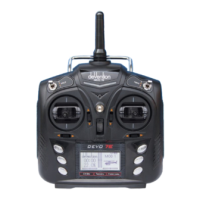

 To Next Page
