Wing Tiyipe
1
...
3
-Tai I
Inhibit
C:1
LI
al Channels
Elevator
0
Welcome to use the DEVO 7E transmitter
deUention
DEVO 7E
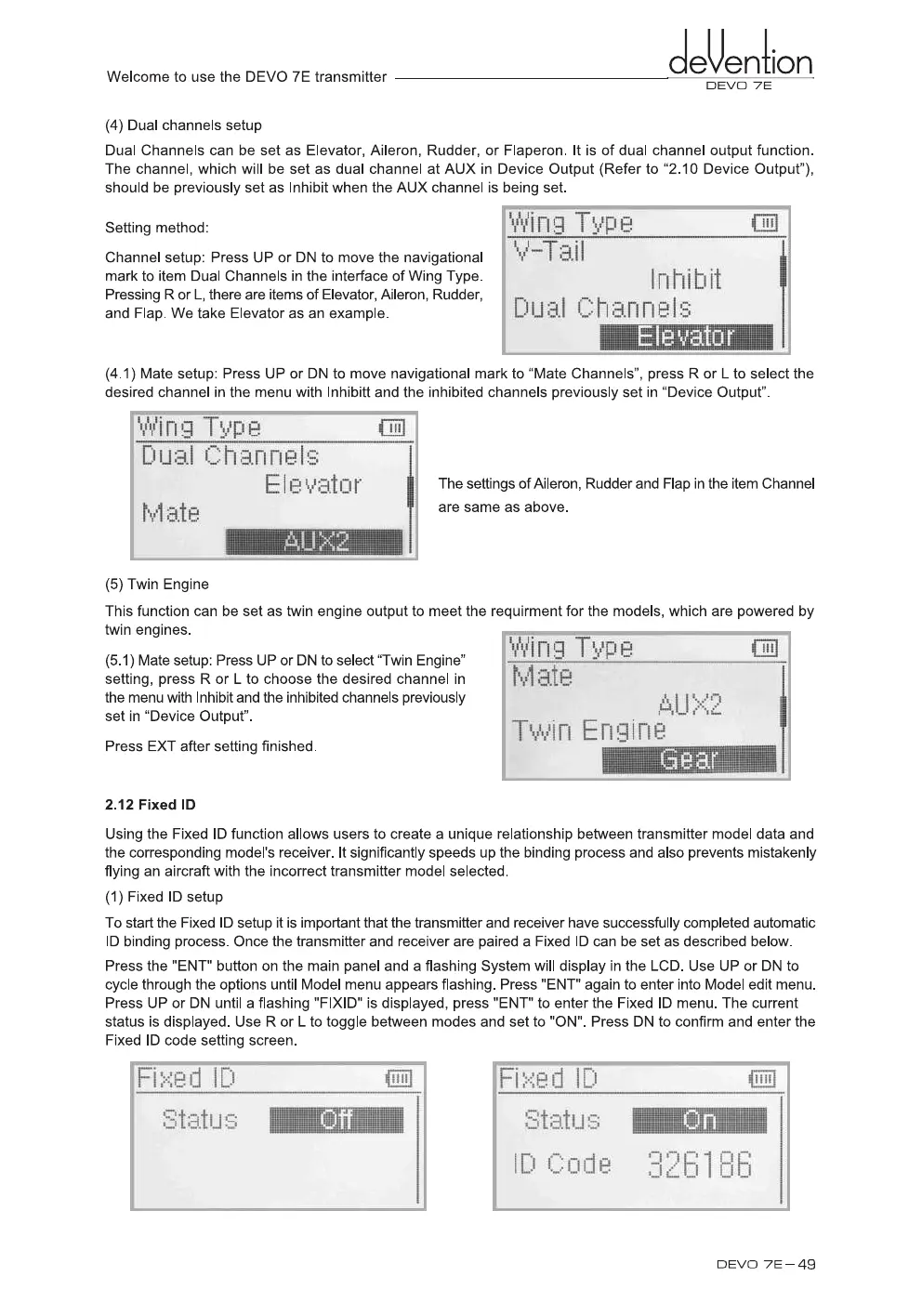
(4) Dual channels setup
Dual Channels can be set as Elevator, Aileron, Rudder, or Flaperon. It is of dual channel output function.
The channel, which will be set as dual channel at AUX in Device Output (Refer to "2.10 Device Output"),
should be previously set as Inhibit when the AUX channel is bein
g
set.
Settin
g
method:
Channel setup: Press UP or DN to move the navi
g
ational
mark to item Dual Channels in the interface of Win
g
Type.
Pressin
g
R or
L,
there are items of Elevator, Aileron, Rudder,
and Flap. We take Elevator as an example.
(4.1) Mate setup: Press UP or DN to move navi
g
ational mark to "Mate Channels", press R or L to select the
desired channel in the menu with Inhibitt and the inhibited channels previously set in "Device Output".
Wing T'y'
P
e
D li
a I 1:::: h an nels
EIP v
;RI
o
r
r.,,,1:7-11
.
1-7:!
The settin
g
s of Aileron, Rudder and Flap in the item Channel
are same as above.
(5) Twin En
g
ine
This function can be set as twin en
g
ine output to meet the re
q
uirment for the models, which are powered by
twin en
g
ines.
(5.1) Mate setup: Press UP or DN to select "Twin En
g
ine"
settin
g
, press R or L to choose the desired channel in
the menu with Inhibit and the inhibited channels previously
set in "Device Output".
Press EXT after settin
g
finished.
2.12 Fixed ID
Usin
g
the Fixed ID function allows users to create a uni
q
ue relationship between transmitter model data and
the correspondin
g
model's receiver. It si
g
nificantly speeds up the bindin
g
process and also prevents mistakenly
flyin
g
an aircraft with the incorrect transmitter model selected.
(1) Fixed ID setup
To start the Fixed ID setup it is important that the transmitter and receiver have successfully completed automatic
ID bindin
g
process. Once the transmitter and receiver are paired a Fixed ID can be set as described below.
Press the "ENT" button on the main panel and a flashin
g
System will display in the LCD. Use UP or DN to
cycle throu
g
h the options until Model menu appears flashin
g
. Press "ENT" a
g
ain to enter into Model edit menu.
Press UP or DN until a flashin
g
"FIXID" is displayed, press "ENT" to enter the Fixed ID menu. The current
status is displayed. Use R or L to to
gg
le between modes and set to "ON". Press DN to confirm and enter the
Fixed ID code settin
g
screen.
n
9
TY
P
e
M
ate
AU
Twin Engine
DEVO 7E -
49


 To Next Page