NDS3306I 6 in 1 ISDB-T Modulator User Manual
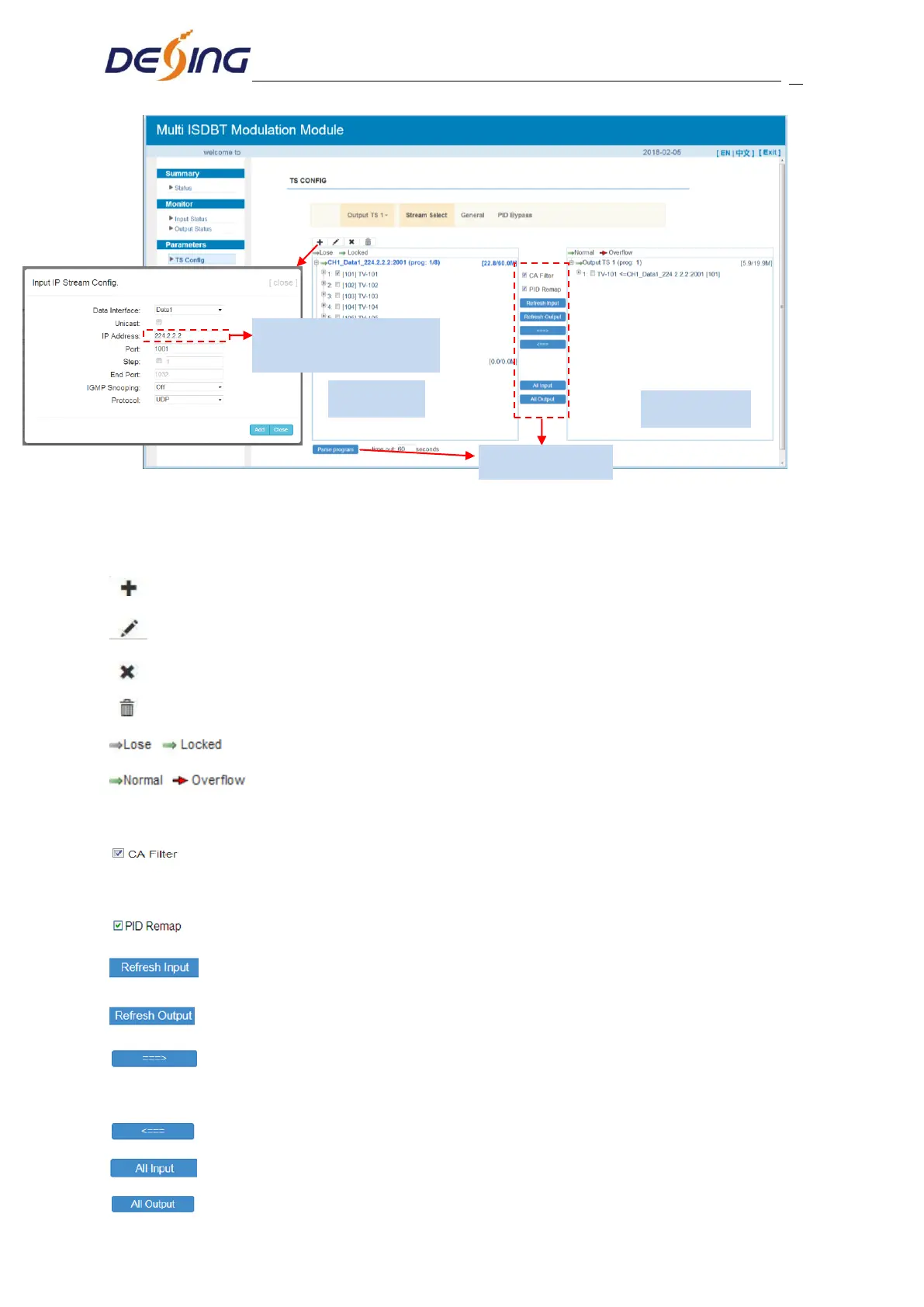
Figure-8
Configure ‘Input Area’ and ‘Output Area’ with buttons in ‘Operation Area’. Instructions are
as below:
: To add input channel which come from Data1 or Data 2 or Data/Module
: To edit the input channel
: To delete the input channel
: To delete all inputs channel
: To check input IP lock or not, green means current IP locked
: To check current TS overflow or not, red color means current TS
overflow, need reduce program
:Enable/disable the CA Filter function. Clicking the box, user can filter the input
CA to avoid disturbing with the device scrambling function.
: To enable/disable the PID remapping
To refresh the input program information
To refresh the output program information
Select one input program first and click this button to transfer the selected
program to the right box to output.
Similarly, user can cancel the multiplexed programs from the right box.
To select all the input programs
To select all the output programs
Set output IP address of
streamer


 To Next Page