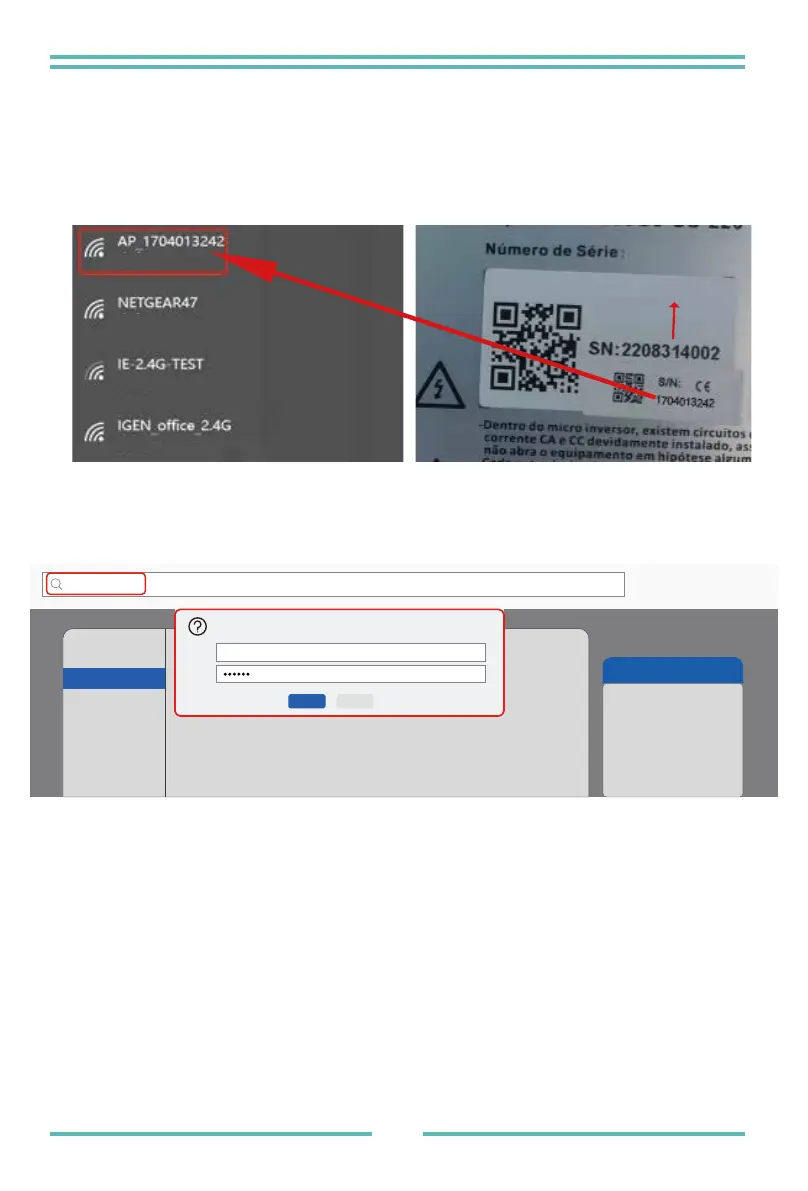
Microinverter SN: 2208314002 Built-in datalogger :1704013242
1. Turn on the wireless network of your PC or smartphone.
2. Select logger network (network name: AP_SN) and connect. The default
password is 12345678.
3. Open a browser and enter 10.10.100.254. Both username and password are "admin".
(Recommended browser: IE 8+, Chrome 15+, Firefox 10 + ).
How to Configure the Microinverter to the Router Via Web
4. Browser jumps to “ Status ” page, the basic information is listed there.
10.10.100.254
http://10.10.100.254 Please input username and password.“USER LOGIN”
Username:
Password:
Sure Cancel
admin
Help
The setup wizard will assist
you to complete the device
setting within one minute.
Status
Quick Set
Advanced
Upgrade
Restart
Reset
Wizard
Microinverter SN
Safe
Safe
Safe
Safe
- 20 -


 To Next Page