- 23 -
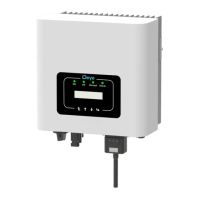
9. Connect to loggeer AP network again, then log in to 10.10.100.254 by Browser,
and check the system info of "Status" page. After the network setting is done, the remote
server A or B should be "connected".
10. If both remote server A and B are "Not connected", please refresh the page or repeat the
previous steps. If the "Signal Quality" is lower than 40%, please move your Router closer to
the Microinverter.
Help
Quick Set
Advanced
Upgrade
Restart
Reset
Wizard
Status
1 2 3 4
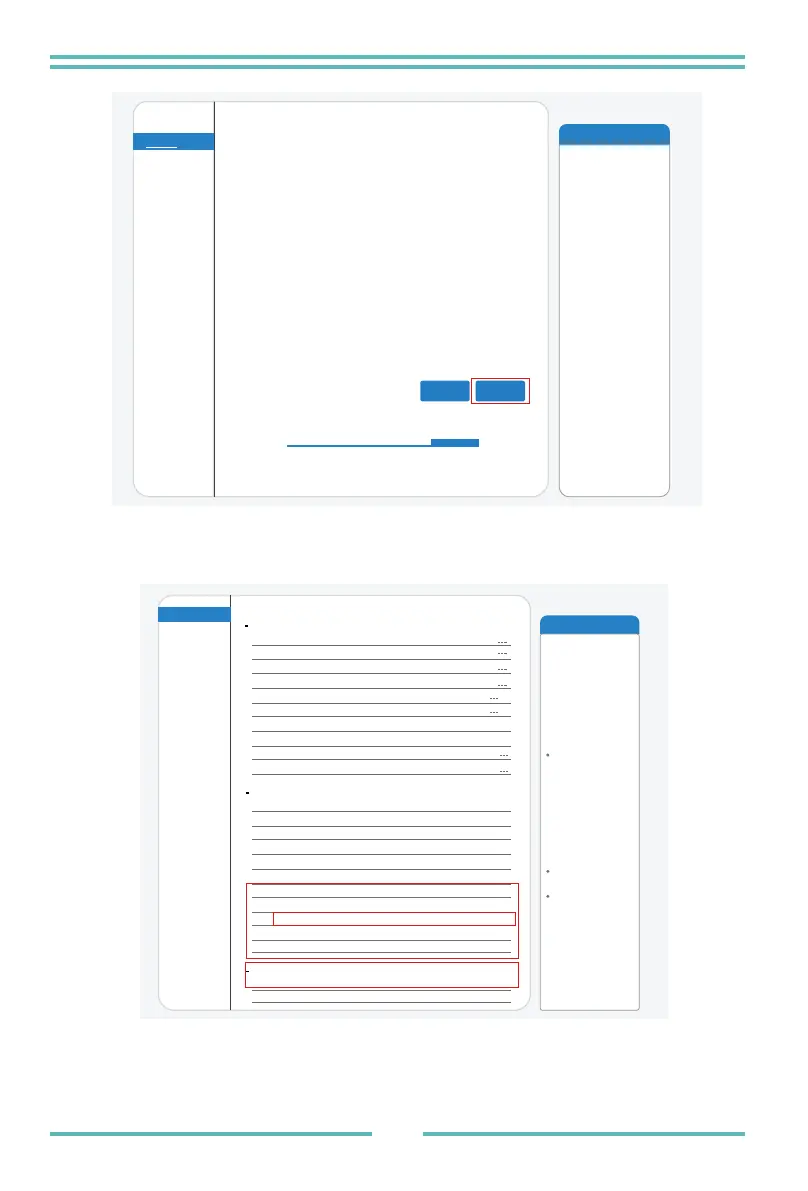
After clicking OK,the
system will restart
immediately.
Back OK
Setting complete!
Click OK, the settings will take effect and the system will
restart immediately.
If you leave this interface without clicking OK, the settings will
be ineffective.
Help
Quick Set
Advanced
Upgrade
Restart
Reset
Wizard
Status
The device can be used as
a wireless access point(AP
mode) to facilitata users to
configure the device, or it
can also be used as a
wireless information terminal
(STA mode) to connect the
remote server via wireless
router.
Status of remote server
If under such status, please
check the issues as follows:
(1)check the device
information to see whether
IP address is obtained or
not;
(2)check if the router is
connected to internet or not;
(3)check if a firewall is set
on the router or not;
Not connected: Connection
to server failed last time.
Connected: connection to
server successful last time;
Unknown: No connection
to server. Please check
again in 5 minutes.
Inverter information
Inverter serial number
Firmware version(main)
Firmware version(slave)
Inverter model
Rated power
Current power
Yield today
Current power
Alerts
Last updated
Device information
Device serial number
Firmware version
Wireless AP mode
SSID
IP address
IP address
MAC address
MAC address
Remote server A
Remote server B
Wireless STA mode
Router SSID
Signal Quality
Remote server information
connected
Not connected
W
W
---kWh
---kWh
1704013242
Disable
Enable
IE-2.4G-TEST
100%
172.16.30.247
98:D8:63:71:8D:B0
LSW3_14_FFFF_1.0.23


 To Next Page