Seite 39
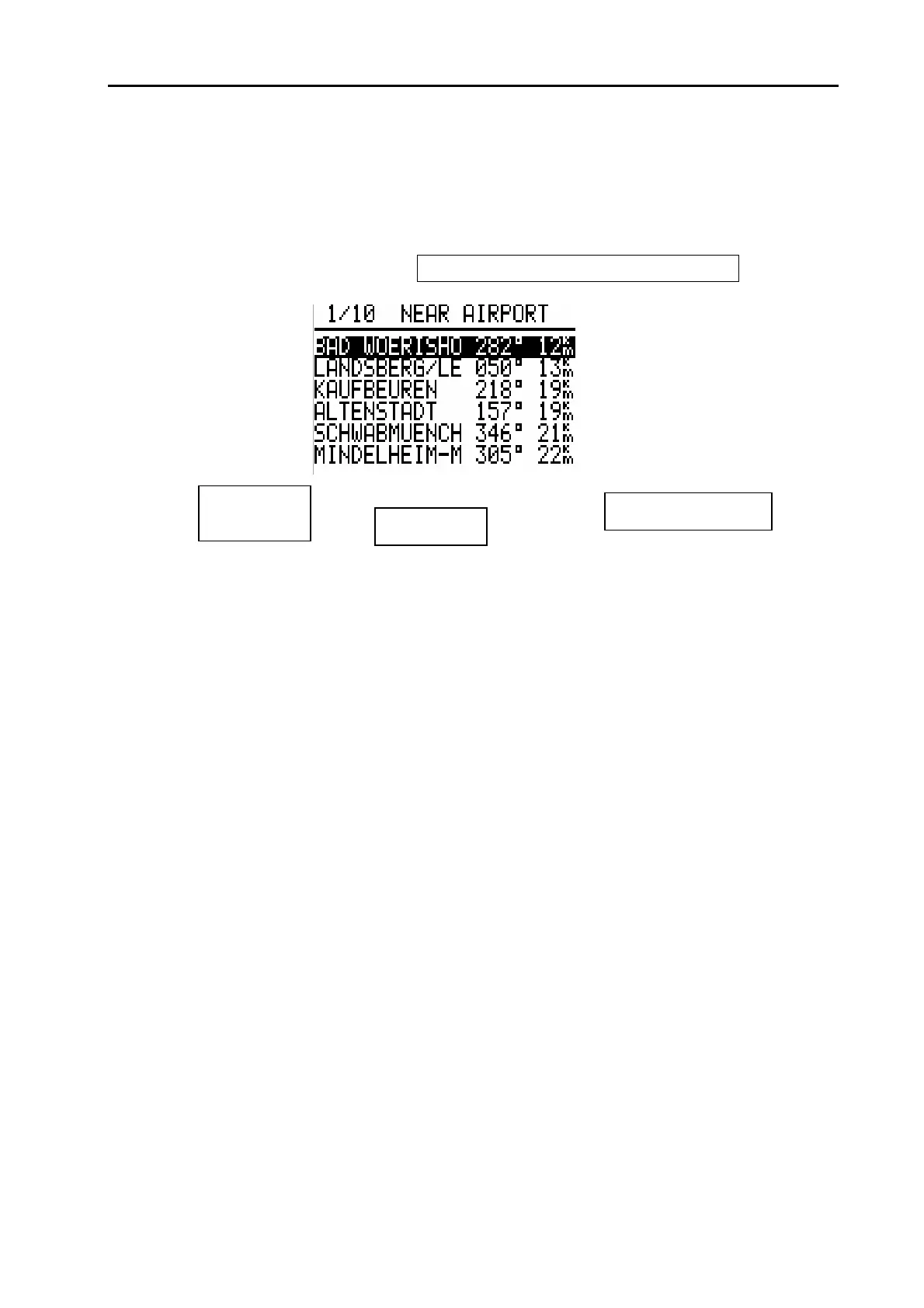
the abbreviated name of the airport (max. 6 signs)
the bearing to the airport
the distance to the airport
Figure 19: Near Airport
By UP/ DOWN keys the desired airport can be selected. If it should be activated, that means if you want to fly to
this airport, the ENTER button has to be pushed. The program automatically returns to the APT mode where now
the selected airport is active and is available for navigation.
Attention:
Please note that before using the Near Airport function the instrument only offers exact data after a good GPS re-
ceipt of at least 5 minutes (otherwhise the message “GPS BAD” is displayed).
Any way only these airports are displayed which have been stored in the APT memory of the DX 50!!
5.5 Statistic program
The DX 50 has a very comprehensive staristic with the log book. There are two different modes:
- Statistic during the flight
- Statistic after the light with graphical presentation of the barogram, flying route, photo sectors and PC interpretati-
on
Statistic during the light
The flight data can be read from the STATISTIC menu during the flight:
Distance to the airport
BRG to the air-


 To Next Page
 Loading...