26
The OFF FREQUENCY setting relates to each PRESSURE SET operating pressure, and so if PRESSURE SET 2
(see – parameter 1.2 PRESSURE SET 2) is also used, the OFF FREQUENCY 2 parameter will also have to be set.
The OFF FREQUENCY setting is automatically changed every time the PRESSURE SET operating pressure is
changed, and it is moved to the new frequency below which it is considered that there is no more flow
request.
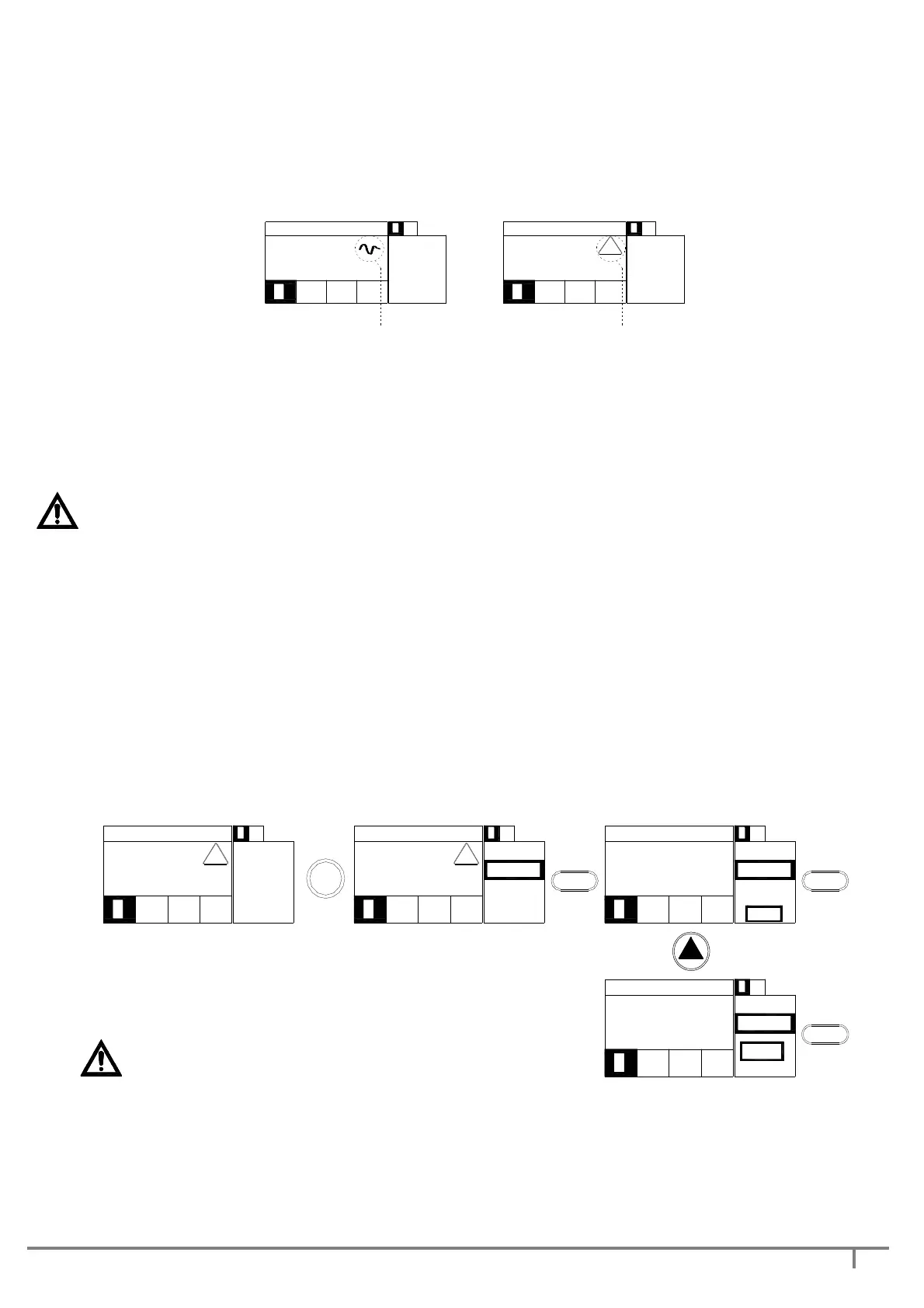
If the OFF FREQUENCY parameter has been set, the symbol on the display screen is the waveform (see fig.
below).
21
21
P 4 .0
set 4 .0 Bar
0 4 /1 1 /2 0 1 1 1 5 :0 2
4 5 .
0 HZ
5 .8 A
4 1 0 V
1 1 : 1 7
0 8 / 1 1 /1 1
set 4 .0 Bar
P 4 .0
1
!
4 1 0 V
5 .8 A
4 5 .
0 HZ
2
1 2
OFF FREQUENCY parameter set OFF FREQUENCY parameter not set
The OFF FREQUENCY setting can be manual or in self-learning.
Manual setting: a switch-off frequency will have to have been defined.
Move to advanced configuration mode ADV SETUP (see para. 4.3 fig. 4.8), select the OFF FREQ SP1
parameter (or OFF FREQ SP2 depending on the set pressure) and set the switch-off frequency.
IMPORTANT: If the OFF FREQUENCY setting is too high, this will cause the pump to stop while the
request is still active, and involve frequent restarts; if the setting is too low, this could cause the
continuous operation of the pump even at zero flow, with pump overheating and damage.
Setting in self-learning: from WORK mode and with the pump operating:
- bring the system to switch-off flow rate (rate below which it is thought there is no more flow request); to
this flow rate corresponds a switch-off frequency (indicated as 27.8 Hz in the illustration below)
- hit the TEST key
- the display screen shows the current switch-off frequency (selected) and the default value (40 Hz).
- confirm the current switch-off frequency with ENTER
- Save the choice (YES) and confirm with ENTER.
11:17
08/11/11
set 2.4 Bar
P 2.4
1 2
1 2
SAVE?
27.
8 HZ
-YES-
-NO-
ENTER
11:1708/11/11
set 2.4 Bar
P 2.4
!
1 2
1 2
OFF FR
27.
8 HZ
Old
40.
0 HZ
-NO-
-YES-
27.
8 HZ
SAVE?
21
21
P 2.4
set 2.4 Bar
08/11/11 11:17
21
21
P 2.4
set 2.4 Bar
04/11/2011 15:02
27.
8 HZ
5.5 A
410 V
!
TEST
ENTER ENTER
**
IMPORTANT:
THE SWITCH-OFF FREQUENCY MUST NECESSARILY BE HIGHER OR THE SAME AS THE
MINIMUM FREQUENCY. IN THE EVENT OF THE MINIMUM FREQUENCY (LOF) BEING RAISED, THE DGBOX
CONTROL BOARD WILL ALSO ADAPT THE OFF FREQ IF REQUIRED.


 To Next Page