Page 28
Constant Lighting Controller Menus
2. Groups
The Groups screen displays all outputs controlled by a Constant
Lighting Controller (CLC) local sensor. The sensor has three types
of settings:
Threshold Trigger - triggers a relay output to ON when the
measured light level goes below the Low Level Set Point and
triggers the output to OFF when the light level goes above the
High Level Set Point value.
Open Loop - constantly adjusts the dimming levels of each output
in response to the measured light level coming into the room.
Closed Loop - constantly adjusts the dimming levels of each
output in response to the measured light level inside the room.
The groups are listed by type of CLC setting in the order of the
controlling sensor. Output type is also displayed with r = relay and
d = dimmer. Groups are assigned to sensors when a new Group
Mode is created.
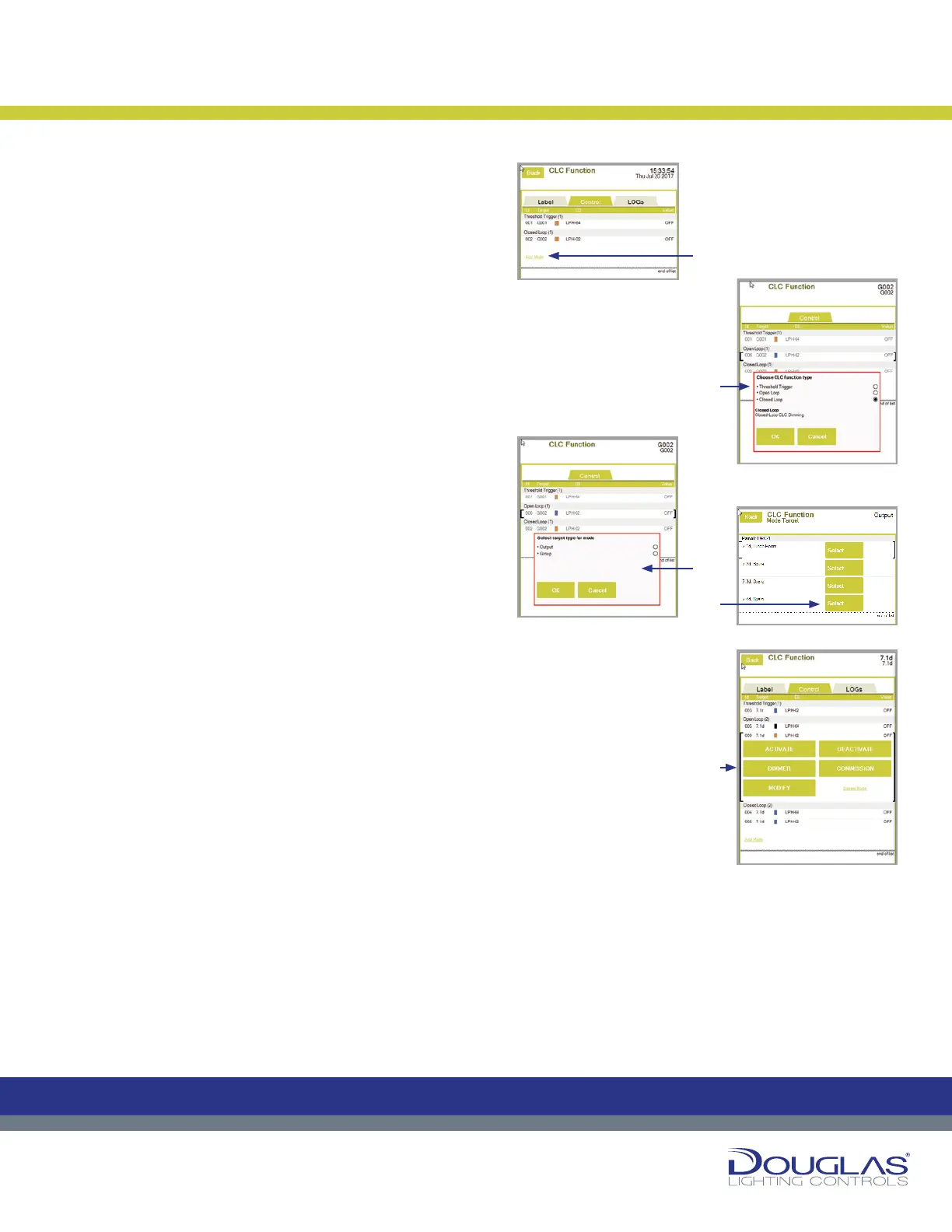
1. To create a new Group Mode:
a) Select the Add Mode link. You may have to scroll to the end
of the list.
b) Select the CLC setting and select the OK button.
c) Select the group output type and select the OK button.
d) Select the controlling output and select the OK button.
e) The new group mode is displayed. Use the buttons on the
screen to adjust the conguration.
Constant Lighting Controller
27
Dialog® Lighting Control System
Constant Lighting Controller Menus
2. Groups
The Groups screen displays all outputs controlled by a Constant Lighting
Controller (CLC) local sensor. The sensor has three types of settings:
Threshold Trigger - triggers a relay output to ON when the measured light
level goes below the Low Level Set Point and triggers the output to OFF
when the light level goes above the High Level Set Point value .
Open Loop - constantly adjusts the dimming levels of each output in
response to the measured light level coming into the room.
Closed Loop - constantly adjusts the dimming levels of each output in
response to the measured light level inside the room.
The groups are listed by type of CLC setting in the order of the controlling
sensor. Output type is also displayed with r = relay and d = dimmer. Groups
are assigned to sensors when a new Group Mode is created.
1. To create a new Group Mode:
a) Select the Add Mode link. You may have to scroll to
the end of the list.
b) Select the CLC setting and select the OK button.
c) Select the group output type and select the OK
button.
d) Select the controlling output and select the OK
button.
e) The new group mode is displayed. Use the buttons on
the screen to adjust the conguration.
Constant Lighting Controller
C
M
Y
CM
MY
CY
CMY
K
27
Dialog® Lighting Control System
Constant Lighting Controller Menus
2. Groups
The Groups screen displays all outputs controlled by a Constant Lighting
Controller (CLC) local sensor. The sensor has three types of settings:
Threshold Trigger - triggers a relay output to ON when the measured light
level goes below the Low Level Set Point and triggers the output to OFF
when the light level goes above the High Level Set Point value .
Open Loop - constantly adjusts the dimming levels of each output in
response to the measured light level coming into the room.
Closed Loop - constantly adjusts the dimming levels of each output in
response to the measured light level inside the room.
The groups are listed by type of CLC setting in the order of the controlling
sensor. Output type is also displayed with r = relay and d = dimmer. Groups
are assigned to sensors when a new Group Mode is created.
1. To create a new Group Mode:
a) Select the Add Mode link. You may have to scroll to
the end of the list.
b) Select the CLC setting and select the OK button.
c) Select the group output type and select the OK
button.
d) Select the controlling output and select the OK
button.
e) The new group mode is displayed. Use the buttons on
the screen to adjust the conguration.
Constant Lighting Controller
C
M
Y
CM
MY
CY
CMY
K
27
Dialog® Lighting Control System
Constant Lighting Controller Menus
2. Groups
The Groups screen displays all outputs controlled by a Constant Lighting
Controller (CLC) local sensor. The sensor has three types of settings:
Threshold Trigger - triggers a relay output to ON when the measured light
level goes below the Low Level Set Point and triggers the output to OFF
when the light level goes above the High Level Set Point value .
Open Loop - constantly adjusts the dimming levels of each output in
response to the measured light level coming into the room.
Closed Loop - constantly adjusts the dimming levels of each output in
response to the measured light level inside the room.
The groups are listed by type of CLC setting in the order of the controlling
sensor. Output type is also displayed with r = relay and d = dimmer. Groups
are assigned to sensors when a new Group Mode is created.
1. To create a new Group Mode:
a) Select the Add Mode link. You may have to scroll to
the end of the list.
b) Select the CLC setting and select the OK button.
c) Select the group output type and select the OK
button.
d) Select the controlling output and select the OK
button.
e) The new group mode is displayed. Use the buttons on
the screen to adjust the conguration.
Constant Lighting Controller
C
M
Y
CM
MY
CY
CMY
K
27
Dialog® Lighting Control System
Constant Lighting Controller Menus
2. Groups
The Groups screen displays all outputs controlled by a Constant Lighting
Controller (CLC) local sensor. The sensor has three types of settings:
Threshold Trigger - triggers a relay output to ON when the measured light
level goes below the Low Level Set Point and triggers the output to OFF
when the light level goes above the High Level Set Point value .
Open Loop - constantly adjusts the dimming levels of each output in
response to the measured light level coming into the room.
Closed Loop - constantly adjusts the dimming levels of each output in
response to the measured light level inside the room.
The groups are listed by type of CLC setting in the order of the controlling
sensor. Output type is also displayed with r = relay and d = dimmer. Groups
are assigned to sensors when a new Group Mode is created.
1. To create a new Group Mode:
a) Select the Add Mode link. You may have to scroll to
the end of the list.
b) Select the CLC setting and select the OK button.
c) Select the group output type and select the OK
button.
d) Select the controlling output and select the OK
button.
e) The new group mode is displayed. Use the buttons on
the screen to adjust the conguration.
Constant Lighting Controller
C
M
Y
CM
MY
CY
CMY
K
27
Dialog® Lighting Control System
Constant Lighting Controller Menus
2. Groups
The Groups screen displays all outputs controlled by a Constant Lighting
Controller (CLC) local sensor. The sensor has three types of settings:
Threshold Trigger - triggers a relay output to ON when the measured light
level goes below the Low Level Set Point and triggers the output to OFF
when the light level goes above the High Level Set Point value .
Open Loop - constantly adjusts the dimming levels of each output in
response to the measured light level coming into the room.
Closed Loop - constantly adjusts the dimming levels of each output in
response to the measured light level inside the room.
The groups are listed by type of CLC setting in the order of the controlling
sensor. Output type is also displayed with r = relay and d = dimmer. Groups
are assigned to sensors when a new Group Mode is created.
1. To create a new Group Mode:
a) Select the Add Mode link. You may have to scroll to
the end of the list.
b) Select the CLC setting and select the OK button.
c) Select the group output type and select the OK
button.
d) Select the controlling output and select the OK
button.
e) The new group mode is displayed. Use the buttons on
the screen to adjust the conguration.
Constant Lighting Controller
C
M
Y
CM
MY
CY
CMY
K
To create a new Group Mode:
a)
c)
b)
e)
d)


 To Next Page
 Loading...