Page 41
4. The System Diagnostics screen provides information on
memory consumption and storage consumption.
5. The Event Log Functions screen allows you to congure,
save, or clear logs.
6. The Mode Settings allows you to congure and recongure
the various system modes. For more information on each
type of mode, see the corresponding section in this manual.
7. The System Settings screen allows you to set system
parameters including the system’s descriptive name, screen
calibration, and IP settings.*
8. The Login Settings screen provides information on
consumption of system memory and les.
9. The Cong Management screen allows you to congure
information including consumption of system memory and
les.
*Only applies to the WLC-4150-C
Schedules
40
Dialog® Lighting Control System
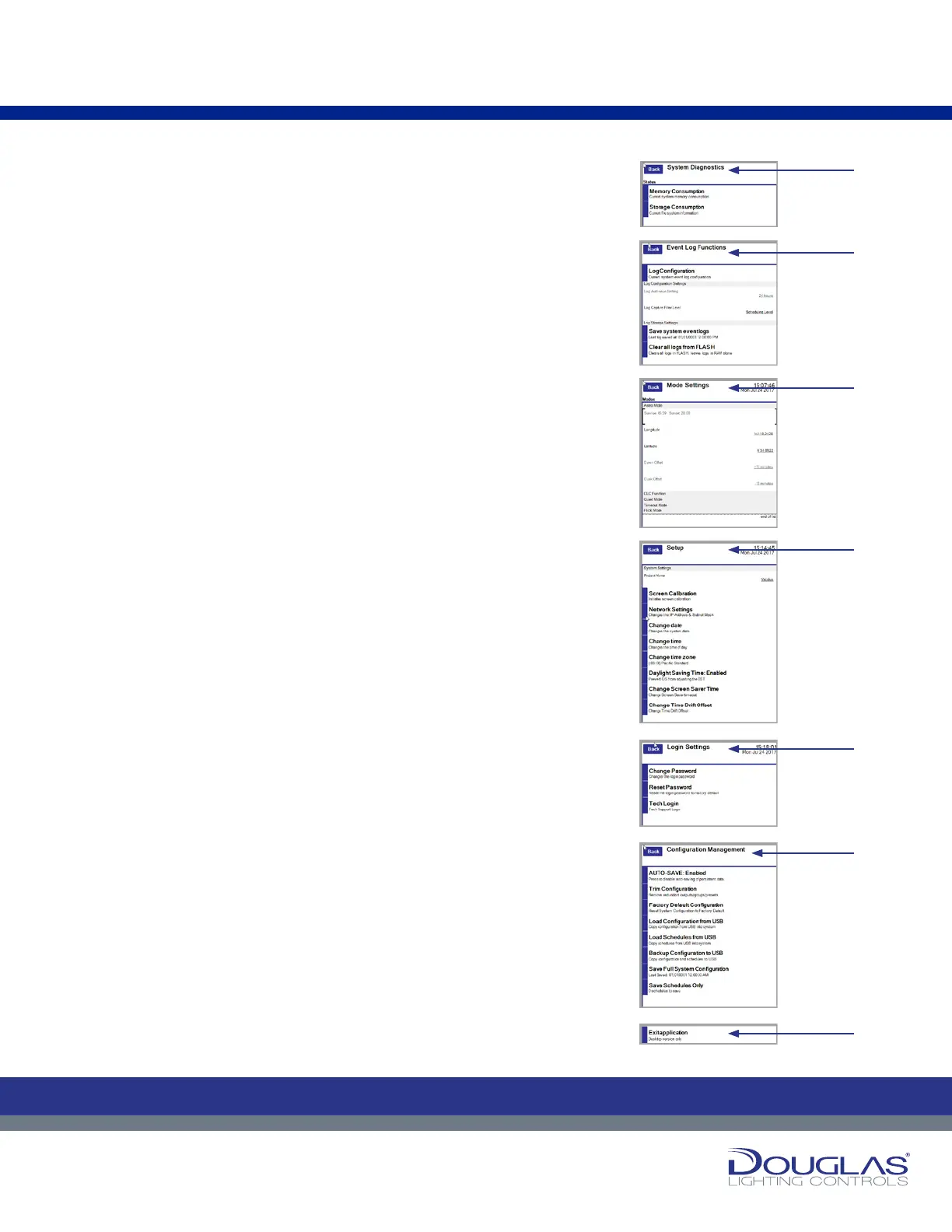
4. The System Diagnostics screen provides information on memory
consumption and storage consumption.
5. The Event Log Functions screen allows you to configure, save, or clear logs.
6. The Mode Settings allows you to configure and reconfigure the various
system modes. For more information on each type of mode, see the
corresponding section in this manual.
7. The System Settings screen allows you to set system parameters including
the system’s descriptive name, screen calibration, and IP settings.
8. The Login Settings screen provides information on consumption of system
memory and files.
9. The Cong Management screen allows you to configure information
including consumption of system memory and files.
10.The Exit Application screen allows to exit the application. This screen
applies to only the desktop version of the software. It does not apply to the
touchscreen version of the software.
Settings
40
Dialog® Lighting Control System
4. The System Diagnostics screen provides information on memory
consumption and storage consumption.
5. The Event Log Functions screen allows you to configure, save, or clear logs.
6. The Mode Settings allows you to configure and reconfigure the various
system modes. For more information on each type of mode, see the
corresponding section in this manual.
7. The System Settings screen allows you to set system parameters including
the system’s descriptive name, screen calibration, and IP settings.
8. The Login Settings screen provides information on consumption of system
memory and files.
9. The Cong Management screen allows you to configure information
including consumption of system memory and files.
10.The Exit Application screen allows to exit the application. This screen
applies to only the desktop version of the software. It does not apply to the
touchscreen version of the software.
Settings
40
Dialog® Lighting Control System
4. The System Diagnostics screen provides information on memory
consumption and storage consumption.
5. The Event Log Functions screen allows you to configure, save, or clear logs.
6. The Mode Settings allows you to configure and reconfigure the various
system modes. For more information on each type of mode, see the
corresponding section in this manual.
7. The System Settings screen allows you to set system parameters including
the system’s descriptive name, screen calibration, and IP settings.
8. The Login Settings screen provides information on consumption of system
memory and files.
9. The Cong Management screen allows you to configure information
including consumption of system memory and files.
10.The Exit Application screen allows to exit the application. This screen
applies to only the desktop version of the software. It does not apply to the
touchscreen version of the software.
Settings
40
Dialog® Lighting Control System
4. The System Diagnostics screen provides information on memory
consumption and storage consumption.
5. The Event Log Functions screen allows you to configure, save, or clear logs.
6. The Mode Settings allows you to configure and reconfigure the various
system modes. For more information on each type of mode, see the
corresponding section in this manual.
7. The System Settings screen allows you to set system parameters including
the system’s descriptive name, screen calibration, and IP settings.
8. The Login Settings screen provides information on consumption of system
memory and files.
9. The Cong Management screen allows you to configure information
including consumption of system memory and files.
10.The Exit Application screen allows to exit the application. This screen
applies to only the desktop version of the software. It does not apply to the
touchscreen version of the software.
Settings
40
Dialog® Lighting Control System
4. The System Diagnostics screen provides information on memory
consumption and storage consumption.
5. The Event Log Functions screen allows you to configure, save, or clear logs.
6. The Mode Settings allows you to configure and reconfigure the various
system modes. For more information on each type of mode, see the
corresponding section in this manual.
7. The System Settings screen allows you to set system parameters including
the system’s descriptive name, screen calibration, and IP settings.
8. The Login Settings screen provides information on consumption of system
memory and files.
9. The Cong Management screen allows you to configure information
including consumption of system memory and files.
10.The Exit Application screen allows to exit the application. This screen
applies to only the desktop version of the software. It does not apply to the
touchscreen version of the software.
Settings
40
Dialog® Lighting Control System
4. The System Diagnostics screen provides information on memory
consumption and storage consumption.
5. The Event Log Functions screen allows you to configure, save, or clear logs.
6. The Mode Settings allows you to configure and reconfigure the various
system modes. For more information on each type of mode, see the
corresponding section in this manual.
7. The System Settings screen allows you to set system parameters including
the system’s descriptive name, screen calibration, and IP settings.
8. The Login Settings screen provides information on consumption of system
memory and files.
9. The Cong Management screen allows you to configure information
including consumption of system memory and files.
10.The Exit Application screen allows to exit the application. This screen
applies to only the desktop version of the software. It does not apply to the
touchscreen version of the software.
Settings
40
Dialog® Lighting Control System
4. The System Diagnostics screen provides information on memory
consumption and storage consumption.
5. The Event Log Functions screen allows you to configure, save, or clear logs.
6. The Mode Settings allows you to configure and reconfigure the various
system modes. For more information on each type of mode, see the
corresponding section in this manual.
7. The System Settings screen allows you to set system parameters including
the system’s descriptive name, screen calibration, and IP settings.
8. The Login Settings screen provides information on consumption of system
memory and files.
9. The Cong Management screen allows you to configure information
including consumption of system memory and files.
10.The Exit Application screen allows to exit the application. This screen
applies to only the desktop version of the software. It does not apply to the
touchscreen version of the software.
Settings
Settings Menu:
4.
5.
6.
7.
8.
10.
9.


 To Next Page
 Loading...