DQ & MQ-Rack User Guide 1.5 Using the Q-Rack Menu System
12
Status Menu.......................................................
The Status menu is the first menu visible once the rack is unlocked. No adjustments are possible from this
menu.
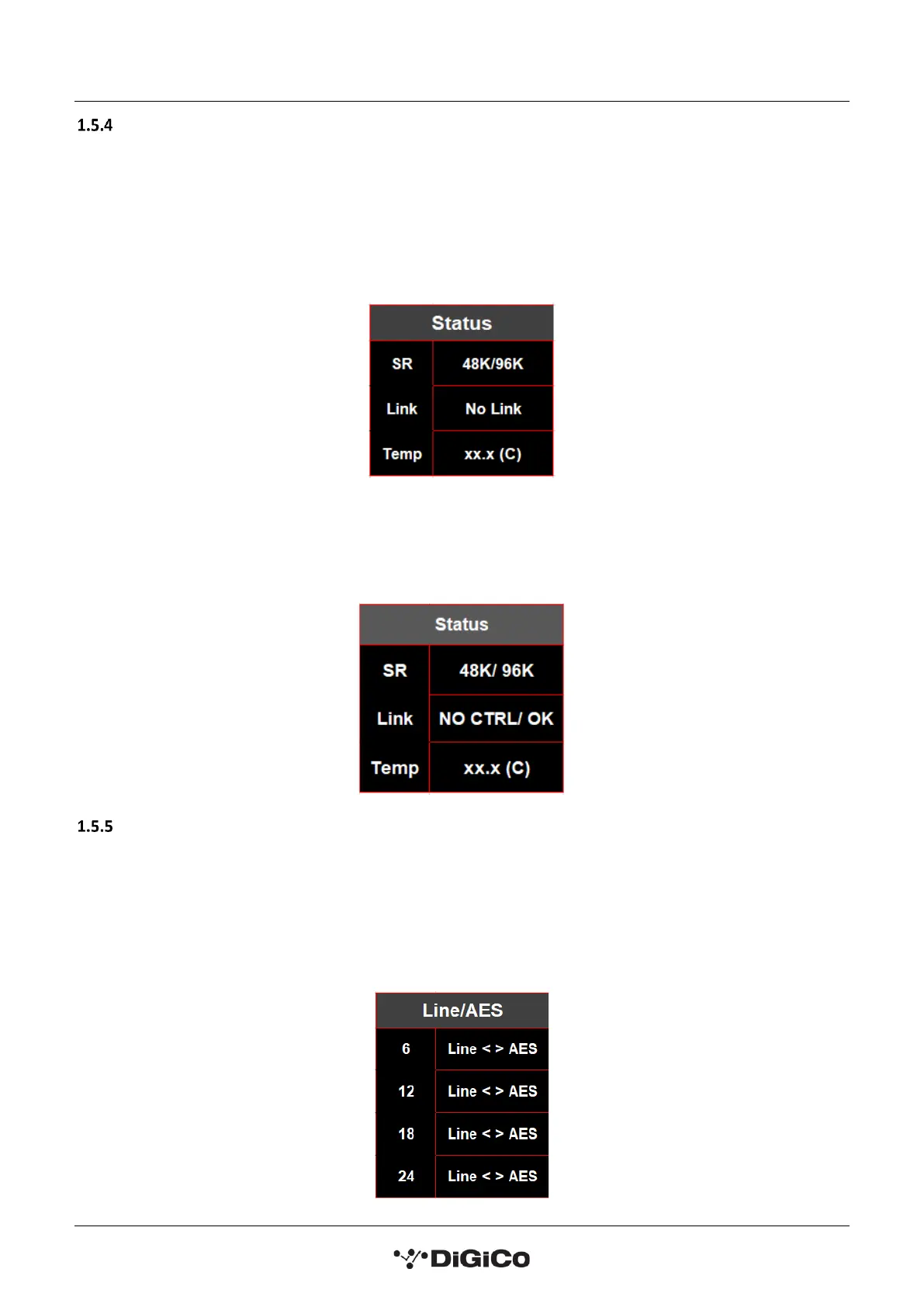
On the MQ-Rack the status menu page displays the sample rate the rack is working at, whether it has a link via
the MADI MAIN, MADI AUX or both and the current temperature of the rack.
MQ-Rack Status Menu
On the DQ-Rack the status menu shows the working sample rate, whether the rack is receiving control
information and the current internal temperature of the rack.
DQ- Rack Status Menu
Line/AES Menu ...................................................
In the Line/AES menu page, the user can change the state of the 4 switchable Line/AES outputs, by selecting
the desired socket and changing it between Line and AES using the left and right buttons. When the socket is
in AES mode the LED light below the socket will light up blue.
Note: On Quantum consoles, this setting’s status can be displayed and switched from within the Audio
I/O panel on the console.


 To Next Page