DQ & MQ-Rack User Guide 1.5 Using the Q-Rack Menu System
15
MADI Sync Menu (MQ-Rack only) ................................................................
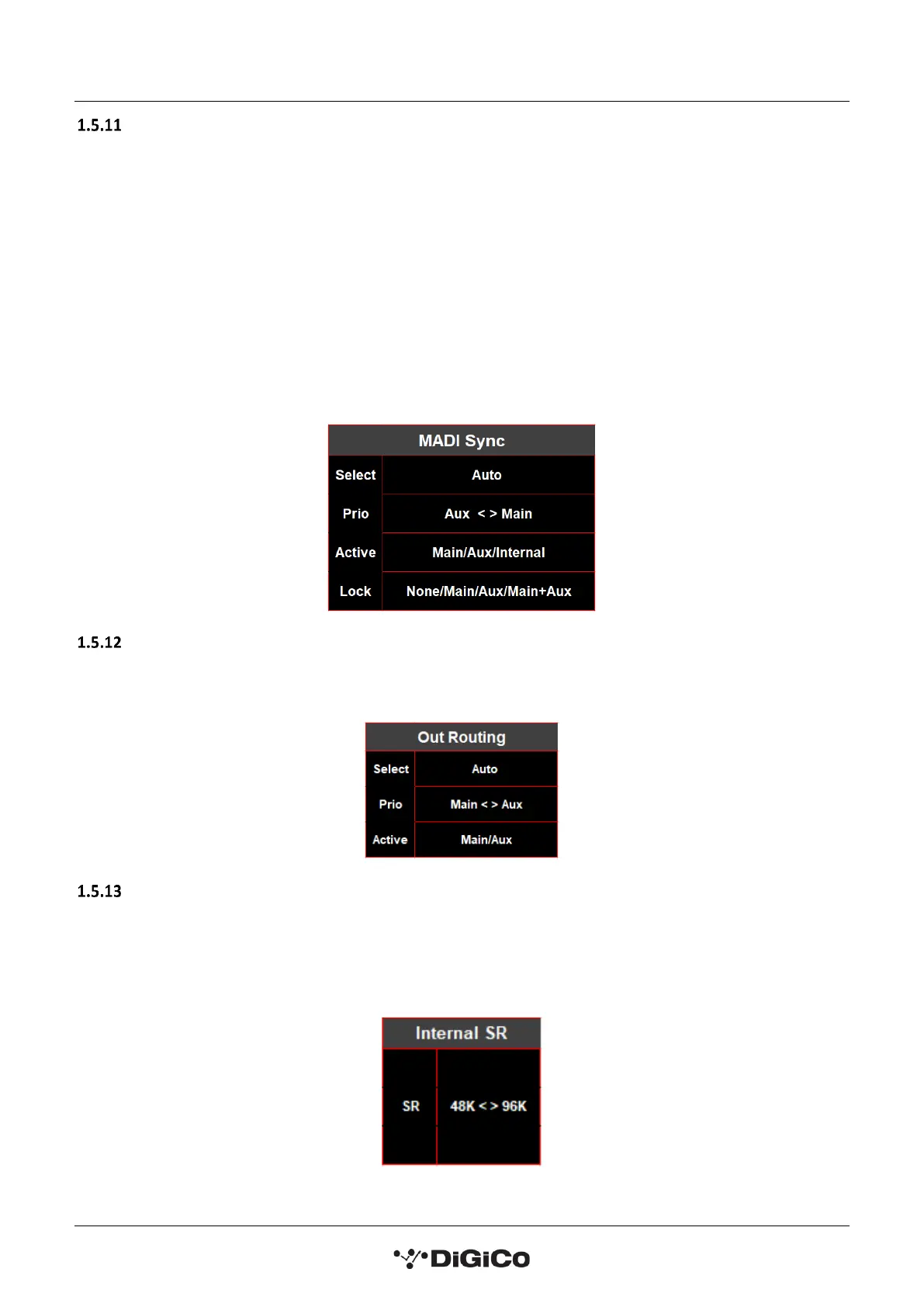
This page allows selection of the MQ-Rack sync source.
When selecting a sync source:
Auto will automatically sync to any connection with a clock signal. If the rack is not receiving a connection with
a valid clock signal it will use its internal sync. MADI MAIN and MADI AUX sockets can be given priority so that
if a clock signal comes into the rack it will sync to the port with priority.
Selecting the Main or Aux setting in the Select parameter forces the active sync source to be the selected
connection and is not affected by the priority option.
The Active parameter shows which socket the rack is currently syncing to.
The Lock parameter displays from which sources a stable clocking source is received.
Out Routing Menu (MQ-Rack only) ..............................................................
The Out Routing menu is for selecting which MADI inputs from a console can output via the MQ-Rack’s 24
physical outputs.
Internal SR Menu (MQ-Rack only) ...........................................................
The Internal SR menu allows selection of the rack’s sample rate.
This is only possible to sync from the internal clock if the MADI Sync Active is internal.
Available options are 48K and 96K


 To Next Page