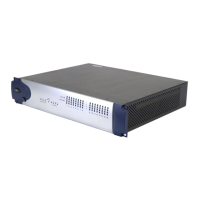
Using the 1622 I/O
7
Using the 1622 I/O
Interface as Stand-Alone
Audio Converter
The 1622 I/O can be used apart from
Pro Tools as a stand-alone 2-channel,
20-bit analog-to-digital, or 24-bit digi-
tal-to-analog converter.
Input and output levels are determined by
the settings last saved by clicking the Store
button in the Other Options dialog (Setups
> Hardware > Other Options).
▲
If no input level settings are stored, input
levels default to +4 dBu and output levels de-
fault to –10 dBV.
There are no panning controls in
stand-alone mode. Odd numbered chan-
nels are hard-panned left and even num-
bered channels hard-panned right. Mono
instruments will play out of output L or R,
but not both. Stereo instruments will play
out of both outputs L and R. Output gain
must be controlled directly from con-
nected instruments.
Before you use the 1622 I/O in stand-alone
mode:
1
If the 1622 I/O is currently on, turn it
off.
2
Turn off your computer. Do not turn on
your computer while the 1622 I/O is in
stand-alone mode. If you do, the 1622 I/O
will stop operating in stand-alone mode.
To use the 1622 I/O as a stand-alone A/D
converter:
1
Turn off any digital devices that may
send a word clock signal to the 1622 I/O
S/PDIF digital input.
2
Turn on the 1622 I/O. The 1622 I/O
searches briefly for a word clock signal on
channels 1–2 of its digital input ports.
3
If the 1622 I/O does not detect word
clock, it functions as a stand-alone A/D
converter using its internal clock. In this
mode you will use analog inputs 1–16 and
the S/PDIF output.
To use the 1622 I/O as a stand-alone 24-bit
D/A converter:
1
Make sure that a digital device providing
a word-clock signal is connected to the
S/PDIF input of the 1622 I/O and that the
device is powered on.
2
Turn on the 1622 I/O. The 1622 I/O will
search for a valid word clock on its S/PDIF
input port.
3
When a valid word clock lock is recog-
nized, the 1622 I/O will enter digital sync
mode and function as a stand-alone D/A
converter using the S/PDIF input and ana-
log outputs 1–2.
To return the 1622 I/O to Pro Tools-based
operation:
◆
Turn on your computer.
– or –
◆
If your computer is on, launch Pro Tools.


 To Next Page