15
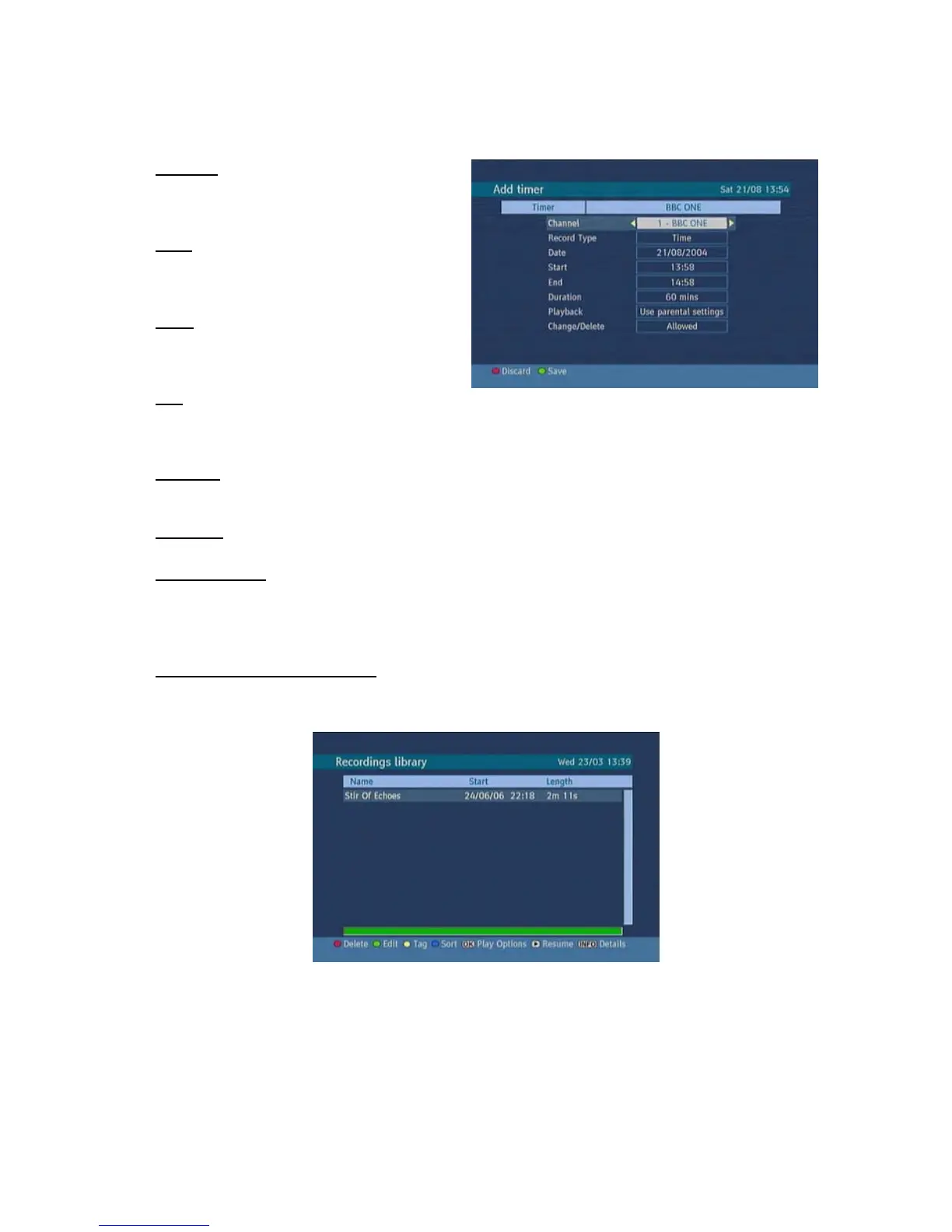
To add a Timer press YELLOW button on the remote and the, “Add Timer “ windows appears.
Channel: “3/4” keys will navigate the user
through the TV or Radio list.
Date: By using either “3/4” or “0,1,2…,9”
keys start date is entered.
Start: By using either “3/4” or “0,1,2…,9”
keys start time is entered.
End: By using either “3/4” or “0,1,2…,9”
keys end time is entered.
Duration: Displays the duration of the recording.
This is automatically worked out after the start and end times have been entered.
Playback: permit or block playback for other users."use parental settings" is default.
Change /Delete: permit or prohibit any modifications for other users.
When a timer Start time is reached, the receiver starts to record the desired program, then when the
end time is reached, the record stops. Save the adjustments by means of GREEN key or cancel with
RED button. Edit the list via GREEN key and delete with the RED button.
4. RECORDINGS LIBRARY
All the recordings are kept in list. To show the list of recordings press either LIB button on the remote
or access it from the main menu.
RED BUTTON (DELETE) : Erase the recordings
GREEN BUTTON (EDIT ) : make changes to the recordings
YELLOW BUTTON (TAG) : marks the recordings for archiving
BLUE BUTTON (SORT) : change the order of the recordings
INFO (DETAILS) : displays the short extended programs in detail
OK BUTTON : opens the play options menu
4 (RESUME) : recommence the recordings



 To Next Page