PRODUCT GUIDE
Keypad | Basic & Advanced
6
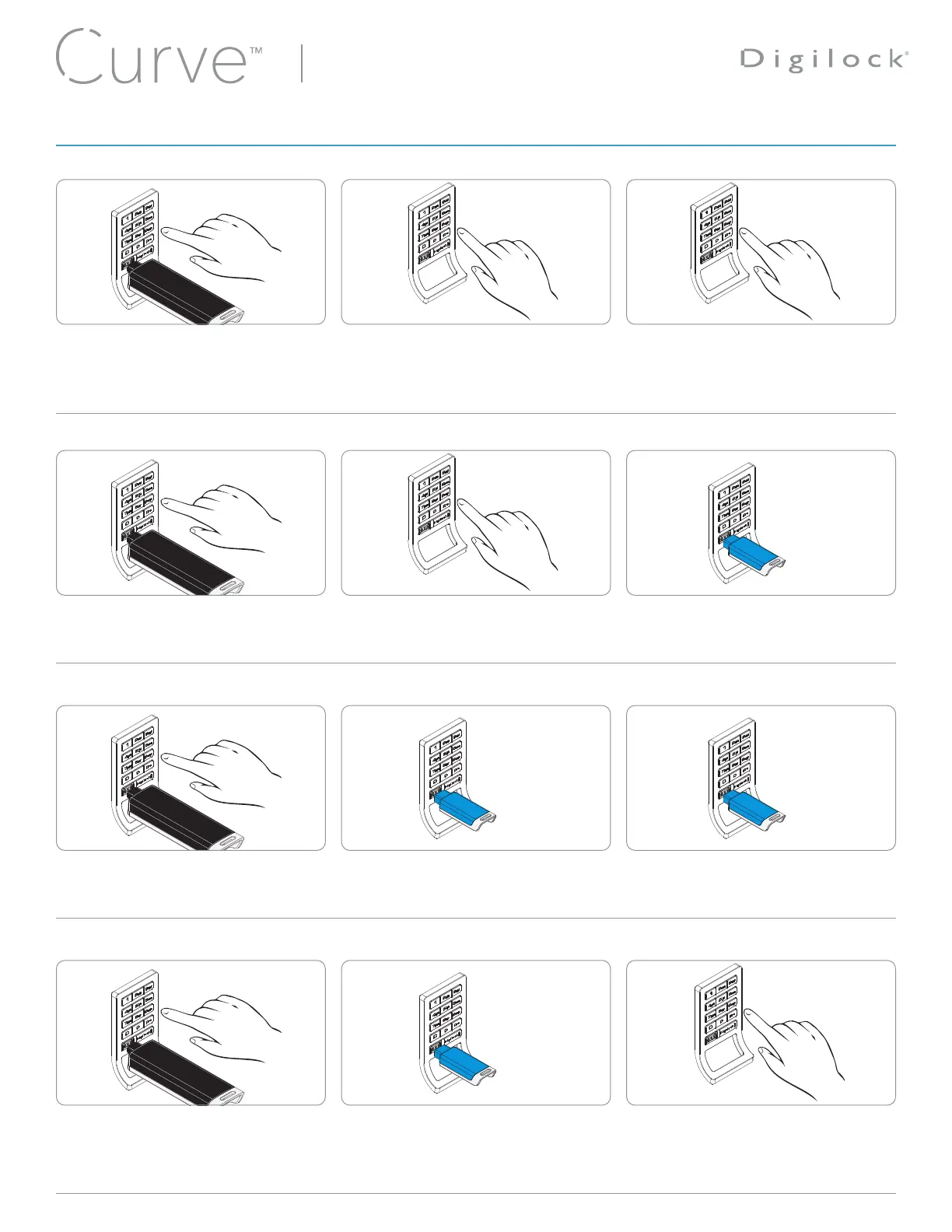
Replace an Assigned User Code with a New User Code
Replace an Assigned User Key with a New User Code
Press
= `
, then insert a valid Manager Key.
A two-tone beep will be heard and the
LED will turn on.
Press
=
[assigned user code]
`
.
A two-tone beep will be heard.
Press:
=
[new 4-7 digit user code]
`
=
[the same 4-7 digit user code]
`
.
Two sets of two-tone beeps will be heard
and the LED will turn off.
Press
= `
, then insert a valid Manager Key.
A two-tone beep will be heard and the
LED will turn on.
Insert an assigned User Key.
A two-tone beep will be heard.
Press:
=
[new 4-7 digit user code]
`
=
[the same 4-7 digit user code]
`
.
Two sets of two-tone beeps will be heard
and the LED will turn off.
Press
= `
, then insert a valid Manager Key.
A two-tone beep will be heard and the
LED will turn on.
Press
=
[assigned user code]
`
.
A two-tone beep will be heard.
Insert a new User Key.
Two sets of two-tone beeps will be heard
and the LED will turn off.
Press
= `
, then insert a valid Manager Key.
A two-tone beep will be heard and the
LED will turn on.
Insert an assigned User Key.
A two-tone beep will be heard.
Insert a new User Key.
Two sets of two-tone beeps will be heard
and the LED will turn off.
Replace an Assigned User Code with a New User Key
Replace an Assigned User Key with a New User Key
Note: If the same credential needs to be replaced on multiple locks, please see instructions for Express Register User Credentials and Manager Keys.
2
2
2
2
1
1
1
1
3
3
3
3
PROGRAMMING INSTRUCTIONS - IN ASSIGNED USE FUNCTIONALITY










 To Next Page