Key Managed
Bolt Mechanism
Product Guide
CUE is a keypad lock designed to operate for shared or assigned use applications. In shared use functionality, the user chooses any
available locker and enters a self-selected 4-digit code to lock and the same code to later unlock. Once unlocked, the locker is available
for a different user. In assigned use functionality, the user is assigned a specific locker and a 4-digit code or User Key to operate the
lock. A Programming Key unique to the lock system programs up to 25 Manager Keys to the locks for management access, external
power, and inspection.
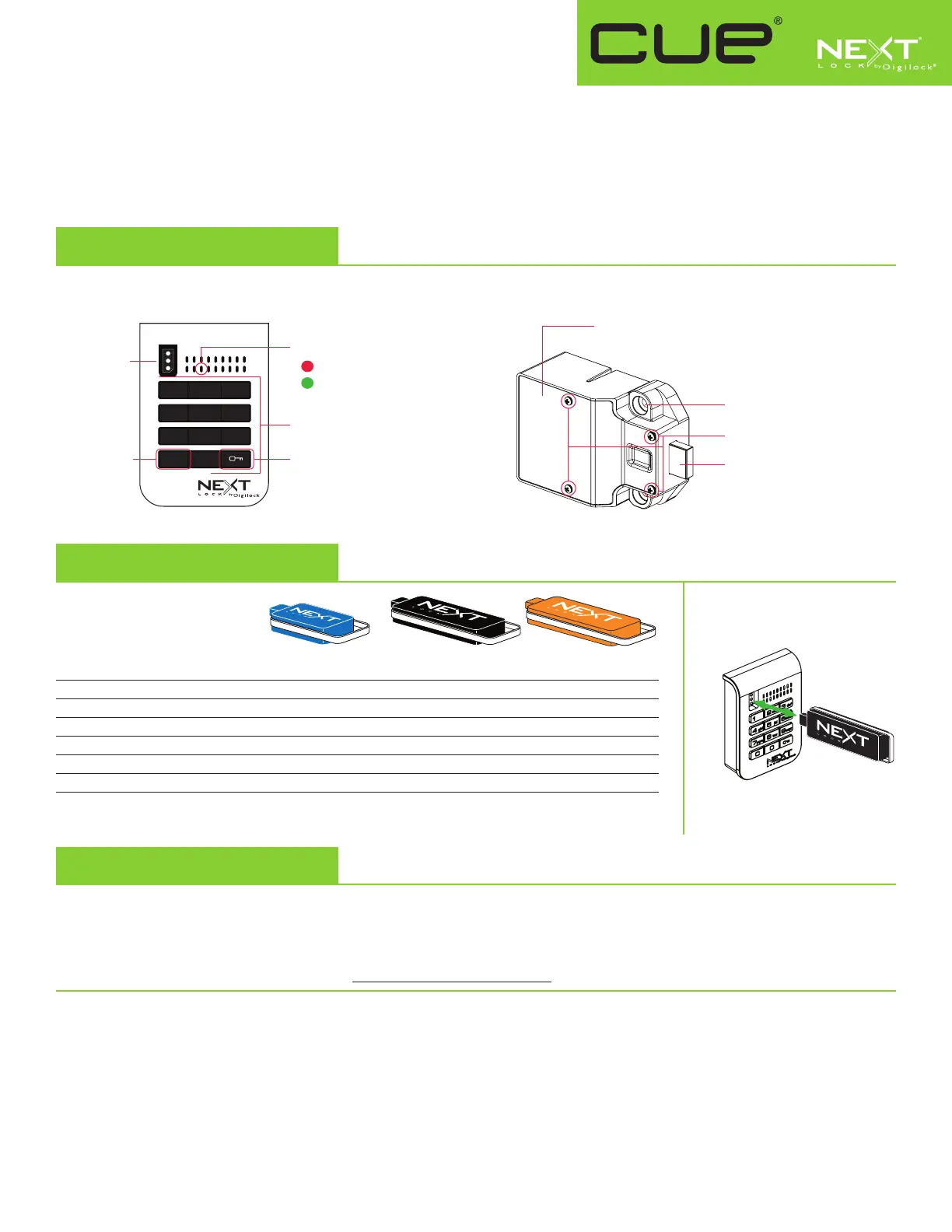
Lock Parts
Front Unit
C Button Key Button
Key Slot
Alpha Numeric
Keypad
1 2 3
4 5 6
7 8 9
C 0
LED Usage Indicator
Shared Use
Assigned Use
Rear Unit
Cover Plate
Lock Mounting Holes
1/2" (12.7 mm) Deadbolt
Cover Plate Screws
User Key Manager Key* Programming Key**
Operates the lock
• • •
Overrides user access
• •
Allows management inspection
• •
Provides external power
• •
Registers Manager Keys
•
Assigns user credential (in assigned use)
•
Sets lock functionality
•
*Up to 25 Manager Keys may be registered to each lock **1 Programming Key allowed per lock group.
Keys
Next logo must face left.
Key Insertion
Initial Setup
New locks operate only by pressing = `. Locks must be setup to allow full operation.
a. Touch the Programming Key to the key slot until a two-tone beep is heard and the LED turns on.
b. Touch each Manager Key to the key slot. A two-tone beep will be heard for each Manager Key that is successfully registered.
c. Touch the Programming Key to the key slot until a two-tone beep is heard and the LED turns off.
d. Repeat above steps for each lock or follow Express Register Manager Key(s) instructions to setup all locks.
Express Register Manager Key(s)
The Programming Key can quickly register the same Manager Key(s) to operate multiple locks.
a. Go to the lock registered with the Manager Key(s).
b. Press =`66`. The LED will turn on.
c. Touch the Programming Key to the key slot until a two-tone beep is heard and the LED turns off.
d. At each lock to be registered, touch the Programming Key to the key slot until a two-tone beep is heard and the LED flashes once to
indicate successful registration.
e. End express registration,* go to any registered lock and press =` then touch the Programming Key to the key slot to operate the lock.
* The Programming Key will continue to function in express registration mode until it is used to operate a lock.



 To Next Page