DG-WA3000N User Manual
83
2-10-2 IP Address of the Wireless Access Point
You can change the IP address of this wireless Access Point, so it can become a part
of your local network. Please remember this address, or you will not be able to
connect to the configuration menu of this wireless Access Point.
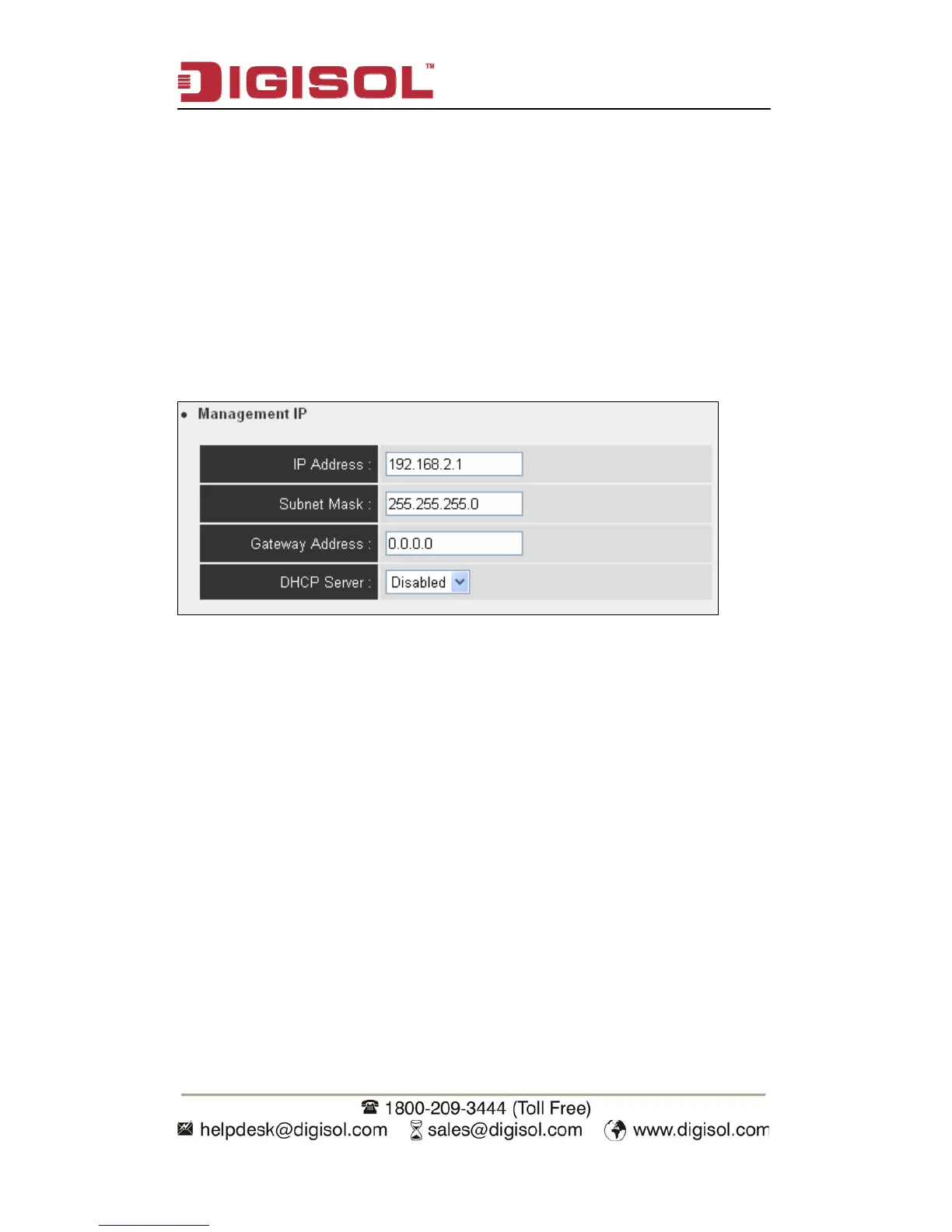
Default IP address is: 192.168.2.1 / Subnet Mask 255.255.255.0, you can press and
hold ‘Reset/WPS’ button over 10 seconds to change the IP address back to default
value if you forget the IP address you set.
Please input IP address and Subnet Mask in corresponding fields. You can also input
IP address of the gateway in ‘Gateway Address’ field, if you need to manage this
wireless Access Point from other network (like Internet).
If you want to activate the DHCP server function of this wireless Access Point,
please select ‘Enabled’ in ‘DHCP Server’ option, and see next Section for detailed
instructions. If you don’t want to use DHCP server function of this wireless Access
Point, or there’s another DHCP server on the network this Access Point connects to,
please select ‘Disabled’.


 To Next Page