DG-WA3000N User Manual
85
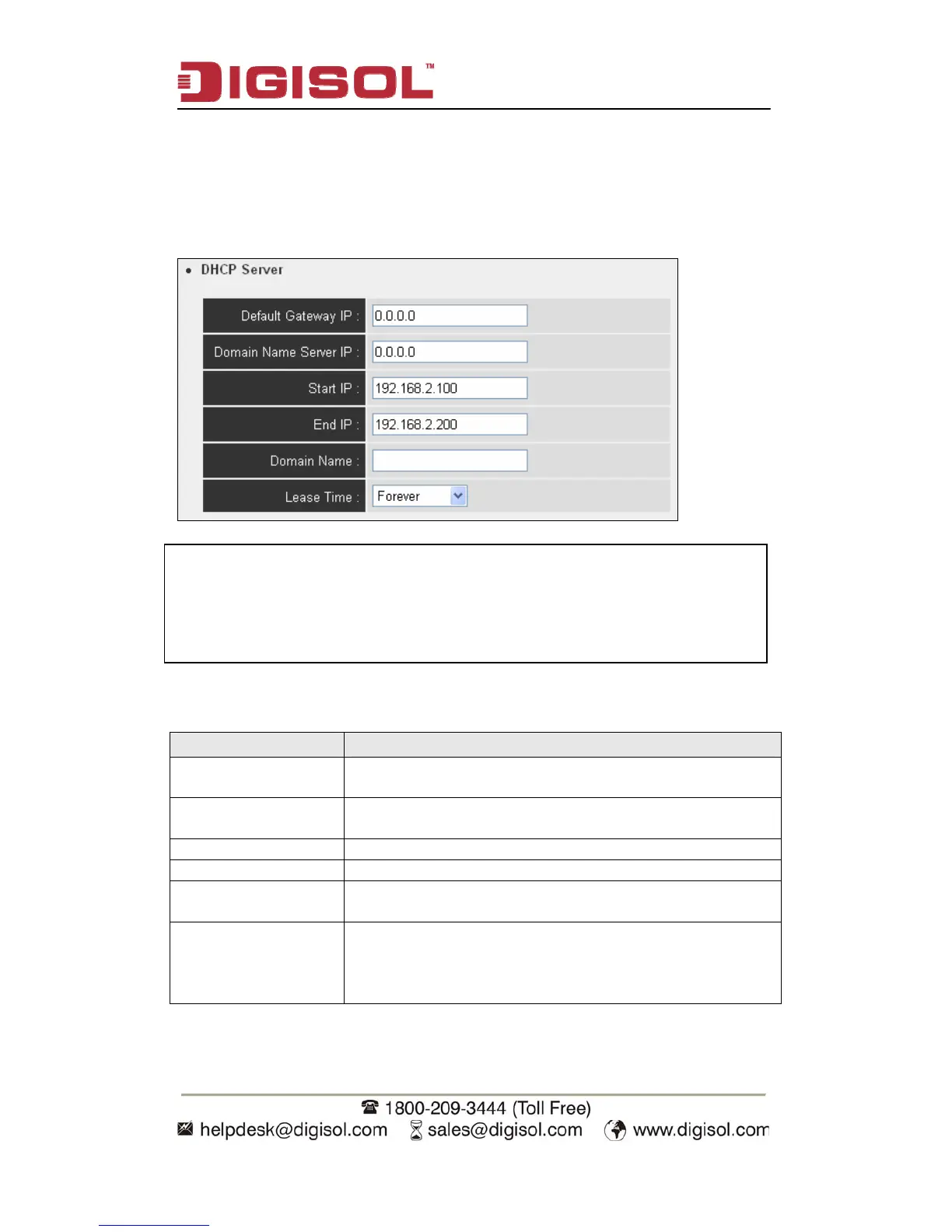
2-10-3 DHCP Server
This wireless Access Point is capable to act as a DHCP server for your network, and
it’s disabled by default.
NOTE: Please remember to select ‘Enabled’ in ‘DHCP Server’
option as described in last Section, or all DHCP-related
fields will be grayed out, and you will not be able to input
an
arameter.
Here is the description of every setup item:
Parameter Description
Default Gateway IP Please input the IP address of default gateway of your
network here.
Domain Name Server
IP
Please input the IP address of domain name server (DNS)
here.
Start IP Please input the start IP address of the IP range.
End IP Please input the end IP address of the IP range.
Domain Name If you wish, you can also input the domain name for your
network. This is optional.
Lease Time Please choose a lease time (the duration that every
computer can keep a specific IP address) of every IP
address assigned by this Access Point from dropdown
menu.


 To Next Page