DG-WA3000N User Manual
73
2-7-5 802.1x Authentication
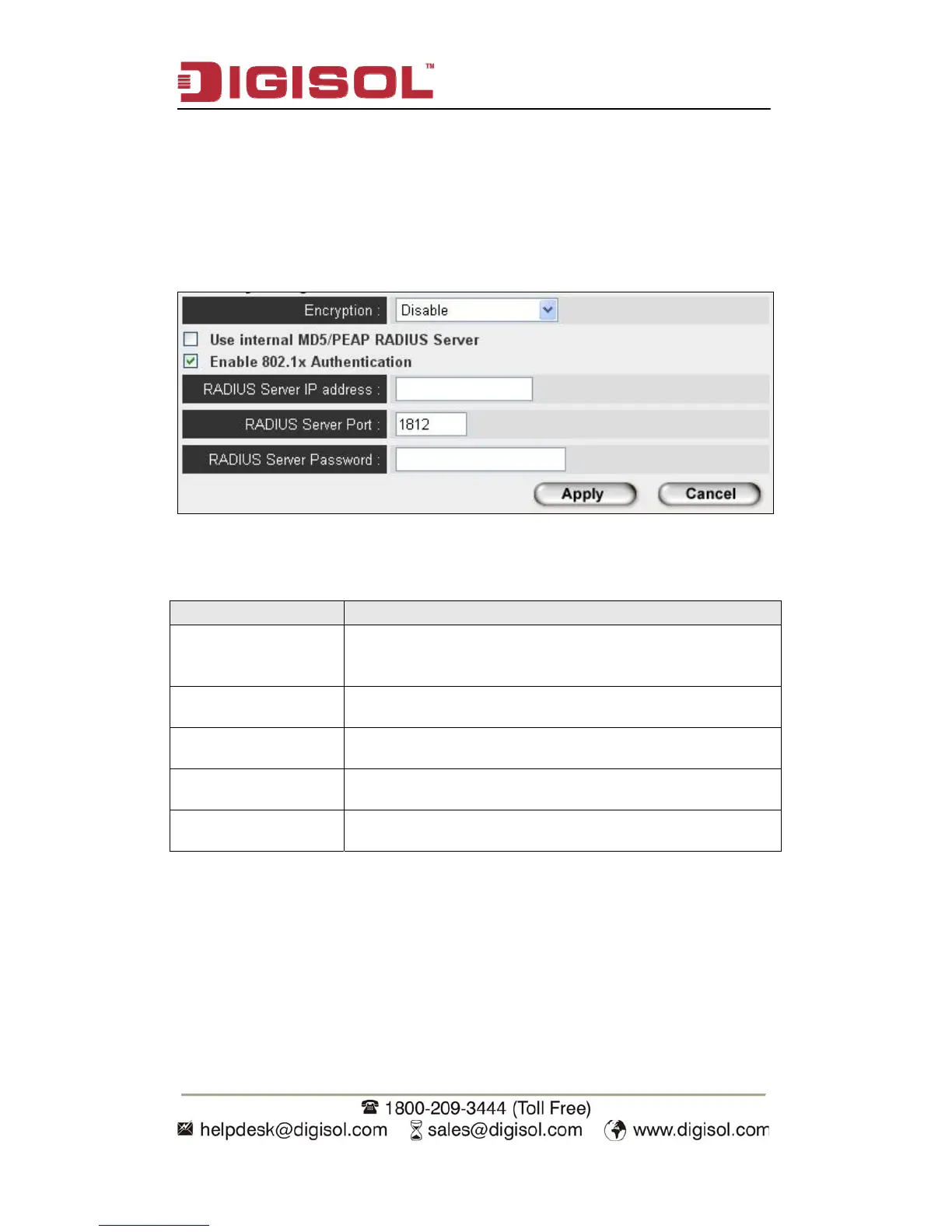
You can enable 802.1x user identification (based on RADIUS user authentication
server) by checking ‘Enable 802.1x Authentication’ box when you select ‘Disable’
or ‘WEP’ as encryption type, and the following message will be displayed:
Here is the description of every setup item:
Parameter Description
Use internal
MD5/PEAP RADIUS
Server
Uses built-in RADIUS Server (refer to next Section)
instead of external RADIUS server. If you check this box,
the value of internal RADIUS server fields will be ignored.
Enable 802.1x
Authentication
Enables or disables the use of 802.1x user authentication.
RADIUS Server IP
address
Please input the IP address of RADIUS authentication
server here.
RADIUS Server Port Please input the port number of RADIUS authentication
server here. Default value is 1812.
RADIUS Server
Password
Please input the password of RADIUS authentication server
here.


 To Next Page