9
OPTIONS WIRING TABLE (M2)
REFERENCE
PIN NUMBER
WIRE
SECTION
mmq
SIGNAL DESCRIPTION
REF. CURR.
9 0,35 Current reference (0-20mA)
REF. VOLT.
8 0,35 Voltage reference (0-5V)
POT
7 0,35 Potentiometer sliding contact
CCW
6 0,35 Potentiometer counterclockwise side (0V insulated)
CW
5 0,35 Potentiometer clockwise side (+5V insulated)
0V
4 0,35 0V insulated for external sensor feeding
RUN
3 0,35 Run command from PNP or NPN sensor
INV. OK
2 0,35 Power supply is OK
+18V
1 0,35 +18V insulated for external sensor feeding
If voltage reference is coming from external voltage generator, connect 0V at pin 6 and
reference at pin 8.
If voltage reference is coming from external potentiometer 10K, the potentiometer
sliding
contact must be connected to pin 7, the CW to pin 5 and the CCW to pin 6.
If current reference 0-20 mA is used, connect 0V at pin 4 and reference at pin 9, pins 8
and 9 must be shorted.
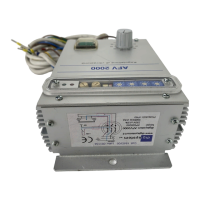
A switch (SW2 red) on front panel selects automatic or remote start/stop; the switch
ON selects start at power-on, the switch OFF enables start from external command. The
power supply is delivered with this switch ON.
The start-stop control with one external sensor (photocell or other type of sensor) is
available a supply (18 V 50 mA not stabilized).
PNP Sensor: connect supply of sensor between pins 1 (
+18V
) and 4 (
0V
), connect signal of
sensor at pin 3.
NPN Sensor: connect supply of sensor between pins 1 (
+18V
) and 4 (
0V
), connect signal of
sensor at pin 3 and change position of jumper H4 from P to N; H4 is located inside the box,
see opening instructions.
Inverter OK: for remote check of the power supply is available a PNP (18V 20mA) signal
at pin 2; pin 4 is 0V.
Downloaded from StockCheck.com


 To Previous Page