14
RS232 Connecons
Analog Audio Connecons
USB Connecons
IR Connecons
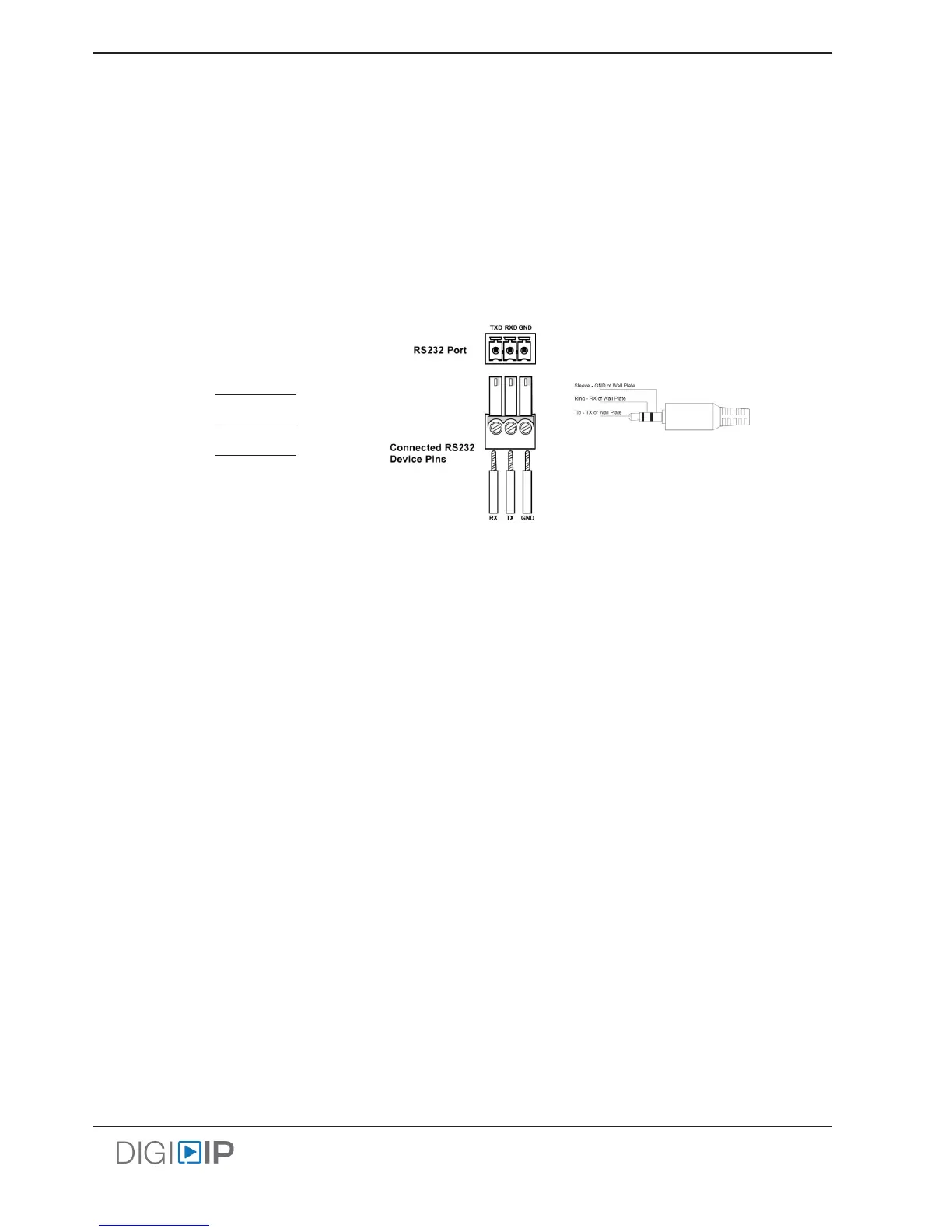
To use the RS232 control transport capabilies of the IPEXCB or the RS232 extension capabilies of the IPEX5001
or IPEX5002, connect the TX, RX, and ground control signal wires to the removable 3-pole terminal block. Consult
the manual of the source or display device(s) to determine which pins the TX and RX signals are carried on. Be sure
to always connect TX to RX and RX to TX.
The analog audio input and output connecons on the IPEX5001 and the analog audio output connecons on the
IPEX5002 use standard 3.5 mm TRS connectors.
Note: Two channel audio in/out capability is only achieved when using the 2CH Stereo EDID seng in the Digitalinx
IP Congurator soware under EDID SETTINGS. Please see the Digitalinx IP Deployment Guide for conguring this
funconality.
The IPEX5000 system is USB 2.0 Full Speed compliant up to 12Mbps
The USB Host port on the IPEX5001 / IPEX5001-WP-W is provided to allow control of a PC source from a remote
locaon. The USB Device ports on the IPEX5002 are provided to add keyboard, mouse or interacve white board
control for the host PC connected to the routed encoder.
The USB signal from the IPEX5002 to the IPEX5001 follows the video route by default however this can be free
routed using the DigitalinxIP API. See DigitalinxIP Programming Guide online at libav.com
The IR connecons on the IPEX5001 and IPEX5002 provide a means to control remote IR equipment. The IR signals
between the IPEX5001 and IPEX5002 follow the video route however IR can be free routed via API. See DigitalinxIP
Programming Guide online at libav.com
Please ensure power is disconnected from the encoders and decoders before connecng the IR receiver to the IR
input ports on the devices.
TX
G
RX
RXD
TXD
GND
IPEX5001 or
IPEX5002
Source or
Display
IPEX5001 / IPEX5002
IPEX5001-WP-W



 To Next Page