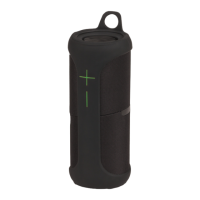
The Digitech XC5240 is a waterproof 360° speaker with Bluetooth® Technology, designed to provide a comprehensive audio experience with its stereo surround sound and various connectivity options. This instruction manual outlines its features, usage, and specifications, ensuring users can maximize their experience with the device.
Function Description:
The XC5240 serves as a portable audio speaker, capable of playing music wirelessly via Bluetooth® or through a wired 3.5mm auxiliary connection. It boasts a 360° stereo surround sound, providing an immersive audio experience. A key feature is its True Wireless Stereo (TWS) pairing capability, allowing two XC5240 speakers to be linked together for a true left and right channel audio setup. The speaker also supports NFC connectivity for quick pairing and includes hands-free call functionality, enabling users to answer and manage phone calls directly from the device. Its waterproof design (IPX7 rating) makes it suitable for various environments, including outdoor and wet conditions.
Important Technical Specifications:
- Bluetooth® Version: 5.0+EDR, ensuring stable and efficient wireless connectivity.
- Output Power: 8.6WRMS (2 x 4.3WRMS), delivering robust sound output.
- Transmission Range: Up to 10m, providing a decent range for wireless operation.
- Frequency Response: 70Hz-18KHz, covering a wide spectrum of audio frequencies.
- IP Rating: IPX7, indicating its waterproof capabilities, meaning it can be submerged in water up to 1 meter for 30 minutes.
- Playback Time: 3-12 Hours, offering a flexible duration depending on usage.
- Charging Time: 4-5 Hours for a full charge.
- Battery: Li-ion 3.7V, 2200mA, a rechargeable battery providing ample power.
- Power Input: 5VDC, 1A (Micro B USB), compatible with standard USB chargers.
- Power Consumption: 700mA (Max).
- Dimensions: 168(H) x 68(Dia)mm, indicating a compact and portable form factor.
Usage Features:
The speaker offers intuitive controls for various functions:
- On/Off Button: Used to power the speaker on or off, and also to play/pause music or answer/reject/hang up calls.
- Volume Up / Next Track Button (+): Press once to increase volume, press and hold to skip to the next track.
- Volume Down / Previous Track Button (-): Press once to decrease volume, press and hold to go back to the previous track.
- NFC™ Connection: For quick and easy pairing with NFC-enabled devices.
- Bluetooth Pairing: To pair the speaker with a smartphone, press and hold the On/Off button until the LED indicator flashes blue. Then, select "Digitech XC5240" from the Bluetooth® device list on your smartphone.
- 3.5mm Aux In Mode: Connects to devices like smartphones, MP3 players, PCs, or laptops using the included 3.5mm auxiliary cable. When in Aux In mode, the green LED will appear, and the stereo sound will be mono output. Volume control in this mode is also managed by single presses of the volume buttons.
- True Wireless Stereo (TWS) Pairing: To enable TWS, turn on both speakers. On the first speaker, press and hold the "+" and "-" buttons simultaneously for up to 2 seconds until a prompt sound is heard. Repeat this on the second speaker. Once both speakers have paired, the second speaker's LED indicator will stay on, while the first speaker's LED will flash. Then, connect your smartphone to "Digitech XC5240" via Bluetooth®. To disconnect TWS, press and hold the "+" and "-" buttons on either speaker for 2 seconds.
- LED Status Indicators:
- Green On: Aux In Mode.
- Blue Flashing: Pairing Mode, Out of Bluetooth Range.
- Blue On: Bluetooth Connected.
- Red On: Charging.
- Red Off: Fully Charged.
- Automatic Shutdown: The speaker will automatically shut down after 10 minutes if no Bluetooth® device is paired or no Aux In cable is connected, to conserve battery.
Maintenance Features:
- Charging: The speaker is charged via a Micro B USB port. It is recommended to use a 5VDC, 1A USB mains power adapter or a standard USB 500mA computer port. The red LED indicates charging, and it turns off when fully charged.
- Troubleshooting:
- Background Noise: If there's background noise during music playback, reducing the distance between the speaker and the Bluetooth® device (within the 10m range) can improve sound quality.
- Speaker Won't Turn On: If the speaker doesn't turn on, it may have a flat battery. Plug it into a charger and try again after a few minutes.
- Connection Issues: If the speaker won't connect to a previously paired phone, remove "Digitech XC5240" from the phone's Bluetooth® device list and then restart the pairing mode by pressing the Bluetooth® disconnection button on the speaker.
- Warranty: The product comes with a 12-month warranty against manufacturing defects. This warranty covers repair, replacement, or refund if the product is faulty or not fit for its intended purpose. It does not cover modified products, misuse, abuse, changes of mind, or normal wear and tear. For warranty claims, contact the place of purchase with a receipt or other proof of purchase.
The Digitech XC5240 is designed for ease of use and durability, making it a versatile option for various audio needs, both indoors and outdoors.

 Need help?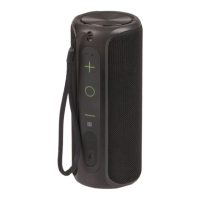

 To Next Page
 General