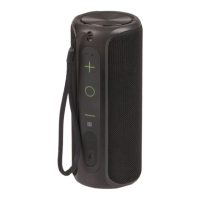
The Digitech XC5242 is a 2-in-1 Waterproof 360° Speaker designed for an immersive audio experience with the convenience of Bluetooth® technology. This device features a unique separated speaker design, allowing for true wireless stereo (TWS) pairing and 360° stereo surround sound. It is built to be waterproof, making it suitable for various environments. The speaker is powered by a rechargeable battery and supports hands-free calls.
Key Features:
- 2-In-1 Separated Speaker Design: The device consists of two individual speakers that can be used together for a stereo experience or separately.
- 360° Stereo Surround Sound: When paired, the two speakers deliver a comprehensive audio experience from all directions.
- True Wireless Stereo (TWS): This feature allows the two speakers to connect wirelessly to each other, creating a stereo sound system without the need for cables between them.
- Waterproof (IPX7): The speaker is designed to withstand immersion in water, making it suitable for outdoor use or near water.
- Rechargeable Battery: Equipped with a Li-ion 3.7V, 1500mA x 2 battery, providing portable power.
- Hands-free Calls: Integrated microphone and controls allow users to answer and manage calls directly from the speaker.
Technical Specifications:
- Bluetooth® Version: 5.0
- Output Power: 15WRMS (2 x 7.5WRMS)
- Transmission Range: Up to 10m
- Frequency Response: 68Hz-20KHz
- IP Rating: IPX7
- Playback Time: 3-15 Hours (depending on usage and volume)
- Charging Time: 3-4 Hours
- Battery: Li-ion 3.7V, 1500mA x 2
- Power: 5VDC, 1A (Micro B USB)
- Power Consumption: 500mA (Max)
- Dimensions: 210(H) x 84(Dia)mm
Usage Features:
Power On/Off:
To power on, press and hold both the power buttons of the master and slave speakers simultaneously for up to 2 seconds. A beeping sound will indicate power-on. The slave speaker's LED will stay blue, and the master speaker's LED will flash. To power off, press and hold the power button for up to 2 seconds.
Bluetooth Pairing:
- Power On: Ensure both speakers are powered on as described above.
- Smartphone Pairing: Open your smartphone's Bluetooth settings and enable Bluetooth. Scan for devices, and "Digitech XC5242" will appear. Select it to connect.
- Pairing Successful: Once connected, the blue LED indicator on both speakers will stay lit.
Bluetooth Operation:
- Power On/Off / Call Button: Press and hold for 2 seconds to power on/off. Press once to play/pause. Press once to accept incoming calls. Press twice to reject incoming calls. Press once to hang up a call.
- Volume Up / Next Track: Press the volume up button to increase volume. Press and hold to skip to the next track.
- Volume Down / Previous Track: Press the volume down button to decrease volume. Press and hold to skip to the previous track.
- TWS Disconnect: Press the power button three times to disconnect the TWS pairing.
- Bluetooth® Disconnect: Press the power button two times to disconnect the current Bluetooth® device.
- Note: The volume buttons on both speakers control the main volume, so ensure both are connected.
LED Status Indicator:
- Blue Flashing: Bluetooth pairing, out of Bluetooth range.
- Blue On: Bluetooth connected successfully.
- Red On: Charging.
- Red Flashing: Low battery.
- LED Off: Fully charged, power off.
True Wireless Stereo (TWS) Pairing:
By default, one speaker is controlled by the main volume buttons on the front. To separate the speakers for TWS, twist and rotate them. To connect, press and hold the power button simultaneously on both speakers for up to two seconds. They will connect automatically to one another once Bluetooth is successful. You can also use just one speaker if preferred, controlling it with the power and volume buttons.
Maintenance Features:
- Charging: The speaker is charged via a 2-Way USB Charging Cable. A red LED indicates charging, and the LED turns off when fully charged.
- Storage: It is recommended to keep the original packaging for storing the product when not in use.
- Cleaning: The manual does not specify cleaning instructions, but general care for electronic devices applies.
Troubleshooting (FAQs):
- USB charger: Use a 5VDC, 1A USB mains power adaptor or a standard USB 500mA computer port.
- Background noise: Ensure the speaker is within Bluetooth® range (up to 10m) to reduce distance-related sound issues.
- Speaker shut down: If no Bluetooth® device is paired or the Aux In cable is connected, the speaker will automatically shut down after 10 minutes to save battery.
- Previously paired phone: Remove the speaker's pairing name "Digitech XC5242" from your smartphone's Bluetooth® device list, then press the Bluetooth® disconnection button to restart the pairing mode.
- Speaker not turning on: Plug the speaker into a charger and try to turn it on after a few minutes, as the battery may be flat.
The product comes with a 12-month warranty against manufacturing defects. Electus Distribution will repair, replace, or refund faulty products. The warranty does not cover modified products, misuse, abuse, changes of mind, or normal wear and tear. Consumers are entitled to remedies under Australian Consumer Law. To claim warranty, contact the place of purchase with proof of purchase. Return expenses are typically borne by the customer. The warranty is provided by Electus Distribution, located at 46 Eastern Creek Drive, Eastern Creek NSW 2766, Ph. 1300 738 555.

 Need help?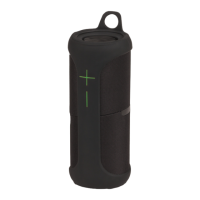

 To Next Page
 General