5
BLUETOOTH OPERATION
NOTE: The volume buttons on both speakers control the main volume no
matter which speaker you control while they’re both connected.
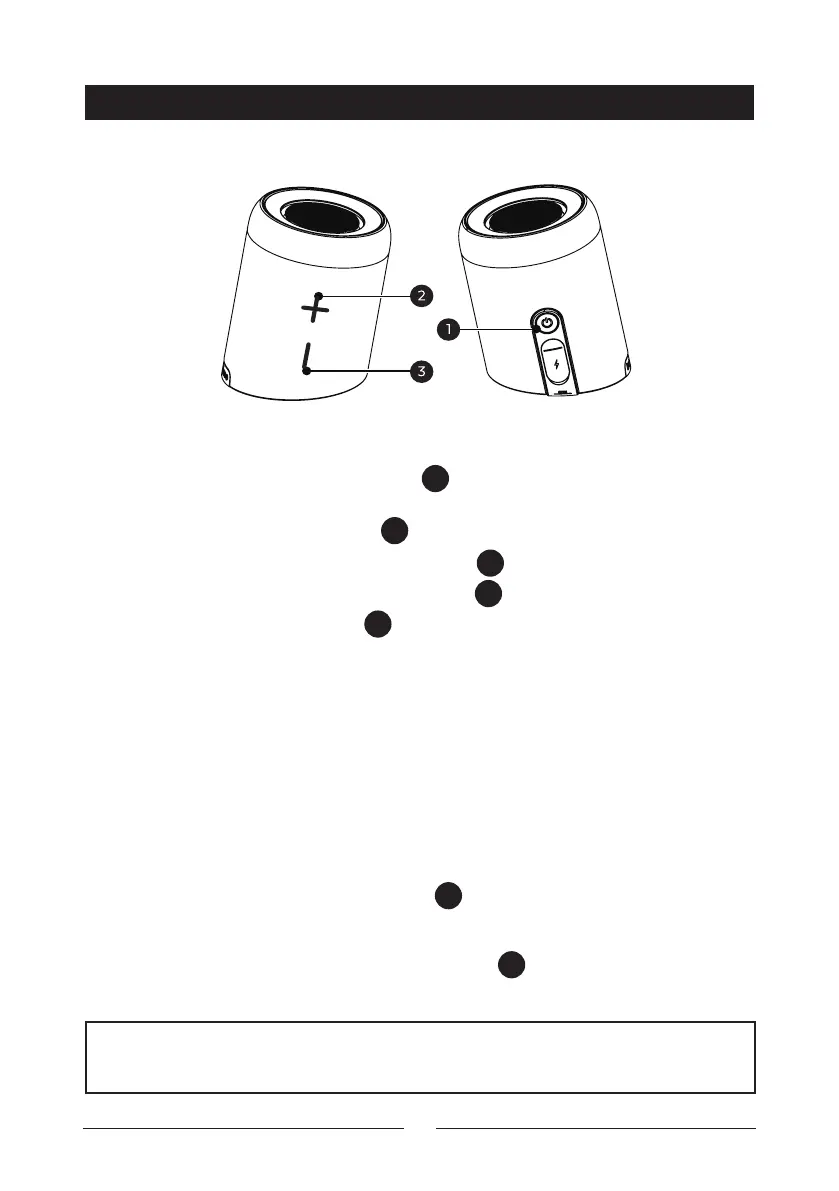
Power On/O / Call Button:
Power: Press and hold the power button
1
for up to 2 seconds to power on and
o
Play/Pause: Press the power button
1
to play or pause
Accept Incoming Calls: Press the power button
1
to answer an incoming call
Refuse Incoming Calls: Press the power button
1
twice to reject a call
Hang Up: Press the power button
1
to hang up the call once you have already
accepted it
Volume Up/ Next Track:
Volume Up: Press the volume up button to turn the music up
Next Track: Press and hold the volume up button to skip to the next track
Volume Down/Previous Track:
Volume Down: Press the volume down button to turn the music down
Previous Track: Press and hold the volume down button to skip to the previous
track
TWS Disconnect: Press the power button
1
three times to disconnect the TWS
pairing.
Bluetooth® Disconnect: Press the power button
1
two times to disconnect
the current Bluetooth® device connected


 To Next Page