Digium, Inc. Page 32
Chapter 2: Card Installation
Hardware Installation
1. Now that you are acquainted with the cards, power down your
computer and unplug it from its power source.
2. Attach a static strap to your wrist and open the case.
3. Check the jumper setting to ensure it matches your equipment
configuration. Setting the jumper with the jumper strap on enables the
ports for E1. Setting the jumper with the jumper strap off enables the
ports for T1.
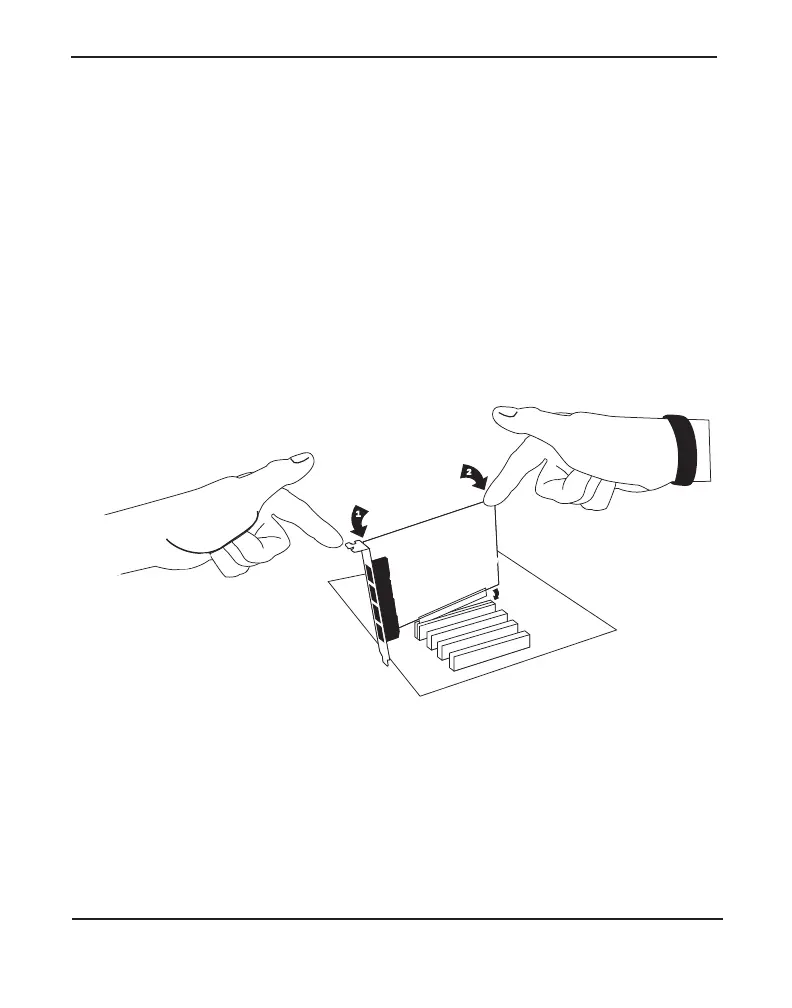
4. Remove the bracket place holder and insert the card into a PCI or PCI
Express slot. See Figure 10 for an example of card installation.
Figure 10: Insert the Card
5. Replace the cover to your computer.
6. Plug all T1 or E1 equipment cables into the RJ45 ports as needed.
Note: It is recommended that you use shielded cables.



 To Next Page