15
Safety Precautions
Proper Operation
Repairs Customer support
Great features of
dimchae
○
14
Proper Operation
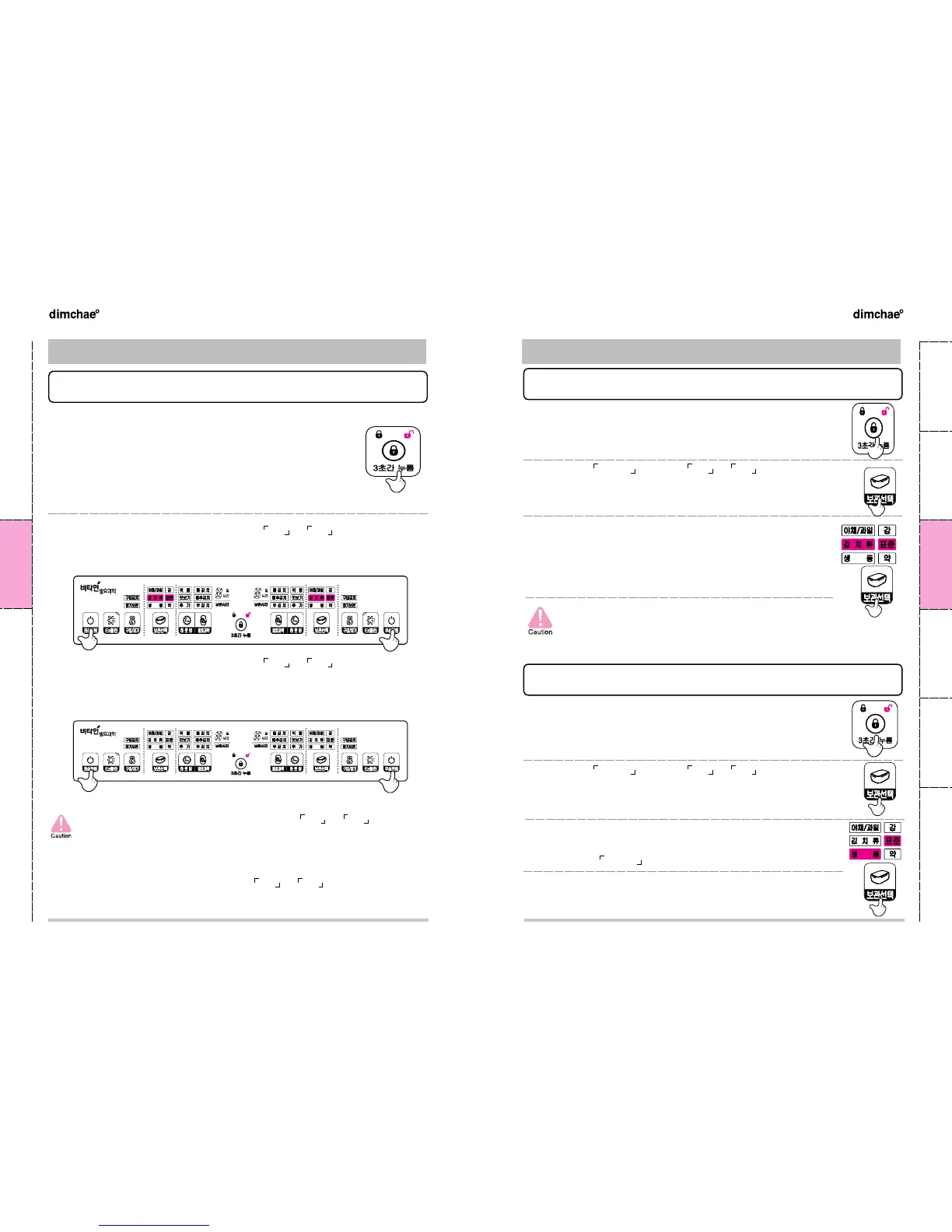
Selecting functions
3
2.
“
How to set up Kimchi storage
”
3.
“
How to set up Chill storage
”
❷
Press the
보관선택 button of 좌실 or 우실 depending on the
room you want to change the mode
❶
Press the [잠금/풀림] button for three seconds to change to
unlock
●
If any input is not made within twenty-five seconds, the appliance will be
returned to
look
.
● 「생동」is a function to slightly freeze for keeping food fresh.
※ DO NOT store vegetable, fruit or Kimchi.
(It may be frozen due to low temperature.)
●
Mode change is available when the power for the room you want to
change function is on.
❸
You will see the change of 김치류 (표준 → 강 → 약) →
야채/과일 (표준 → 강 → 약)→ 생동 (표준 → 강 → 약) each time
you press [보관선택] button
.
●
Choose the mode according to the level of ripening of kimchi.
Store kimchi ripened appropriate in [표준], choose [강] for overly ripened
kimchi and choose [약] if it is slightly iced.
Kimchi may be frozen according to the saltiness.
(Use [표준], [강] and [약] appropriately.)
Watery plain kimchi may be frozen when it is stored in [김치류]
mode since it is low in saltiness and watery.
❶
Press the [잠금/풀림] button for three seconds to change to
unlock
●
If any input is not made within twenty-five seconds, the appliance will be
returned to look.
❷
Press the
보관선택 button of
좌실 or 우실 depending on the
room you want to change the mode
●
Mode change is available when the power for the room you want to
change function is on.
❸
You will see the change of 김치류 (표준 → 강 → 약) →
야채/과일 (표준 → 강 → 약)→ 생동 (표준 → 강 → 약) each time
you press
보관선택 button
.
1.
“
How to turn ON/OFF the power
”
❸
Press power button after pressing either
좌실 or 우실 button to turn off the
power of specific room you have selected
❷
Press power button after pressing either
좌실 or 우실 button to turn on the
power of specific room you have selected
❶
Press the [잠금/풀림] button for three seconds to change to
unlock.
●
If any input is not made within twenty-five seconds, the appliance will be
returned to look.
Selecting functions
3
Turning on [좌실]:
※ When you first switch on the power, it is set up as [보관선택-김치류-표준].
Foods might turn bad if you store them in the
좌실 or 우실
power is off
※ If you use only one room, you may feel the chilly air in the
room that is turned off since small quantity of chilly air is
contained for balance of cycle pressure.
※ Button is not operated when
좌실 or 우실
are concurrently
pressed.
Turning on [우실]:
Turning off [좌실]: Turning off [우실]:


 To Next Page