10 www.dimplex.com
Operation
safety device to prevent overheat-
ing. Should the heater overheat,
an automatic cut out will turn the
heater off and it will not come
back on without being reset. It
can be reset by switching the
3-Position Switch (Figure 1A) to
Off (“ O ” position) and waiting
ve minutes before switching the
unit back on.
CAUTION: If you need to
continuously reset the heater,
unplug the unit and call your
local dealer.
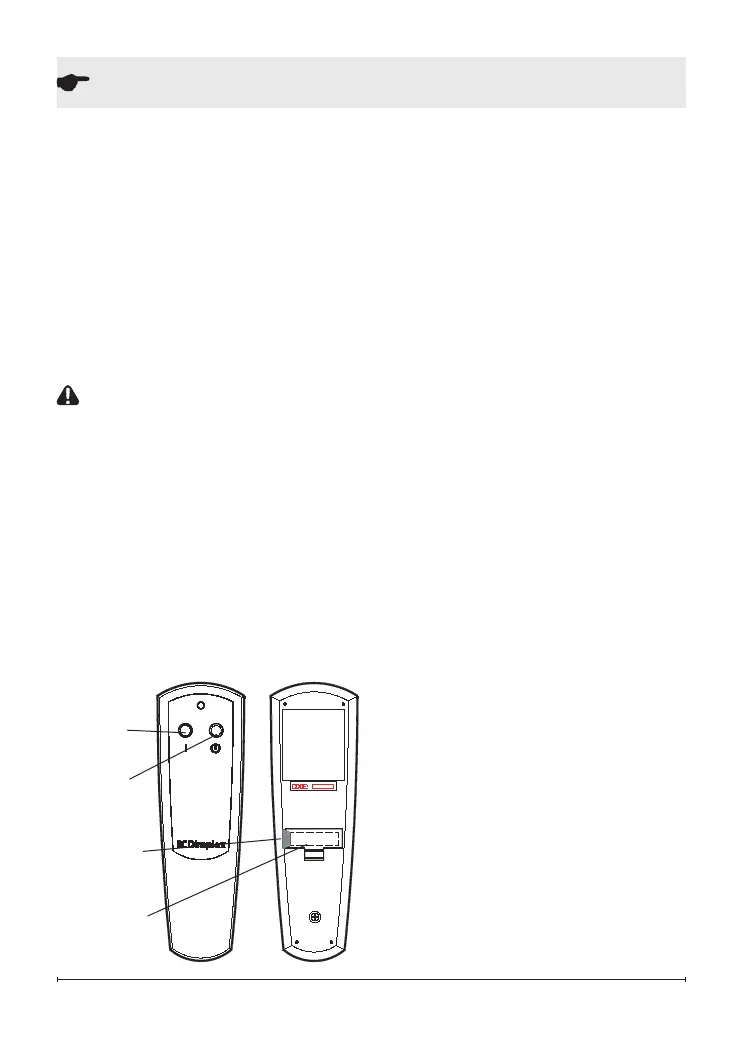
Remote Control (Figure 2)
The replace is supplied with an
integrated On/Off remote control.
!
NOTE: Ensure that the re-
place’s 3-Position Switch is set
to the remote control setting
(“II” position).
To operate, push the ON button
to turn replace on, push the OFF
button to turn the replace off.
!
NOTE: Before attempting any
operation with the remote, pull
the plastic insulator strip out
from between the remote cas-
ing and battery cover
Remote Control Initialization/
Reprogramming
In the event that your remote
control ceases to operate your
replace, follow these steps to
re-initialize the remote controland
the remote control receiver in the
replace:
1. Place the 3-Position Switch
(Figure 1A) in the Off (“ O ”)
position.
2. Wait a minimum of ve sec-
onds and then place the
3-Position Switch in the Re-
mote Control (“ II ”) position.
3. Within 10 seconds of chang-
ing the switch position, press
the ON button located on the
remote control (Figure 2).
This will synchronize the remote
control and the replace receiver.
!
NOTE: You will have only 10
seconds to perform this last
step. Failure to do so will result
Figure 2
Off
Button
On
Button
Battery
cover
Plastic
strip



 To Next Page