5
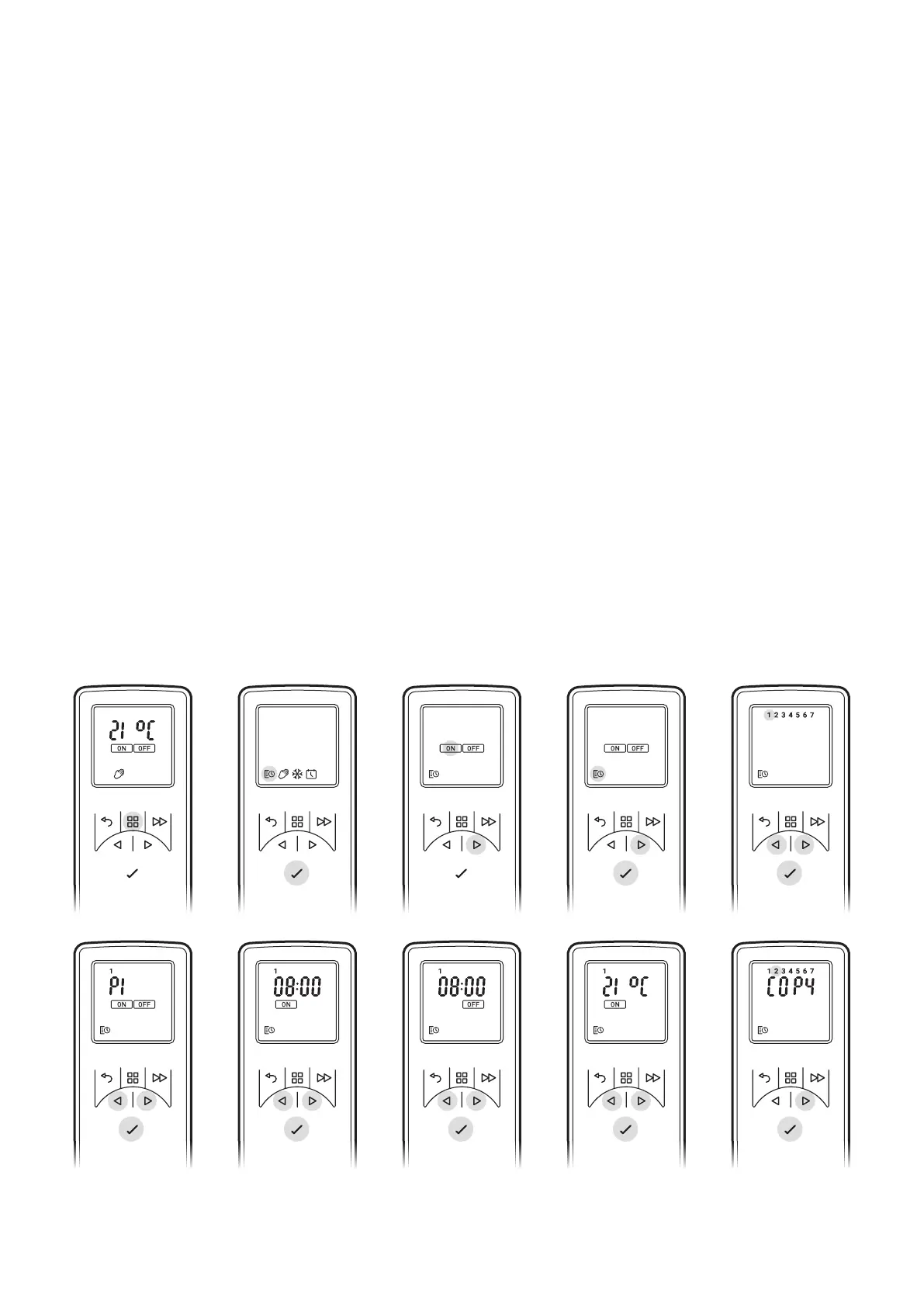
*Days of the weeks are now displayed at the top of the screen*
Day 1 = Monday
Day 2 = Tuesday
Day 3 = Wednesday
Day 4 = Thursday
Day 5 = Friday
Day 6 = Saturday
Day 7 = Sunday
4. Press Enter to Modify Day 1 or Press ^ to navigate to the desired day and Press Enter to Select
5. P1 will be displayed on screen
6. Press Enter to select P1, to navigate to P2, P3 or P4 press ^ and press Enter to select
7. ON will be highlighted, press Enter to set the on Time
8. Press v or ^ to adjust the on Hour time, press Enter to Confirm
9. Press v or ^ to adjust the on Minute time, press Enter to Confirm
10. Press v or ^ to adjust the Temperature setting, press Enter to Confirm
11. Press v or ^ to adjust the o Hour time, press Enter to Confirm
12. Press v or ^ to adjust the o Minute time, press Enter to Confirm
Press Enter to modify Programme P2, follow steps 5-12, Press ^ to skip to P3
Press Enter to modify Programme P3, follow steps 5-12, Press ^ to Skip to P4
Press Enter to modify Programme P4, follow steps 5-12
To copy newly programmed P1-P4 heating programmes to other days press the Enter button.
Copy will be displayed on screen
To copy to the next day in sequence, press ^ button. To deselect the next day in sequence press
Enter button.
The days of the week that are selected will be displayed at the top of the screen. The days that
have been deselected will not be visible (see Diagrams).
Press Enter to confirm, backlight will flash and return to home screen.



 To Next Page