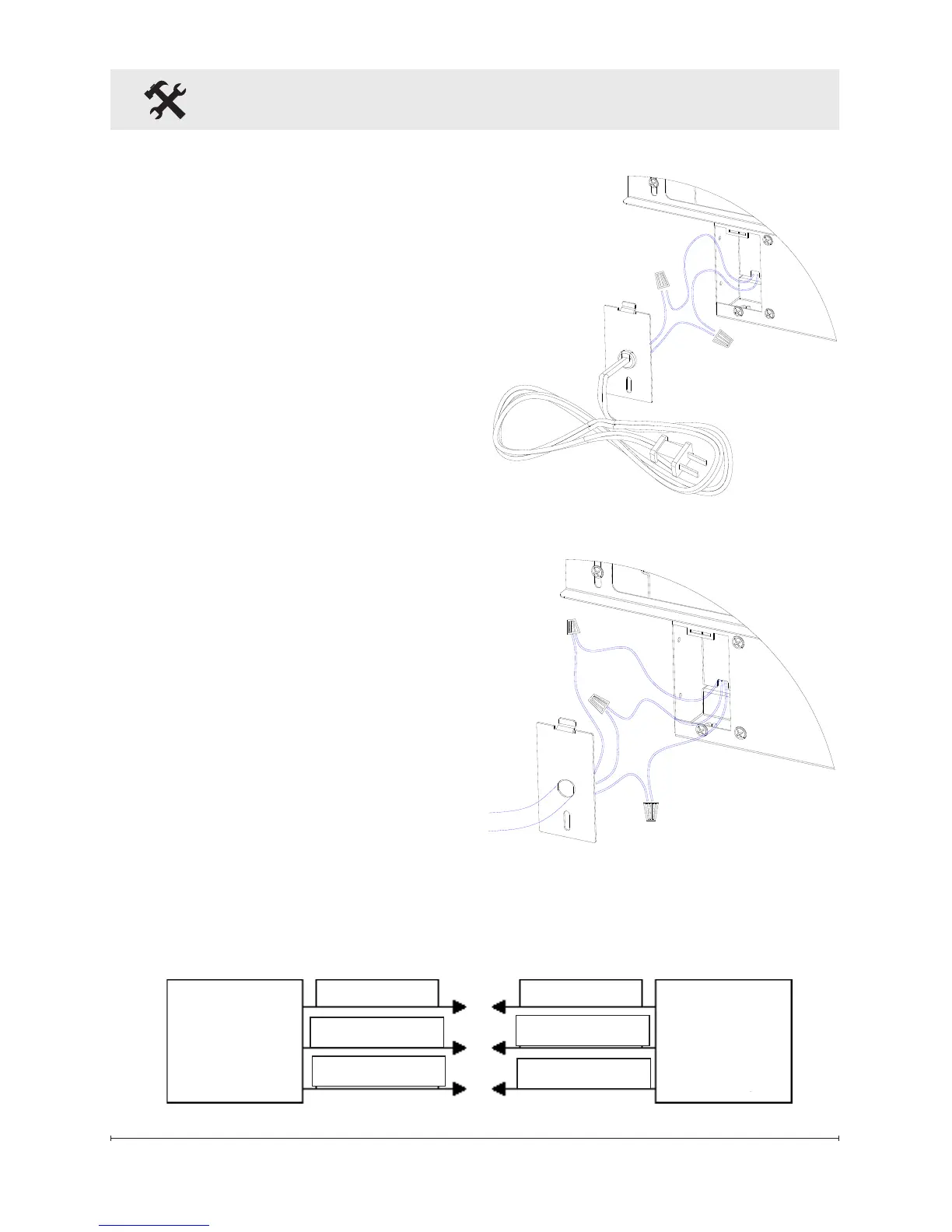
box cover and secure with
a wire clamp (not supplied)
(Figure 7).
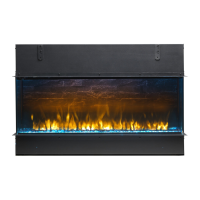
Connect the black wire (live) 8.
from the unit to the black wire
from power supply (Figure 7).
Connect the white wire 9.
(neutral) from the unit to the
white wire from power supply
(Figure 7).
Connect the green wire 10.
(ground) from the unit to the
green wire from power supply
(Figure 7).
Place all connectors inside 11.
the unit and secure the
junction box cover to unit.
Ensure that the cable clamp
grips only the jacket of
service cable.
!
NOTE: All wiring must be
completed prior to installing the
unit into the wall.
Place unit in position in the 12.
opening, push straight in and
attach unit to studs using
No. 10 fasteners (not
Figure 6
Figure 7
Fireplace Installation
Fireplace
Junction
Box
White wire (N)
Black wire (L)
Green wire (G)
Green wire (G)
Black wire (L)
White wire (N)
120 V Power
Supply
(Breaker Panel)


 To Next Page