20
HOW TO USE
How To Use
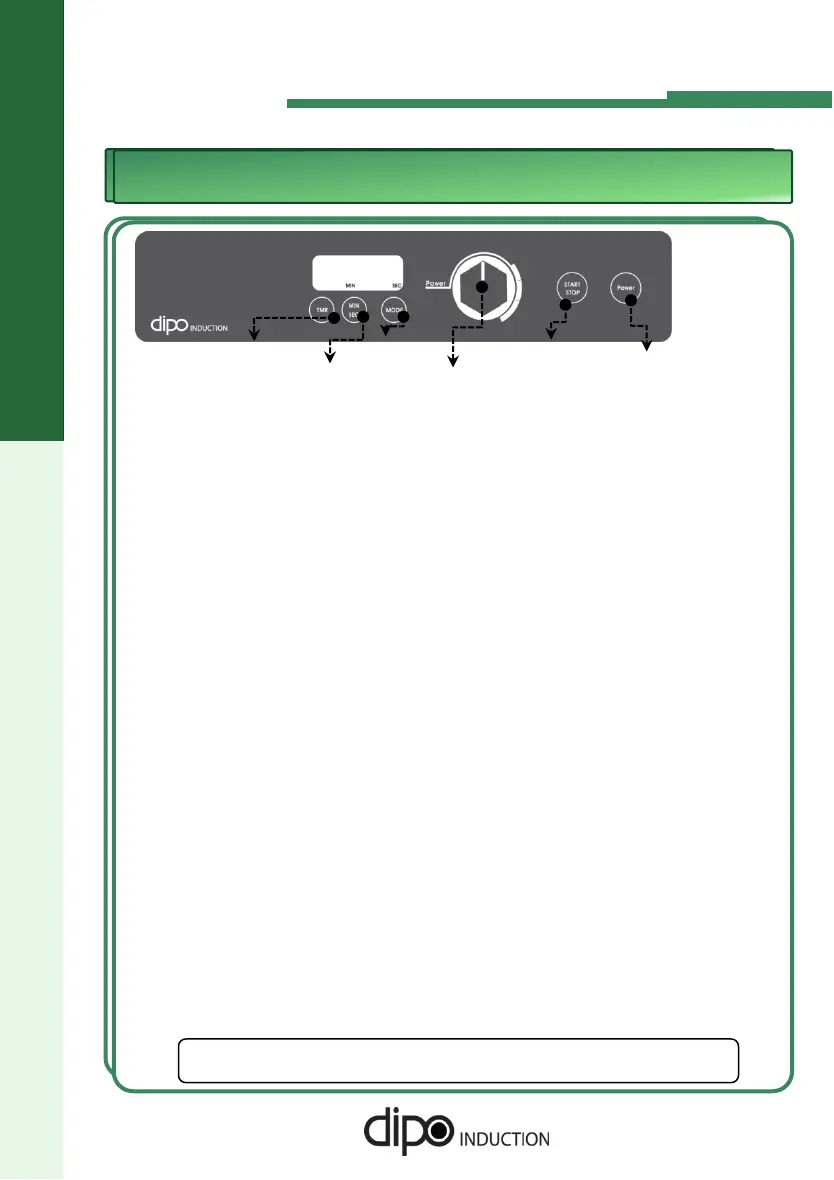
TCK-A Series
Start
Button
Power
Button
Control Knob
Mode
Button
Min/Sec
Button
Timer
Button
1. Insert the power plug.
5. Temperature Mode
◆ And then, press the Mode Button. "000F" is displayed.
◆ Press the Start button. The display will show 100F Then, set the cooking temperature by
turning the knob.. The display will alternate between showing the actual temperature and
the set point.
◆ When the set point is reached, the display will stop changing.
★ If you press the Mode button and no temperature sensor is attached, the display will
flash E5
★ The temperature sensor is optional and purchased separately.
◆ Four lighted dots on the display indicates that the unit is plugged in.
2. Place a vessel on the Ceramic Top Plate.
◆ It must be placed in center of the Target on the Ceramic Top Plate.
3. Operation
◆ If you press the power button, “00” is displayed.
◆ If you want to control Heat Level, spin knob to right(Max.10 Step) or to left(Min.H1
step).
◆ If you want to start operation, Press the Start/Stop button and turn the knob to the
right. At first, “01" is displayed.
4. How to use Timer Function
◆ Press the power button. “00” is displayed.
◆ Press the Timer Button. At first, "720" is displayed.
◆ Press the Min/Sec Button. "720" will blink. And then, if you spin the knob, you can control
the cooking times.( From 59 Seconds to 720 Minutes )
◆ If you want to adjust the seconds, (for times less than 100 minutes) Press the Min/Sec
Button one more time and the Seconds will blink. Use the knob to select the desired time.
◆ If you press the Start Button, the unit will start. If you want to control the heat level, press the
Timer Button, then spin the knob.
◆ At the end of the set time, the operation will stop. Then if you press the start button one
more time, the unit will operate again with the same set time and heat level. But if you press
the power button, the set values are reset to Power Level 1 and 720 minutes.
◆ Press the power button. “00” is displayed.
☞
DIPO is not responsible for damage to the equipment or
injuries caused by mis-use or negligence.


 To Next Page
 Loading...