21
Cleaning & Troubleshooting
Cleaning & Troubleshooting
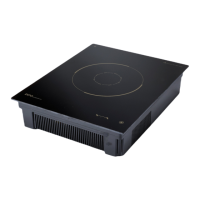
1. Cleaning ceramic top plate and control panel
◆ Light stains : Clean the top plate with a soft damp cloth.
◆ Severe stains : Use a soft cloth with a mild cleaning agent or detergent.
◆ Don't clean the surface by use the hard and sharp tools.
2. Clean the stainless steel case with a soft, dry cloth or dampen
with a commercial stainless steel cleaner.
★ Caution : Unplug the unit and allow to cool before cleaning.
3. Clean the products that have a removable air filter at least
once per week, more if necessary..
◆ The products that have an air filter : CK Series, TCK Series
◆ Filter is located underneath the unit. Clean with a mild detergent and allow to air dry.
Cleaning
Troubleshooting
Symptoms Action
Display is Blank
◆Check that the unit is plugged in.
◆Check that voltage is present at the outlet.
◆Contact the Factory.
Power on, but pan
not heating
◆Check that the pan is proper for Induction Range and
that it is placed in center of the top plate.
◆Contact the Factory
Unit stops heating,
Or output is
weakened.
◆Check the surrounding temperature.
◆Check the product's ventilation.
◆Check that the temperature of the ceramic top plate is above 500 F.
◆Check that the pan is properly placed.
◆ Check the set timer value.
◆Check if the 12 hour run time has been exceeded.
Display
Error
Codes
U, 00
◆Make sure you have a valid pan.
◆Check that the pan has a flat bottom.
E4, E6
◆Turn off and unplug the unit. Allow the unit to cool off.
Plug back in and try again.
E5
◆Check that the temperature sensor is connected to the product correctly.
◆"E5" error means that the sensor isn't connected to the product.
E2,E3,E7
◆Turn off and unplug the unit for 1 minute, plug back in
and try again.
E1,E8,E9
◆Contact the Factory.



 To Next Page