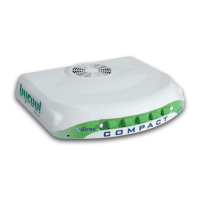
COMPACT
Air conditioning for vehicles
10
EN
F0
allows user to choose comfort temperature and to vary equipment blower speed (5 speeds
indicated by
V1
).
Comfort temperature is controlled by briey pushing the keys
.
Blower speeds will be controlled by pushing the keys
, display will show
V1
,
V2
,
V3
,
V4
,
V5
.
By selecting this function, Compact displays temperature inside cabin.
F2
programs the equipment so that it is automatically disconnected during a 1-9 hour period.
In order to program, push the On/off key
until
F2
is shown on display, select functioning
time using the keys
and conrm by pushing On/off
.
When selecting this function, the equipment will totally be disconnected to protect vehicle
battery during long periods of equipment inactivity. However, Compact is programmed to detect
inactivity periods ranging from 6 to 8 days, thus entering automatically in prolonged switching-
off. To exit this function, push the On/off key
is used, remote control will remain inactive.
Warning: When function
F3
is used, remote control will remain inactive.
In order to switch on Compact, push the On/off key . Equipment always starts on function
F4
(Automatic Function). To change function, push the On/off key
and the various
functions will be displayed one by one. Release key when desired function is reached. The
rst time equipment is switched on, it will be initiated with the pre-established parameters.
Equipment switching on
Function
F0
-
Manual Functioning
Function
F1
-
Digital thermometer function
Function
F2
-
Time programming function
Function
F3
-
Equipment in prolonged switch-off



 To Next Page