COMPACT
Air conditioning for vehicles
9
EN
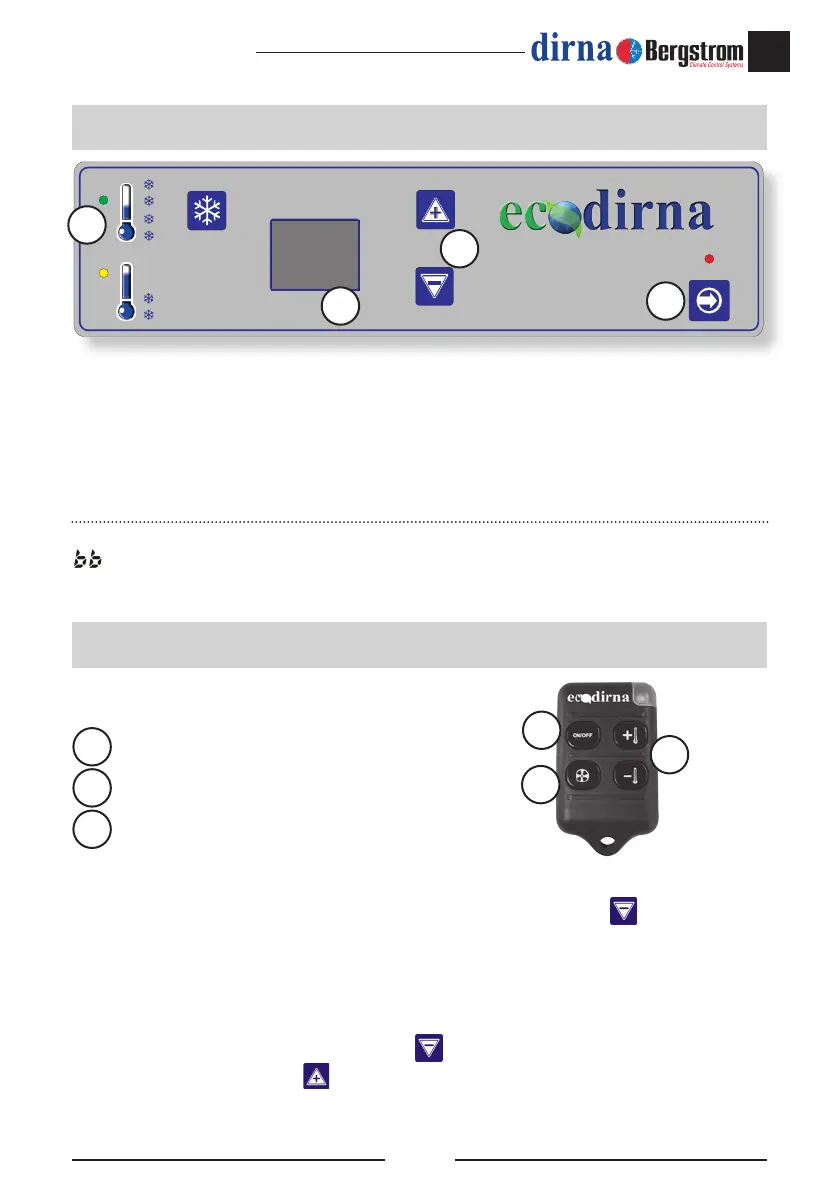
1.- On/off switch on /off the unit and functioning selection mode.
2.- Indicate the compressors functioning.
3.- Display: Screen where it shows the slected functioning and condition of the unit.
4.- Temperature selectors : To select the surrounding temperature and the blower speed (this only
in manual mode) , remote control programmation and Fahrenheit degrees.
• When you connect, the engine make leds control and you can read bd on the display and the
engine swith off.
Remote control functions:
Switching on /off of equipment.
Blower speeds control.
Temperature control.
How to activate remote control:
In order to activate remote control, while equipment is switched off, push key
from control panel
until
C
C
ashes on display. When it stops ashing, push the On/off key on in the remote control. You
will have to do it within 30 seconds or else you will have to repeat the whole operation.
How to deactivate remote control:
In order to deactivate remote control, push key
of control panel until
C
C
, ashes on display.
Once it stops ashing, push key
on panel. You will have to do it within 30 seconds or else you
will have to repeat the whole operation.
Control panel
Remote control
Special display symbols (please see troubleshooting manual):
: Battery is low.
EO: Bad contact of probe cables or terminals or broken down probe.
2
3
1
1
2
3
4
1
2
3



 To Next Page