9
EN
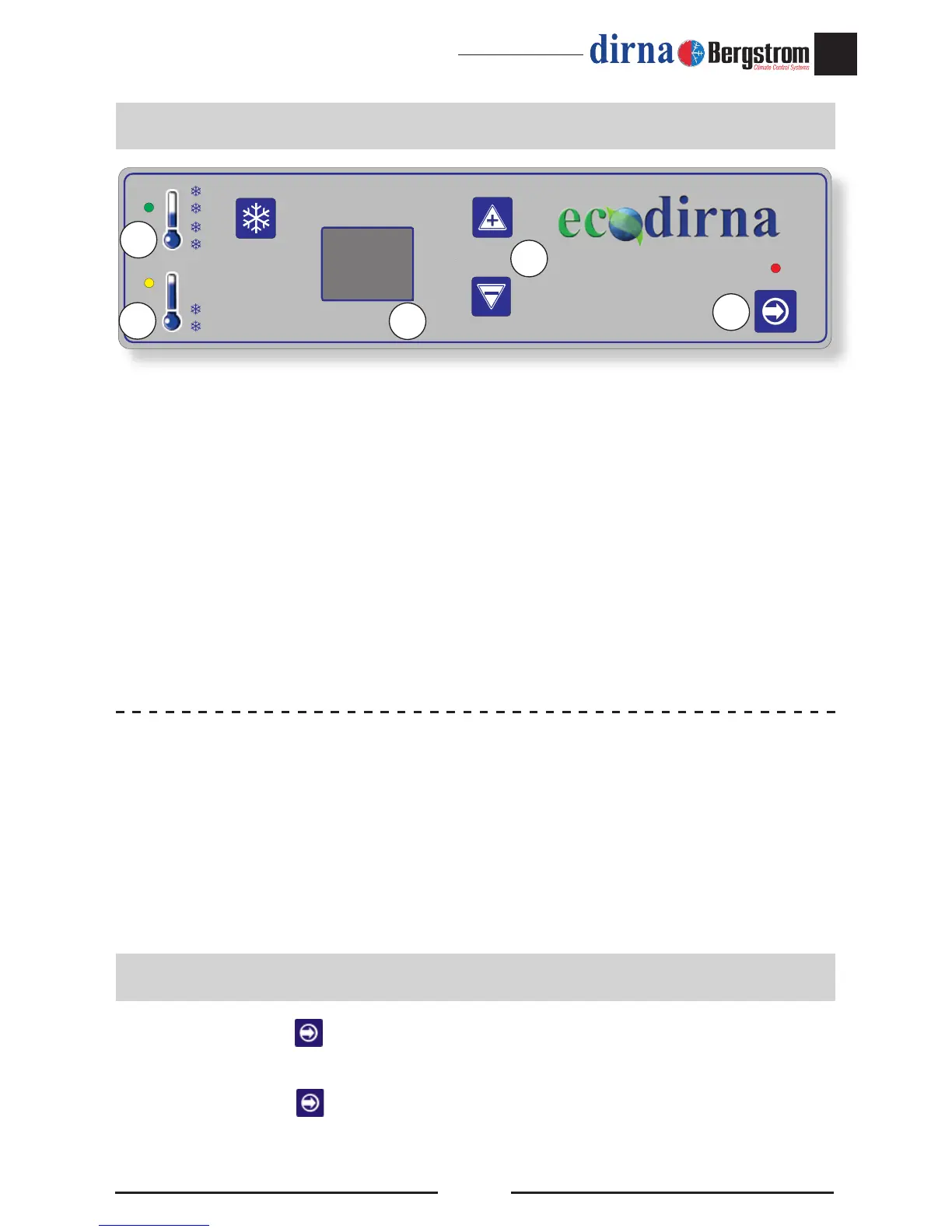
1.- On/off: unit on - off and mode selection
F4
/
F0
/
F1
/
F6
2.- Temperature selector (15-27° C – 59-80° F), Programming remote control,
degrees Fahrenheit and air speed: Ambience control temperature and centrifugal
blower speed (between 1st and 5th speed) manual mode only.
3.- Display: Screen indicating the selected function and the status of the unit.
4.- LED: On - indicates unit running
F4
,
F0
.
• When connecting, the unit checks the LEDs and displays:
-
88
-- IP 24 (in 24V units)
-
88
-- IP 12 (in 12V units)
and goes off.
Press the On/Off key to turn on the Integral Power unit. The unit always starts up in
Function
F4
(Automatic Function)
Keep the On/Off key pressed down to change function. The different functions will
be displayed; release the key for the required function.
Control Panel
Turning the unit on
Special display messages (please check Failure Troubleshooting):
lb
: “ Low battery” (the unit will beep for a few moments and the unit will turn off).
EO
: Poor contact of wires on return air sensor or return air sensor faulty.
E6
: Poor contact of wires or anti-frost sensor faulty.


 To Next Page