32
Operating
3.4 Changing the dust bag Change the dust bag at the latest when the dust bag
change indicator (Fig. 1/10) lights up or when the suction
power drops..
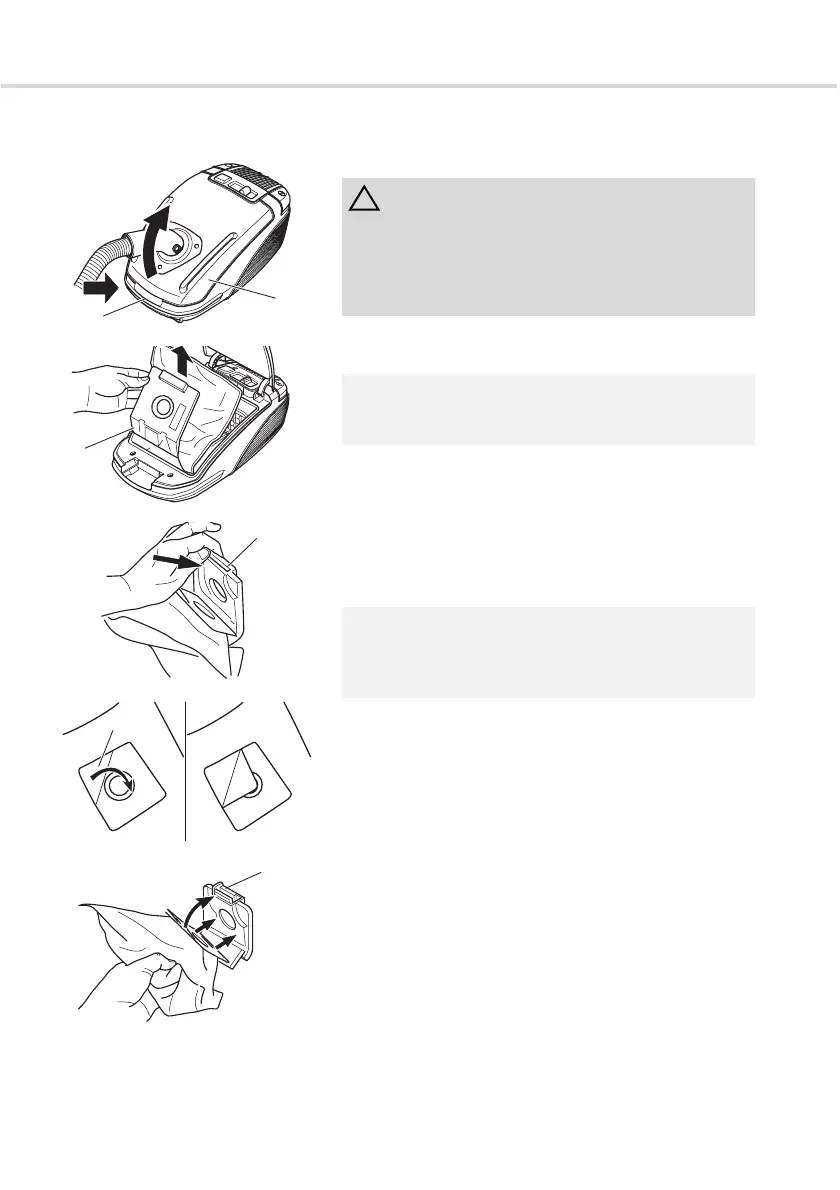
1. Press the release button (Fig. 17/2) and open the dust
chamber cover (Fig. 17/1).
2. Pull the dust bag holder (Fig. 18/1) up and out.
3. Remove any dust found in the dust chamber.
4. Press the locking clip (Fig. 19/1) back to remove the
dust bag.
5. You can close the dust bag using the corner (Fig. 20/1)
so that no dust escapes from it during transport.
6. Press the locking clip (Fig. 21/1) back and insert the
new dust bag as shown in (Fig. 21).
7. Push the dust bag holder (Fig. 18/1) into the rail
provided for this purpose.
8. Close the dust chamber cover. It clicks audibly into
place.
ATTENTION:
Before you change the dust bag switch off the appliance
and observe the instructions under ZChapter 3.2,
"Switching off and retracting the power cable". In this
way, you will prevent the dust from destroying the
appliance.
NOTE:
Be careful and work slowly when removing the dust bag
so that no dust is squeezed out of the dust bag.
NOTE:
You can dispose of the dust bag with the normal
domestic waste as long as it does not contain any dirt not
permitted for domestic waste.
Fig. 17
1
2
Fig. 18
1
Fig. 19
1
Fig. 20
1
a b
Fig. 21
1




 To Next Page