37
Correcting malfunctions
GB
6 Correcting malfunctions
Before sending the appliance to Royal
Appliance Customer Services, use the following table to
check whether you can correct the malfunctions yourself.
WARNING:
Danger of injury! Never use a defective appliance! Always switch off the appliance and disconnect
it from the mains before starting troubleshooting ZChapter 3.2, "Switching off and retracting the
power cable".
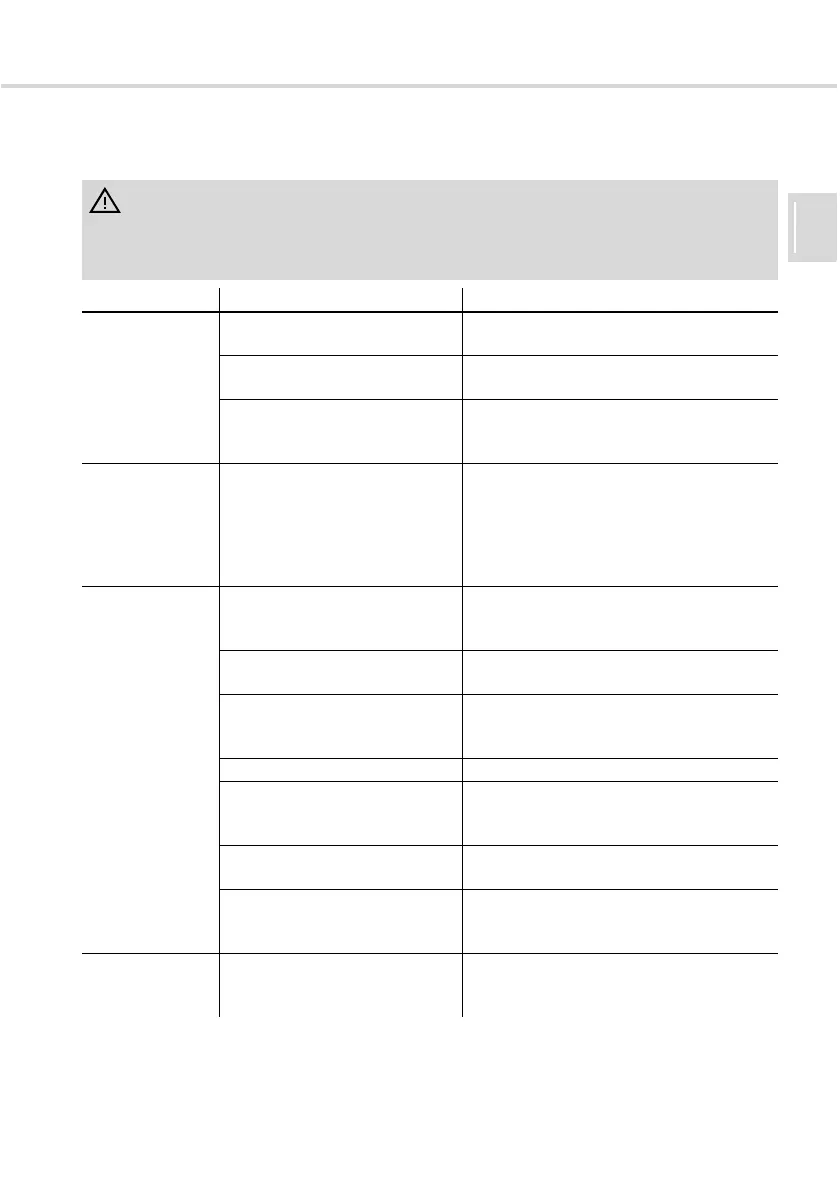
Problem Possible cause Solution
The appliance
does not run
Plug is not plugged in or the
appliance is not switched on.
Plug in plug and switch on appliance,
ZChapter 3.1, "Vacuuming".
The socket does not carry
current.
Test the vacuum cleaner at another socket
which you are sure carries current.
Power cord is damaged. Have the cord replaced by the Royal
Appliance Customer Service, address
ZChapter 8, "Warranty".
The vacuum
cleaner stops
suddenly.
The overheating protection has
tripped (possibly due to blocked
suction channels, filters, or
similar).
Switch the appliance off and pull the plug out
of the socket.
Eliminate the cause of overheating (e.g.
blocked suction channels, filters, etc.). Wait
for about 45 minutes. After the appliance
has cooled off, you may switch it on again.
The appliance
does not pick up
dirt
Dust bag or B-Box is full. Empty/clean dust bag/B-Box, ZChapter 3.4,
"Changing the dust bag" or ZChapter 4,
"Using the B-Box (option)".
The filter is dirty. Clean the respective filter, ZChapter 5,
"Filters".
Nozzle, telescopic tube or suction
hose are clogged.
Remove the obstacle. If necessary, use a
long wooden stick (e.g. a broomstick) to do
this.
Bypass vent (Fig. 1/3) is open. Close (Fig. 1/3) bypass vent.
The power setting does not suit
the flooring.
Set the power to the setting suggested for
the flooring, ZChapter 3.1, "Vacuuming",
step 4.
The attached nozzle does not suit
the flooring.
Fit the correct nozzle, ZChapter 2.3, "Using
other nozzles (accessories)".
The "carpet/hard floor" selector
(Fig. 1/21) is in the wrong position
for the particular type of floor.
Set the "carpet/hard floor" selector (Fig. 1/
21) to the correct position for the type of
floor, ZChapter 3.1, "Vacuuming", step 5.
The appliance
makes unusual
noises.
Sucked-in objects are obstructing
the air stream.
Plug in the plug and switch on appliance,
ZChapter 3.1, "Vacuuming".




 To Next Page