34
Using the B-Box (option)
4.3 Cleaning the B-Box
laminar filter
Clean the B-box laminar filter every 6 months. If you
determine that a filter is damaged, replace it immediately.
1. Empty the B-Box, ZChapter 4.2, "Emptying the B-Box".
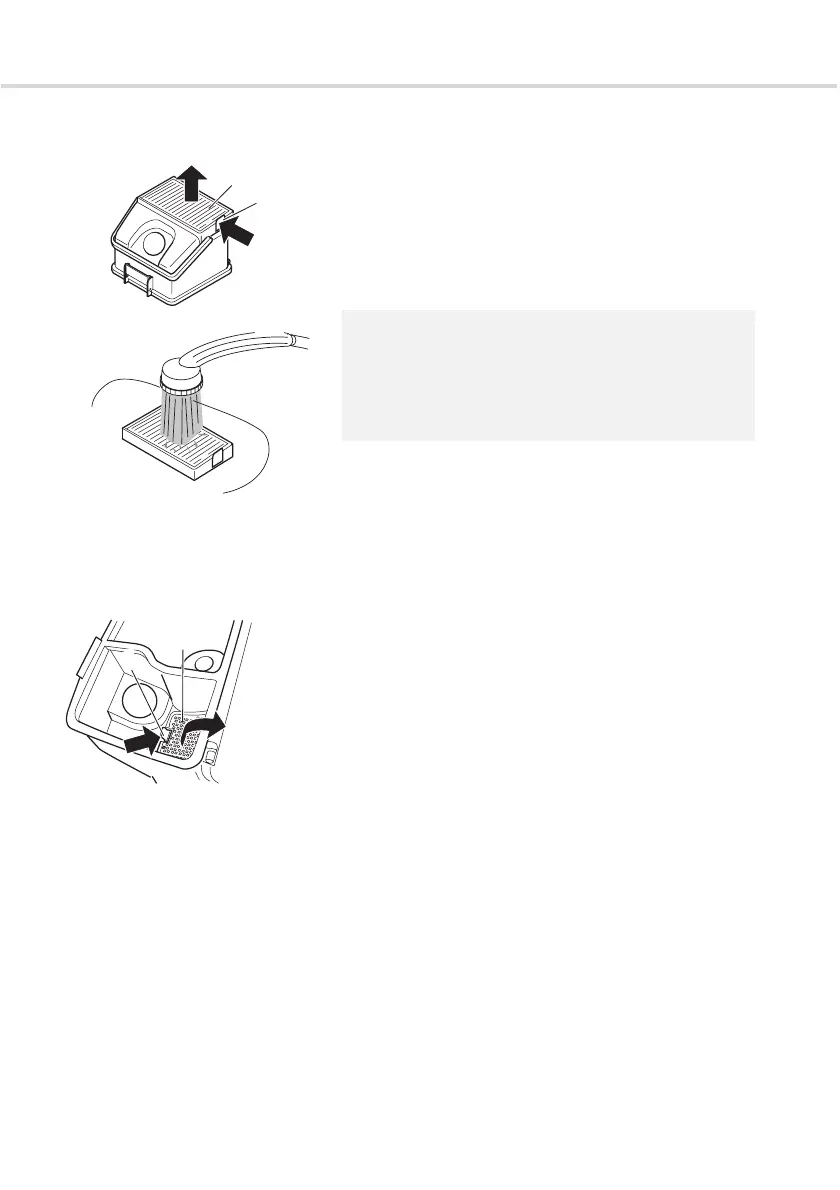
2. Remove the filter (Fig. 26/1). To do this, press the lock
(Fig. 26/2) in and lift the filter up and out.
3. For a rough clean, hold the laminar filter over a dustbin.
Then knock it gently against all sides.
4. Insert the B-Box into the cylinder vacuum cleaner again,
ZChapter 4.1, "Inserting the B-Box".
4.4 Cleaning the B-Box
filter grid
Clean the B-box filter grid every 6 months or if you
determine that the suction effect is dropping.
1. Empty the B-Box, ZChapter 4.2, "Emptying the B-Box".
2. Turn the B-Box onto its back and open the base.
3. Remove the filter grid (Fig. 28/2). To do this, press the
lock (Fig. 28/1) in and lift the filter grid up and out.
4. Remove pieces of fluff and dirt from the filter grid.
5. Then replace the cleaned filter grid . Make sure that it
clicks into place correctly.
6. Close the base.
7. Insert the B-Box into the cylinder vacuum cleaner again,
ZChapter 4.1, "Inserting the B-Box".
NOTE:
If the laminar filter is extremely dirty, rinse it thoroughly
with a shower head (Fig. 27). Do not use any brushes for
this.
Then leave the filter to dry (approx. 15 hours at room
temperature). Only use it again when it is completely dry.
Fig. 26
1
2
Fig. 27
Fig. 28
1
2




 To Next Page