33
Using the B-Box (option)
GB
4 Using the B-Box (option)
The B-Box is a dust container which you can use instead of
the dust bag for bagless operation of the Classic cylinder
vacuum cleaner.
4.1 Inserting the B-Box 1. Remove the dust bag and the dust bag holder from the
cylinder vacuum cleaner, ZChapter 3.4, "Changing the
dust bag".
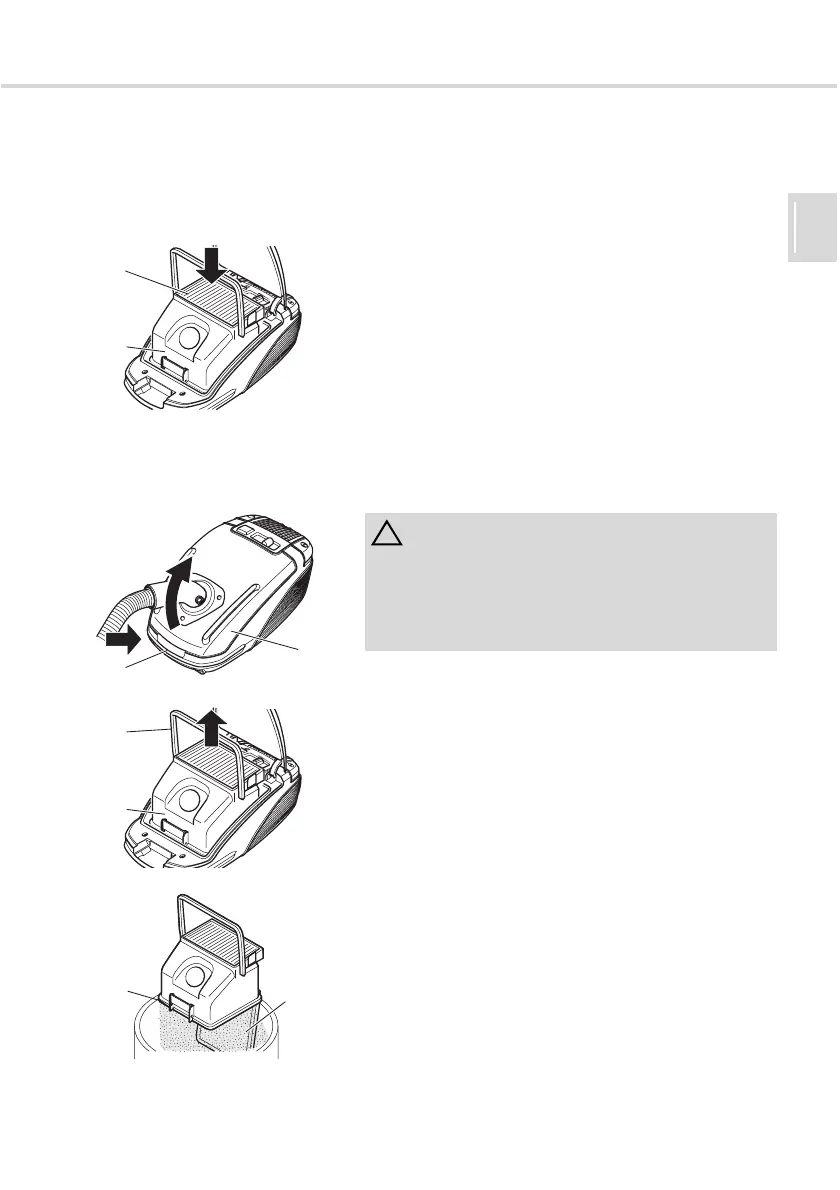
2. Check whether the B-Box (Fig. 22/1) is closed and the
laminar filter (Fig. 22/2) is correctly positioned.
3. Insert the B-Box into the dust chamber.
4. Close the dust chamber cover. It clicks audibly into
place.
The B-Box is now installed and you can vacuum bag-free.
4.2 Emptying the B-Box Empty the B-Box at the latest when the dust bag change
indicator (Fig. 1/10) lights up or when the suction power
drops.
1. Press the release button (Fig. 23/2) and open the dust
chamber cover (Fig. 23/1).
2. Remove the B-Box (Fig. 24/1) by the handle (Fig. 24/2).
3. When emptying the B-Box, hold it low over a dustbin.
4. Open the lock (Fig. 25/1). The base (Fig. 25/2) opens
and the dust runs into the dustbin.
5. Carefully knock the remaining dust loose.
6. Close the base and lock it.
7. Insert the B-Box into the cylinder vacuum cleaner again,
ZChapter 4.1, "Inserting the B-Box".
Fig. 22
1
2
ATTENTION:
Before you empty the B-Box , switch off the appliance
and observe the instructions under ZChapter 3.2,
"Switching off and retracting the power cable". In this
way, you will prevent the dust from destroying the
appliance.
Fig. 23
1
2
Fig. 24
1
2
Fig. 25
1
2




 To Next Page