LOCKING
I
TABS
/
/
LOCKING
I
TABS
I
I
PAPER BAG REMOVAL
&
REPLACEMENT
NOTE:
Unplug cleaner before changing paper bag, Cleaner must have paper bag in place at all times.
/
BAGTYPE:
U
I
You can tell your bag needs replacing when you experience less suction when the "full bag indicator changes to yellow or if the clog indicator
light illuminates (see Pg.
3).
Do not exceed marked fill line on paper bag. Different types of dirt may require bag replacement more often.
*
FULL BAG INDICATOR:
When the full bag indicator window changes to yellow, it may be time for a new paper bag. Check the
paper bag, and if full, replace as described below. If not, the cleaner may have a clogged dirt passage (See "Trouble Shooting" Pg.
9).
TO REMOVE OLD BAG
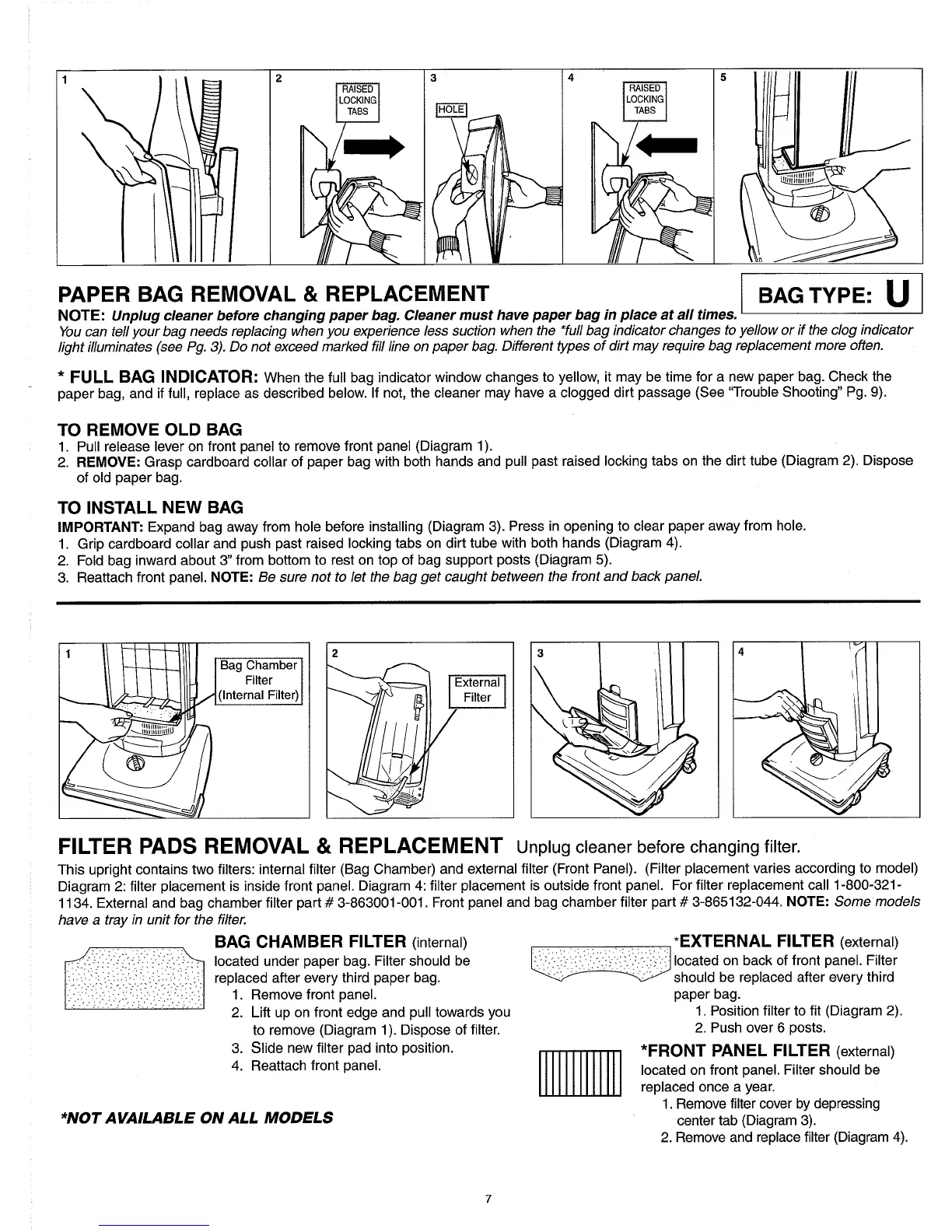
1. Pull release lever on front panel to remove front panel (Diagram 1).
2.
REMOVE:
Grasp cardboard collar of paper bag with both hands and pull past raised locking tabs on the dirt tube (Diagram 2). Dispose
of old paper bag.
TO INSTALL NEW BAG
IMPORTANT:
Expand bag away from hole before installing (Diagram 3). Press in opening to clear paper away from hole.
1. Grip cardboard collar and push past raised locking tabs on dirt tube with both hands (Diagram 4).
2. Fold bag inward about
3"
from bottom to rest on top of bag support posts (Diagram
5).
3. Reattach front panel.
NOTE:
Be sure not to let the bag get caught between the front and back panel.
FILTER PADS REMOVAL
&
REPLACEMENT Unplug cleaner before changing filter.
This upright contains two filters: internal filter (Bag Chamber) and external filter (Front Panel). (Filter placement varies according to model)
Diagram 2: filter placement is inside front panel. Diagram
4:
filter placement is outside front panel. For filter replacement call 1-800-321
-
1134. External and bag chamber filter part
#
3-863001-001. Front panel and bag chamber filter part
#
3-865132-044.
NOTE:
Some models
have a tray in unit for the filter.
BAG CHAMBER FILTER
(internal)
*EXTERNAL FILTER
(external)
located under paper bag. Filter should be
,
...
.-.
,
.
.
.,
,~,,.
.
..
,~,,.
..
-.
located on back of front panel. Filter
.
,
replaced after every third paper bag.
should be replaced after every third
.
.
.
,
.
~
,
.
,.,.:...,:
:,...,.:.,,,2
..
.
.,
1. Remove front panel.
paper bag.
.
~
..
..
.
2. Lift up on front edge and pull towards you
1.
Position filter to fit (Diagram 2).
to remove (Diagram 1). Dispose of filter.
2. Push over 6 posts.
3. Slide new filter pad into position.
*FRONT PANEL FILTER
(external)
4. Reattach front panel.
located on front panel. Filter should be
replaced once a year.
1. Remove filter cover by depressing
*NOT
AVAILABLE
ON
ALL MODELS
center tab (Diagram 3).
2. Remove and replace filter (Diagram 4).



 To Next Page